
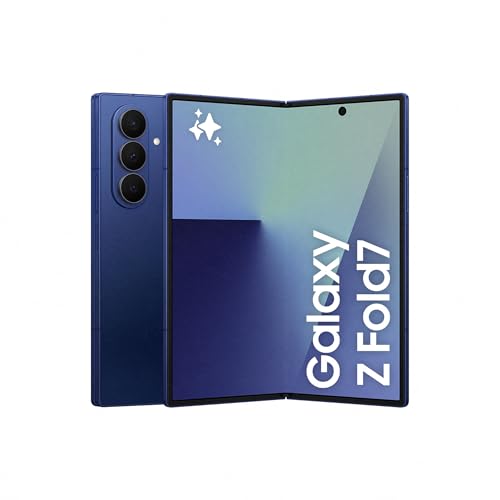
It’s been quite a while since I handled a foldable phone—specifically, four years have passed since I tried the Samsung Galaxy Fold3. Looking at the new Galaxy Fold7, it feels like even more time has elapsed. Gone are the days of clunky, heavy devices. Now, it’s so thin and lightweight that when folded, it resembles a regular smartphone. Let’s explore what the latest foldable from Samsung brings to the table.
Technical Data for the Samsung Galaxy Z Fold7
SAMSUNG GALAXY Z FOLD7 | |
|---|---|
Dimensions and Weight | Folded: 158.4 x 72.8 x 8.9 mm Unfolded: 158.4 x 143.2 x 4.2 mm 215 g |
External Screen | 6.5 inch FHD+ Dynamic AMOLED 2X Display (2520 x 1080, 21:9), 422 ppi 120 Hz adaptive refresh rate |
Main Screen | 8 inch QXGA+ Dynamic AMOLED 2X (2184 x 1968), 368 ppi 120 Hz adaptive refresh rate |
Processor | Snapdragon 8 Elite for Galaxy |
RAM and Storage | 12 GB / 256 GB 12 GB / 512 GB 16 GB / 1 TB |
Front Camera | 10 MP, f/2.2 (exterior screen), 10 MP, f/2.2 (interior screen) |
Main Camera | 200 MP, Quad Pixel AF, OIS, F1.7 12 MP Dual Pixel AF, F2.2 (wide) 10 MP, PDAF, F2.4 (telephoto, 3X optical zoom) |
Battery | Dual 4,400 mAh (typical) |
Connectivity | 5G, LTE, Wi-Fi 7, Bluetooth 5.4 |
Operating System | Android 16, One UI 8 |
Colors | Intense Blue, Silver Gray, Dark Black, Mint Green (only available on Samsung.com) |
Other Features | IP48 resistance |
Price | Starting at €2,109 |
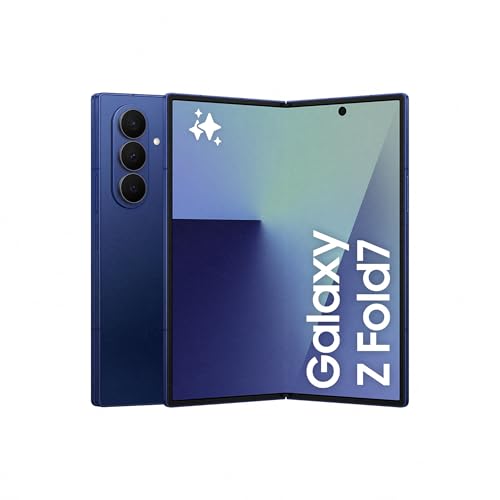
Samsung Galaxy Z Fold7 256GB – Galaxy AI, Lightweight and Foldable, Large Screen, 200MP Camera, 12GB Memory, Intense Blue, Manufacturer’s Warranty 3 Years + 1 Extra Year (Spanish Version)
* Prices may have changed since the last review
Design, Screens, and Sound: A Lesson in Design
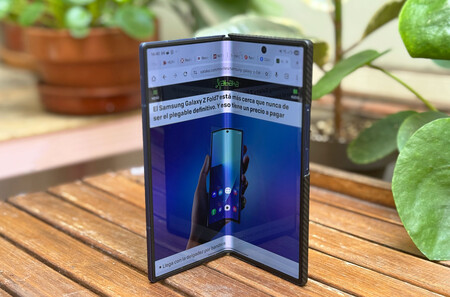
Image: Xataka
Design has been the weak point of earlier generations and where the most improvement has happened in recent years. The previous generation made significant efforts to slim down, but the Fold7 takes that to another level. Weighing 215 grams, it is 3 grams lighter than the Samsung Galaxy S25 Ultra. While it’s not the lightest, for the first time, a Fold weighs less than current flagship phones.
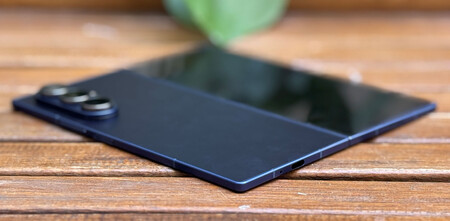
When compared to the Fold6, it is 24 grams lighter, which is impressive considering it’s taller and wider. How did they achieve this? By putting it on a diet. Folded, the Fold7 measures 8.9 mm, placing it among many high-end non-foldable phones; it’s not the thinnest, but it doesn’t feel thick. The surprise comes when you open it—only 4.2 mm thick, so thin that it initially feels intimidating to handle.
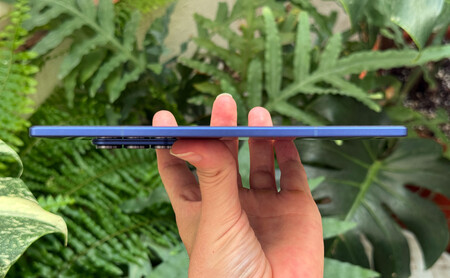
Opened, it is thin enough to feel delicate. Image: Xataka
That initial fear soon faded. Samsung sticks with aluminum frames and glass covering both sides (the cover glass is Gorilla Glass Ceramic 2). The construction feels solid, and the hinge offers just enough resistance to ensure it feels secure when opened and closed. The closure is perfect, and the screen does not leave a gap like previous generations did.
Due to its weight, thickness, and design, when closed, it looks like a regular smartphone.
When closed, it resembles a completely normal phone. No one who saw me use it realized it was a foldable until I opened it. If I have to nitpick, its thinness and straight edges make it a bit tricky to open if you have larger fingers. Additionally, if you’re bothered by phones “dancing” when set on a table, be prepared, as the camera protrudes significantly and results in a noticeable tilt. Other than that, it’s truly a lesson in design.
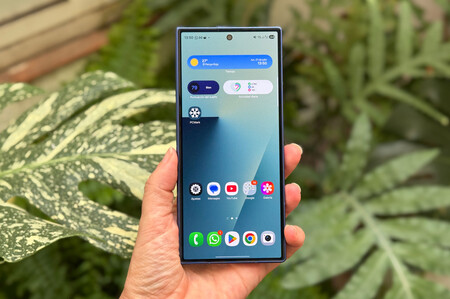
Closed, it passes off as a non-foldable phone. Image: Xataka
The format of the exterior display was another odd point in the Fold series. Early models had elongated screens that made using it when closed very uncomfortable. The last generation already had a more “normal” format, but it still exceeded 22:9. Continuing its quest to look like any other phone when closed, the Fold7 sports a 21:9 aspect ratio , which is the most common among high-end devices.
Furthermore, the screen has grown to 6.5 inches and finally achieves Full HD, with a density of 422 pixels per inch. The screen is Dynamic AMOLED and reaches 120Hz refresh rate. It feels fluid, sharp, and bright enough to be visible even in full sunlight.
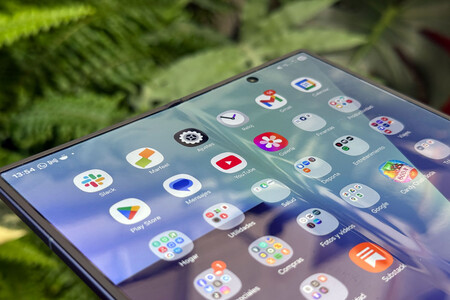
The crease is barely noticeable, but reflections can be distracting. Image: Xataka
The internal screen has also grown, now measuring 8 inches. The resolution has increased along with it, but the pixel density is slightly below its predecessor. Specifically, we’re looking at 368 vs 374 ppi from the previous gen, which is negligible, but still presents a low density for the tier it competes in where 400 ppi is often a minimum benchmark. Both screens excel in calibration and color representation.
The crease has been reduced, but it’s still there and gives the display a more plastic-likefeel.
The drawback of the internal display is its plastic feel when sliding your finger over it, particularly near the crease. Although it has diminished significantly, it’s an aspect that seems never to fully disappear. Personally, after using it for a few days, I got accustomed, but if you’re picky about such things, you might find it bothersome, especially when glare occurs on the screen.
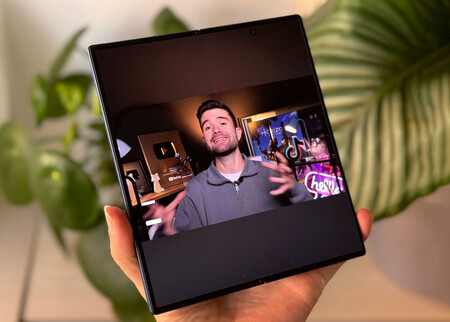
The large display looks good, but the external one is not only visually appealing but also has a far better tactile feel. That said, its nearly square format presents the perennial problem: multimedia content is panoramic. If you watch a movie, half the screen will show black. In a phone whose large screen is part of its identity, this is quite penalizing.
Lastly, let’s discuss sound. Last year’s Fold6 left us with a very favorable impression in the audio department. The Fold7 does not disappoint; the volume is high and sounds very clear , although I personally miss a bit more punch in the bass. Perhaps it’s the price to pay for that thinness. The settings provide the option to activate Dolby Atmos along with various sound modes such as automatic, film, music, and voice. From my experience, the equalization is good, and leaving it on automatic is optimal.
Performance, Software, and Autonomy: Almost Everything Outstanding
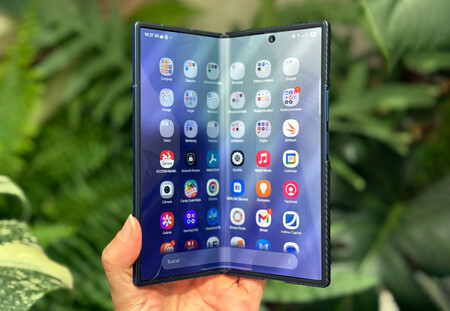
Image: Xataka
The Fold6 already satisfied us regarding power, and according to Samsung, the new model offers 38% faster processing. This is achieved with the Snapdragon 8 Elite, Qualcomm’s most powerful mobile chip for this year. It also comes with 16GB of LPDDR5X RAM and UFS 4.0 storage.
The Fold 7 uses Qualcomm’s most powerful chip. It handles everything but tends to get overly hot.
The phone can handle everyday tasks without any problem; however, I also haven’t noticed any lags even when demanding more from it with multitasking or heavy gaming. Benchmarks support this observation. What I did notice is that it heats up quite a bit. Last year, Samsung boasted about a new vapor chamber in the Fold6, but during the analysis, we saw that temperature management needed improvement. This year, there was no mention of the vapor chamber, and we encounter the same issue again.
It’s summer and hot; using any phone for a while outdoors causes it to heat up. With the Fold7, the back area, especially near the camera, warms up quickly even without heavy usage. Here are the results of the main benchmarks for your reference:
SAMSUNG GALAXY FOLD7 | SAMSUNG GALAXY Z FLIP7 | Samsung Galaxy S25 Ultra | OPPO Find X8 Pro | IPHONE 16 PRO MAX | |
|---|---|---|---|---|---|
Processor | Qualcomm Snapdragon 8 Elite | Exynos 2500 | Qualcomm Snapdragon 8 Elite | MediaTek Dimensity 9400 | A18 Pro |
RAM | 16 GB | 12 GB | 12 GB | 16 GB | 8 GB |
GEEKBENCH 6 (SINGLE/MULTI) | 2,527/8,582 | 1,775/6,820 | 3,851/9,451 | 2,685 / 8,398 | 3,106/7,799 |
3D MARK Wild Life Unlimited | 20,138 | 14,258 | 23,731 | 22,312 | 16,809 |
3D MARK Wild Life Stress Unlimited | 21,197 / 8,849 | 13,692/6,532 | 23,965/ 19,531 | 23,330 / 18,964 | 16,906/8,538 |
PCMARK WORK | 17,507 | 15,516 | 25,251 | 16,738 | – |
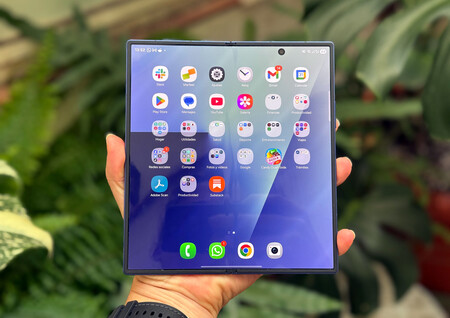
Android 16 out of the box. The fastest to implement a new version. Image: Xataka
In software, we must applaud Samsung as both the Fold7 and Flip7 launch with Android 16. They were presented on July 9th, less than a month after the new version rolled out to Pixels. I cannot recall such a rapid adaptation from a brand with its own customization layer. Well done.
And speaking of customization, they also feature the latest version of their layer: One UI 8. The design is quite similar to One UI 7, but everything feels more polished and coherent. It comes with a “Now Bar” on the lock screen, Now Brief, and prominent AI features . The highlights include AI Selection, Drawing Assistant, and Interpreter, all accessible by default from the sidebar, along with the integration with Google Gemini.
One UI 8 introduces features specifically for the Fold, including improvements in multitasking that make it easy to move and resize windows. This is where the Fold7 offers more possibilities, allowing us to have up to three apps open at the same time , including a small floating window.
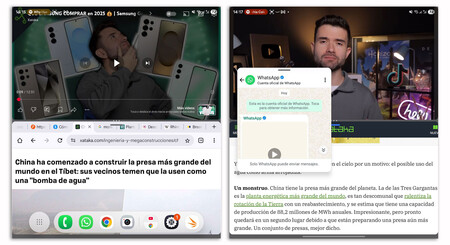
We can have up to three apps open simultaneously, two on a split screen and one in a floating window.
The Fold7 screen is the closest thing to a computer you’ll find in a smartphone. At the bottom, there’s a quick access bar for some apps, along with the option to tap on the icon to the left to open all apps and choose which one to launch, resembling the Windows taskbar.
The problem I’ve encountered with this bar is that by default, it is hidden and opens with an upward swipe gesture. I often accidentally pull up the recent apps panel instead of the quick access bar. Fortunately, Samsung allows for it to be permanently displayed via settings (though it’s slightly hidden).
Another benefit of the foldable format at the software level is the ability to leave the phone bent on a table, allowing the interface to adapt. This occurs in apps like YouTube, where the video displays at the top and the playback controls appear at the horizontal bottom. We can also use it as a sort of tripod for taking photos. Talking about photos, a practical feature is that when taking pictures with the phone open, we can see the camera on one side while the photo we just captured appears on the other.
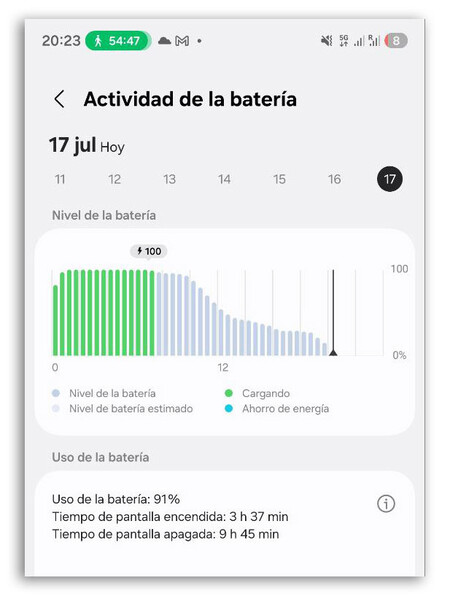
When it comes to battery life, it’s surprising how Samsung has managed to fit a battery of the same capacity as the previous generation into a slimmer body, of course, the phone is slightly larger, giving it an advantage.
The autonomy aligns with that of the Fold6: it’s not its strong point, but it’s not overly problematic either. On workdays with moderate usage, the phone has easily lasted until the end of the day. However, on days of intensive use with lots of camera, messaging, and GPS navigation, the battery does suffer. Specifically, from the cycle shown in the image, I got 3.5 hours of screen time, with the phone being kept closed almost 99% of the time. If you plan to heavily utilize it, better bring a power bank.
Camera: It’s About Time
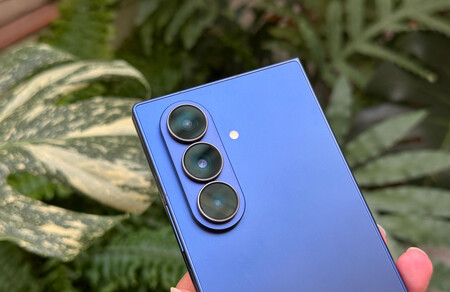
The cameras improve, especially the main sensor. Image: Xataka
Being a foldable device comes with sacrifices, and photography has been one of them—up until now. In previous generations, we always saw camera systems that fell short of the Galaxy S series, which notably diminished its appeal, especially in a phone that costs over €2,000. This year, the Fold7 features the same main sensor as the Samsung Galaxy S25 Ultra. The ultra-wide and telephoto sensors remain nearly the same as in the Fold6, with the upgrade being that the ultra-wide now has Dual Pixel autofocus. Here’s how the new foldable camera setup looks.
- Main Camera: 200 megapixels, 1/1.3-inch sensor, 0.6µm pixels, Quad Pixel autofocus, f/1.7 aperture, 24mm lens.
- Telephoto: 10 megapixels, 1.0µm pixels, f/2.4 aperture, and 67mm lens (3x optical zoom).
- Ultra Wide: 12 megapixels, 1.4µm pixels, Dual Pixel autofocus, f/2.2 aperture, and 120-degree field of view (equivalent to 0.6x zoom).
- Exterior Front Camera: 10 megapixels, 1.12µm pixels, f/2.2 aperture, and 85-degree field of view.
- Interior Front Camera: 10 megapixels, 1.12µm pixels, f/2.2 aperture, and 100-degree field of view.
Main Camera
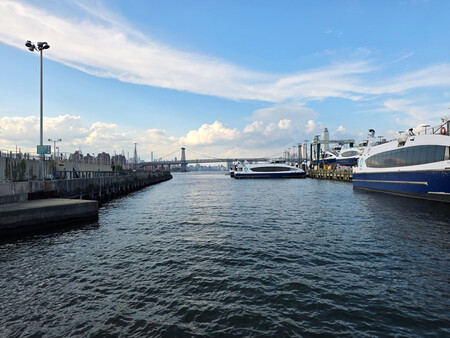
Photo captured with the main sensor. Image: Xataka
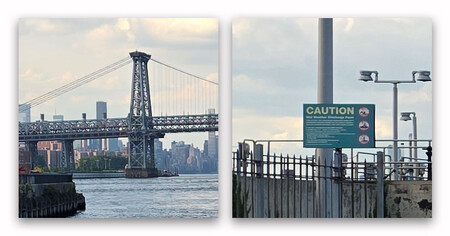
Details at 100%. Image: Xataka
Shooting with the main sensor is a guarantee of success. Images showcase great dynamic range and accurate white balance in nearly all scenarios. When zoomed in, the detail holds up well with complex patterns like bridge structures, maintaining sharpness to the edges.

Main sensor at night. Image: Xataka
When it gets dark, the main camera delivers adequate but improvable results. Sharpness does dip, and dynamic range gets narrowed, especially in shadowed areas, and more so as we stray from the center. Nevertheless, the white balance surprisingly holds up well, especially in photos featuring a multitude of colors.

Shot at 200 megapixels. Image: Xataka

100% details at 12, 50, and 200 megapixels. Image: Xataka
By default, the main camera captures images at 12 megapixels, but we can also shoot in 50 or 200 megapixels, and RAW format is available as well. The results are coherent in terms of white balance and dynamic range. Unless in rare instances, I don’t see myself using the higher resolutions daily and would argue it makes more sense to stick with 12 megapixels. Especially since the phone provides a strong zoom feature.
Ultra Wide Camera
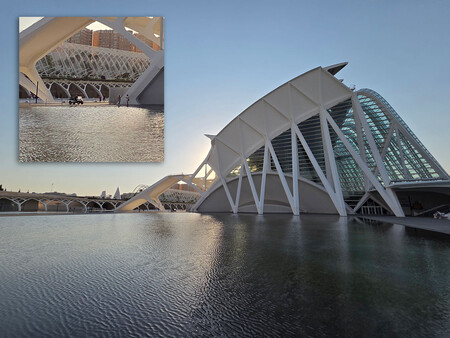
Photo taken with the ultra-wide camera. The detail is good, but it trails behind the main sensor. Image: Xataka
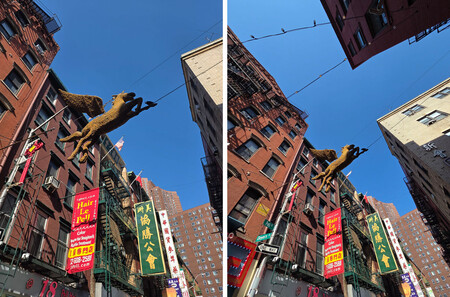
Main camera vs ultra-wide. Image: Xataka
The ultra-wide camera is especially useful for photographing architecture or landscapes. It opens up the field of view considerably but doesn’t distort too much. Overall, it produces quality images—sharpness, correct white balance, and good dynamic range. However, its weaknesses become apparent as light dims.
Telephoto and Digital Zoom
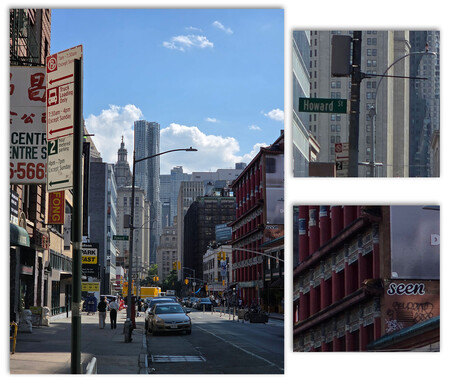
Photo captured with the telephoto lens at 3x. Detail also drops when zooming in. Image: Xataka
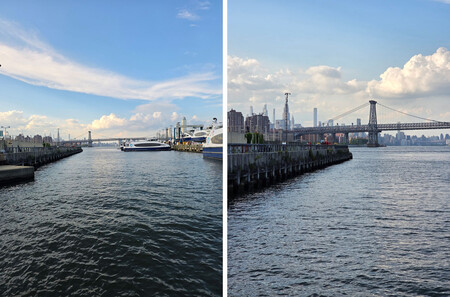
Main camera vs telephoto 3x. Image: Xataka
With the telephoto camera, the similar situation applies as with the ultra-wide. It delivers excellent results in favorable conditions, but as light decreases, performance wanes. This is logical, as its lens has the least brightness of the three. We can achieve 3x optical zoom , but Samsung offers a much wider range. Let’s see how digital zoom performs.

Zoom 2x, 3x, 10x, 20x, and 30x. Image: Xataka

Photo with the main camera vs zoom 30x. Image: Xataka
The Galaxy Fold7 allows us to reach up to 30x zoom. While it doesn’t match the 100x zoom of the Galaxy S25 Ultra, this isn’t necessarily essential (unless, like me, you want to get a close-up of a duck). Up to 10x, with steady hands, the quality holds up well, but beyond that, I wouldn’t recommend it unless you want to use it as a sort of binoculars to read distant signs.
Portrait Mode

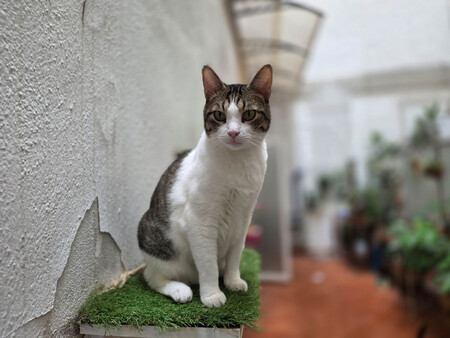
Portrait mode with main camera (1x) and telephoto (3x)
The portrait mode impressed me, delivering very natural results without altering exposure or contrast in facial features. The cropping is quite accurate, and you have to zoom in a lot to actually notice the seams (and they are present, especially in hair). There are moments when the blur is a bit too much, especially when the subject is closer, but that’s nothing we can’t adjust later.
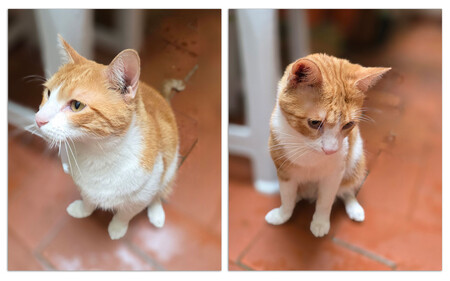
Caution when photographing cats that are not sitting still. Image: Xataka
The experience with the portrait mode is very speedy, allowing multiple shots without waiting several seconds for it to focus. Just be cautious about snapping too quickly, as it might apply the blur even when the subject isn’t properly focused, resulting in quirky output, as seen in the images above.
Front Cameras
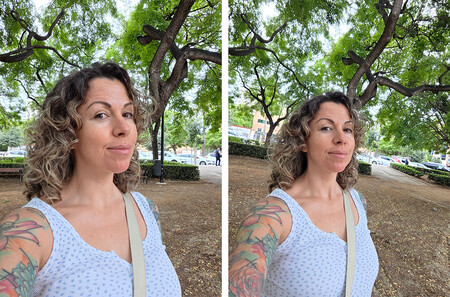
Exterior and interior front cameras. Image: Xataka
Depending on whether the phone is open or closed, we’ll utilize a different camera. The good news is that they’re exactly the same, delivering identical results. The only difference is that the interior camera lens is a bit wider, capturing a 100-degree angle, which is helpful for video calls. While the quality of these cameras is decent, they fall a bit short, particularly in the dynamic range department.

Selfie with the main camera. Image: Xataka
This is a foldable phone, so for good selfies, you can always use the rear camera. In the Galaxy Z Flip7, this is quite convenient because it can be done with the device folded, but with the Fold7, you’ll need to open it up and activate the exterior screen for alignment. Practicality isn’t its strong suit, but at least the option exists.
Video
In the video department, Samsung allows recording in 8K, though it’s worth noting that this mode only permits a 30fps frame rate and zooming is not an option. The results are quite good, but be warned: a mere ten-second clip weighs 102 MB.
Personally, I find myself leaning more towards 4K recording due to its remarkable quality without limitations. Here, we can choose between 30 or 60fps and utilize all lenses, including up to 12x digital zoom. Just bear in mind, don’t expect clarity because you won’t find it.
Overall, the results are good even at night, though I feel it struggles a bit to adapt to light shifts and tends to blow out highlights. The normal stabilization works well, but there is a “super steady” mode that functions in 4K, minimizing jitters even if you’re running (second clip below).
Samsung Galaxy Z Fold7, Xataka’s Opinion
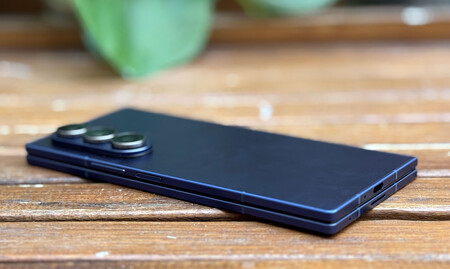
Image: Xataka
After years without analyzing a Fold, I must admit that my first impression was outstanding. The design work is exceptional , and after testing it, I stand by that: it is the Fold7’s most significant asset. I was concerned that the extreme thinness might compromise battery life, but while it may not boast the most powerful battery on the market, it performs well. Heat management is a downside I encountered, which could be influenced by this thinness, although using a case minimizes this quite a bit.
When closed, the Fold 7 appears as a regular phone, but not just any phone—it checks all the important boxes: design, screens, power, software, and cameras.
The Fold7 has addressed what I consider the major issue of previous models: folded, they were uncomfortable. While it remains narrower than non-foldable options and could benefit from a bit more width, it now resembles a standard device when closed, which is how we’ll mostly use it. And not just any device—a high-end treasure that ticks off all the important aspects: design, screens, power, software, and finally, cameras.
When watching a video, much of the screen space goes unrealized. Image: Xataka
What’s off-putting is that when opened, it still feels like a “weird” tablet, with an almost square format that isn’t maximized well. If you watch videos, half the screen ends up black, and in multitasking, the space isn’t that extensive (two windows work well, but three feels cramped). Moreover, many apps still aren’t tailored for this interface.
Lastly, this generation no longer supports the S Pen, which was another enhancement that allowed us to maximize that internal screen. The Fold series is improving, yet it still struggles to convince that a foldable is the mobile device we need, mainly at this price point.
9.1
Design
9.75
Display
9
Performance
9
Camera
9
Software
9.5
Battery
8.5
Pros
- A masterclass in design. The thinness is superb, making it more user-friendly.
- One UI 8 and Android 16 out of the box. Well done, Samsung.
- The cameras have been elevated and are now at par with their series.
Cons
- It still heats up more than we’d like.
- No longer supports the S Pen.
- The price has risen, making it prohibitive.
Samsung Galaxy Z Fold7 256GB – Galaxy AI, Lightweight and Foldable, Large Screen, 200MP Camera, 12GB Memory, Intense Blue, Manufacturer’s Warranty 3 Years + 1 Extra Year (Spanish Version)
* Prices may have changed since the last review