
The sun blazes down as I step outside, managing messages and Google Maps simultaneously on my smartphone. Within minutes, the device heats up uncomfortably in my hand. As an avid technology enthusiast, I can’t help but analyze the situation, particularly given that I live in Andalusia , where temperatures often exceed 30 degrees Celsius. Intriguingly, many of my recent phones, although high-end , share the common trait of overheating in intense heat .
The Processor
One of the primary reasons why smartphones experience serious thermal performance issues is their processors . Today’s high-end devices come equipped with powerful chips that often exceed practical temperature limits. Modern chip architecture attempts to remedy this by splitting the processor into efficient cores for basic tasks and high-performance cores for demanding functions. However, even this dual-core design struggles against excessive heat. In flagship devices, the performance of the smaller cores can rival that of the larger cores found in budget smartphones.
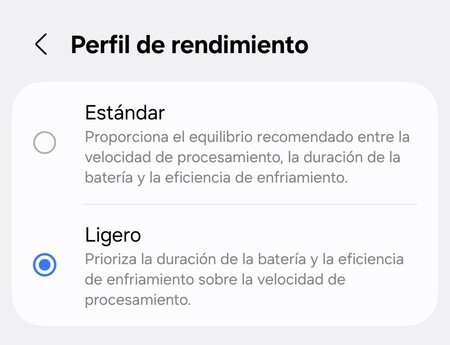
To mitigate overheating, consider using a power-saving mode . Activating this feature can limit background processes and reduce CPU power significantly. Depending on your smartphone’s customization layer, you can adjust the performance profile to ensure the device remains functioning without excessive overheating.
The Display
The competition among smartphone manufacturers for brighter screens has a downside: increased heat production during the summer. Backlighting a display demands significant energy, particularly to maintain brightness. This energy requirement causes many smartphone displays to diminish in brightness when exposed to high temperatures .
No smartphone can consistently maintain peak brightness during extreme heat, making it necessary to adjust settings. Lowering screen brightness in summer months can prevent overheating, which directly contradicts the automatic brightness feature . This feature typically maximizes brightness when you’re outside, often leading to higher temperatures within the device.
The Camera
With summer comes the necessity of capturing memories through photos and videos, but this intense use of the camera can lead to overheating as well. Here are a few reasons why:
- The camera utilizes extensive phone resources, requiring rapid processing.
- High-resolution shots consume significant memory as large amounts of data need quick storage.
- Post-capture processing adds to the strain on your device.
To minimize heat when shooting videos or photos, avoid using high-resolution modes. Opt for 1080p rather than 4k, limit recording durations, and refrain from using apps that demand maximum camera performance.
Connection Issues
As we travel during the summer, mobile devices continually seek network connections . In remote areas such as beaches or mountains, the modem works overtime, attempting to establish a connection, leading to further heating. The increased energy consumption from searching for a signal can cause your phone to overheat.
To avoid excessive heat, switch your smartphone to airplane mode in areas with poor reception. If you can access a 4G network, force your device to use it, as 5G can often be more unstable in remote regions.
Usage Patterns
It’s crucial to acknowledge that “intensive use” encompasses more than just recording high-definition videos or playing graphic-heavy games. Consider some common scenarios:
- Connecting your vehicle to Android Auto or Carplay during long drives.
- Using social media apps like Instagram outdoors with high brightness settings.
- Conducting video calls through various applications.
- Relying on location services such as Google Maps while multitasking.
Seemingly mundane activities can also lead to overheating. One basic rule of thumb to prevent your phone from becoming too hot is to limit the number of active processes running simultaneously.
Image | Xataka
In summary, protecting your smartphone from heat damage is essential, especially during the intense summer months. By considering factors such as processor performance, display brightness, camera usage, connection issues, and how you utilize your device, you can extend its longevity while ensuring a pleasant user experience.