
Understanding the Logi Dock: A Versatile Work Companion
I have been working from home for nine years. It wasn’t long ago that I realized that my laptop, a 2021 MacBook Pro, is the answer to a question no one ever asked me: “What do you want, power or flexibility?”
Flexibility Overpower
I answered flexibility, but I didn’t realize the full implications until later. The MacBook Pro occupies my desk while occasionally traveling with me to different environments when I need a change of pace. It is a desktop computer that occasionally steps outside.
The Logi Dock: A Game Changer
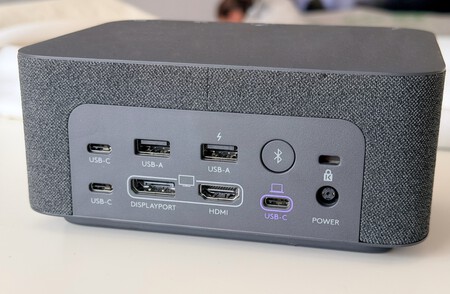
Logitech understands the modern work-from-home setup very well. The Logi Dock is not just a hub to deal with the lack of ports in recent laptops; it represents a shift in how we organize our workspaces. It serves as an operations center that remains on the desktop while the laptop comes and goes. Connecting everything with a single USB-C cable allows for seamless transitions: one cable to connect everything when you arrive, and another to disconnect when you leave. This convenience offers far greater value than what’s simply listed on a specification sheet. Behind the dock, you’ll find:
- HDMI 2.0 (4K, 60Hz, HDR)
- DisplayPort 1.4 (4K, 60Hz, HDR)
- 2 USB-A (USB 3.1 at 5 Gbps)
- 2 USB-C (USB 3.1 at 5 Gbps)
- 1 extra USB-C for fast charging (7.5W)
- USB-C upstream port dedicated to 100W for the laptop
While it lacks Thunderbolt, Ethernet, and card reader options, its design creates an efficient workspace.
Pricing Question: Is It Worth It?
A generic USB-C hub can range from €30 to €80, while the Logi Dock currently retails for around €276 on Amazon. So, why spend five to ten times more? The answer lies in what the Logi Dock provides beyond simple connectivity. Its standout features are the integrated speakers and microphone. This becomes pivotal for users engaged in video calls and digital meetings.
Real-World Performance
For two months, I’ve used the Logi Dock with my MacBook Pro M1 Pro, connected to a 28-inch Huawei MateView. It accommodates my keyboard, mouse, and Scarlett 2i2 interface for podcasting, charging the laptop seamlessly at 100W through just one cable.
The Logi Dock’s speakers offer much better audio than my built-in monitor. Generic hubs can manage connectivity, but they fall short in audio quality. The Logi Dock delivers well-rounded sound and a microphone optimized for clearer video calls.
Versatility and Ease of Use
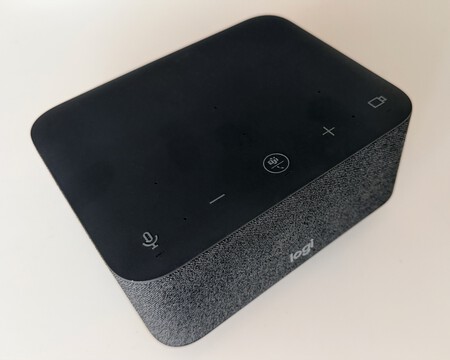
The 55mm drivers with side-mounted passive radiators provide decent sound that’s adequate for music and work. While not a professional audio monitor, it offers clarity in calls—even without headphones. The microphone, utilizing beamforming technology, works efficiently in minimizing background noise.
Daily Convenience: Absence of Friction
The beauty of the Logi Dock isn’t about being the best at anything; rather, it excels in its ability to do everything reasonably well. My experience over three months has shown this device can easily remain plugged in without issues. There are no annoying driver installations or audio disruptions when waking the laptop from sleep mode.
To Invest or Not?
Is it worth spending significantly more on a Logi Dock versus a generic hub? That depends on your needs:
- If your workspace already has good speakers and a microphone, or if you prefer headphones, a cheaper hub will suffice.
- If the Logi Dock becomes your sole audio device and the primary connection for your laptop, it makes the comparison far more favorable. You’re investing in a hub with robust audio features and the neatness of having everything in one place.
In conclusion, for those seeking a hassle-free work setup, the Logi Dock comes out on top for its unique combination of features.

This device was provided for testing by Logitech. For more on how we conduct reviews, you can check out our reviews policy.