

If you work or study for many hours every day in front of the PC screen, it’s highly likely that you will end up with tired eyes: reading extensive text, watching videos, toggling between Excel spreadsheets, writing, editing images, and engaging in myriad tasks can lead to significant eye fatigue and discomfort.
If you find yourself spending long hours in front of your monitor (a common scenario nowadays), there are measures you can take to minimize or even remedy eye strain: Get up periodically, avoid prolonged staring, look at distant objects, and maintain a suitable distance that reduces eye strain. However, there’s another option that might enhance your visual comfort: using a monitor with a high refresh rate, even if you aren’t a gamer. Monitors with refresh rates exceeding 60 Hz (like 120 Hz or 144 Hz) can significantly improve your viewing experience. And the good news is that the price difference for such monitors has decreased considerably, making this investment worthwhile.
What is Refresh Rate (and What Does It Affect)
In simplistic terms, a higher refresh rate (like 120 Hz or 144 Hz) means a monitor can display more frames per second, which translates to a smoother visual experience. More frames mean smoother transitions and animations in applications you use daily, including those on Excel.
Having a refresh rate greater than 60 Hz means greater fluidity across all visual content—whether you’re scrolling through spreadsheets or watching videos. Although this might seem like a minor improvement, it can make a noticeable difference after hours of usage.
Historically, monitors with refresh rates above 60 Hz were expensive. However, today’s market offers options exceeding 360 Hz, with 144 Hz monitors available at reasonable prices. This means a small investment can yield a significant quality improvement.
The Good and the Bad: A Comparison
Understanding the differences between monitor types can be overwhelming if you’re unfamiliar with specifications. The following summary table provides clarity:
60 Hz | 144 Hz | |
|---|---|---|
THE GOOD 🟢 | More affordable, allowing budget for other features like resolution and size. | Provides great fluidity in visuals and a standard for various applications. |
THE BAD 🔴 | Less fluidity and may feel outdated as you can often get better options for similar prices. | Typically more expensive, often designed for gaming. |
IDEAL FOR | Users who don’t experience visual fatigue and prefer to keep costs low. | Gamers or users desiring enhanced visual comfort. |
Choosing the Right Monitor for You
Price plays a less significant role today when choosing between a 60 Hz and a 144 Hz monitor. If you find that 60 Hz suffices for your needs, you might consider investing in other features, like resolution or screen size.
- If 60 Hz suffices: You can allocate your budget towards an ultrawide monitor for more screen real estate.
- If you notice discomfort: Upgrading to a 144 Hz monitor can significantly enhance fluidity, improving overall comfort and reducing eye strain.
In summary:
👉 Choose 60 Hz: If you don’t experience eye strain, spend limited hours in front of the screen, or don’t play games.
👉 Choose 144 Hz or more: If you notice a lack of fluidity, experience eye discomfort after long hours, or play games.
Recommended Models
60 Hz: Asus ProArt Display PA279CV
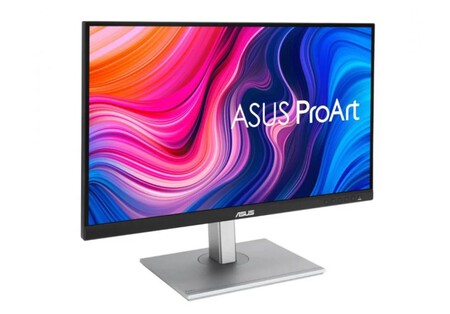
The ProArt Display PA279CV is an excellent choice for creatives, offering Ultra HD resolution and great color representation, making it suitable for graphic design and video editing tasks.
144 Hz: Lenovo Legion R24s
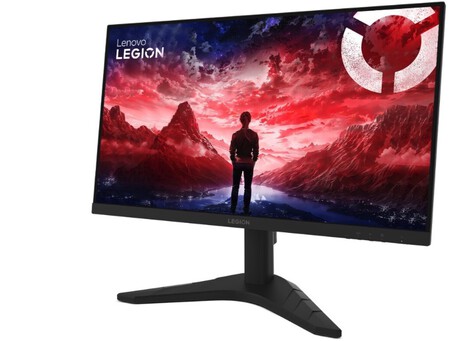
The Lenovo Legion R24s is an impressive 24-inch monitor delivering 144 Hz, perfect for those seeking enhanced visual comfort at a reasonable price point.
Looking for More Models?
There’s a vast array of monitors to choose from, each with unique specifications. For further guidance, consider looking into resources on what to consider when purchasing a monitor for productivity and understanding the specifications on the labels.
Some links in this article are affiliates and may provide a benefit.
Images from Jakub Zerdzicki and Nicholas Worrell.