
Exploring the 23 Functions and Tips to Maximize Claude AI
Claude, the popular AI from Anthropic, stands out with a focus on ethical and responsible AI solutions. While it may lack certain features like image generation, it compensates with polished, natural responses and improved coding capabilities. Below, we outline 23 key functions and tricks that will help you harness the full potential of Claude.
1. Natural and Clear Responses
Claude is designed to offer more organic and clear answers. Unlike other AIs that often use lists, Claude’s responses read like those penned by a person, enhancing readability.
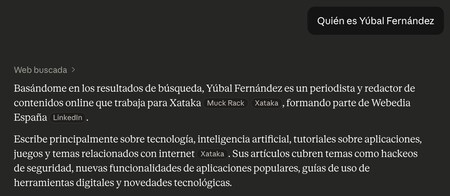
2. Source Transparency
Every response from Claude includes visible sources. You’ll clearly see where the information originated, enhancing trust and reliability.
3. Share Conversations Easily
You can share conversation links directly with others, allowing them to view the entire discussion, including prompts. You have the option to make these links public or private.
4. Copy, Rate, or Revise Responses
Claude allows you to easily copy responses to your clipboard or rate them positively or negatively. This functionality enables a seamless interaction experience.
5. Add Images and Files
In your prompts, you can upload images, files, or screenshots. This feature allows you to ask context-specific questions about the content you provide.
6. Incognito Mode
The incognito mode ensures that your queries are not stored in the conversation history. Simply activate it to keep your inquiries completely private.
7. Use Claude’s Projects
Projects are independent workspaces where you can maintain organized discussions on specific subjects. This feature is excellent for managing content, especially when working on projects like book writing.
8. Add New Conversations to Projects
You can start new chats directly from your project workspace, aiding in keeping your discussions neatly categorized.
9. Activate or Deactivate Modes
Claude offers several modes—such as extended thought mode—that you can activate for faster responses, along with web search functionalities.
10. Choose Your AI Model
Claude typically offers various models tailored for different tasks, allowing you to select a model that best fits your requirements.
11. Tailor Response Style
You can choose from various styles of responses, enhancing the user experience based on individual preferences.
12. Create Custom Writing Styles
Through the Create and Edit Styles option, you can design unique response styles for Claude, which fosters a personalized interaction.
13. Utilize Connectors
Claude can be connected to various applications (like Chrome or Spotify), allowing you to control apps with simple voice commands.
14. Build Your Own Web Applications
You can create simple web apps—like games or writing tools—without any programming skills, by describing your desired app to Claude.
15. Programming Assistance
Claude is equipped to assist with programming tasks, connecting seamlessly with platforms like GitHub to streamline your coding projects.
16. Claude Cowork for Task Management
This feature enables Claude to automate file management tasks on your computer and streamline your workflows.
17. Use Claude’s Skills
Claude has a system of extendable skills that enhance its functionalities, allowing you to tailor its capabilities to your needs.
18. Transparency in Usage Limits
You can easily monitor your usage limits to ensure you stay within set parameters, adding an extra layer of control.
19. Full Control of Actions
Claude empowers you to control its actions, deciding what functionalities to enable or disable for enhanced security.
20. Desktop Shortcuts
Claude integrates with systems like macOS, offering customizable keyboard shortcuts for quick access to its features.
21. Efficient Chat Management
You can manage chat histories effortlessly, such as deleting multiple conversations at once, saving you precious time.
22. Advanced Contextual Search
The built-in search functionality allows deep searches through past conversations, ensuring you can always retrieve needed information quickly.
23. Conversation Mode on Mobile
The mobile version of Claude features a conversation mode, great for practicing languages or executing voice commands, although currently available only in English.
Utilizing these functions and tricks will enhance your interaction with Claude, allowing for a more efficient and tailored user experience. Don’t forget to share your insights or additional tips in the comments section!