
Let’s explain What are they and how to configure Google earthquake alerts—a security system that you can configure on Android. In this way, if there were an earthquake near where you live, you will have an extra notice from Google itself, in addition to any alerts sent by your country’s institutions.
We are going to start this article explaining how these Android mobile notices work. Then, we will briefly explain how you can access the configuration to verify that you are set to receive these notifications.
What are alerts for earthquakes and how do they work?
This type of alert is part of the Google seismic detection system, Shakealert. It is a system that utilizes a network of seismic sensors in various locations, as well as the phones of users themselves, to detect earthquake movements.
All mobile devices are equipped with an accelerometer, a sensor used to detect movement in a variety of applications and functions. Android leverages this sensor to recognize movement changes that its internal algorithms can interpret as an earthquake.
When your mobile detects these movements, it sends a signal to Google’s servers. Google’s internal systems then combine this information with data from other phones in the vicinity to determine whether an earthquake is occurring.

In the event that Google detects multiple phones sending warning signals in a specific area, and it appears to be an earthquake, an alert will be sent to Android users through a notification.
The alerts can be communicated in two formats, depending on the strength of the detected earthquake. If it registers at 4.5 degrees on the Modified Mercalli Intensity (MMI) scale (not Richter), a loud alarm will be sent that overrides silent modes and activates your mobile’s screen. If the detected tremor is less intense, a standard notification will be sent.

How to configure these alerts
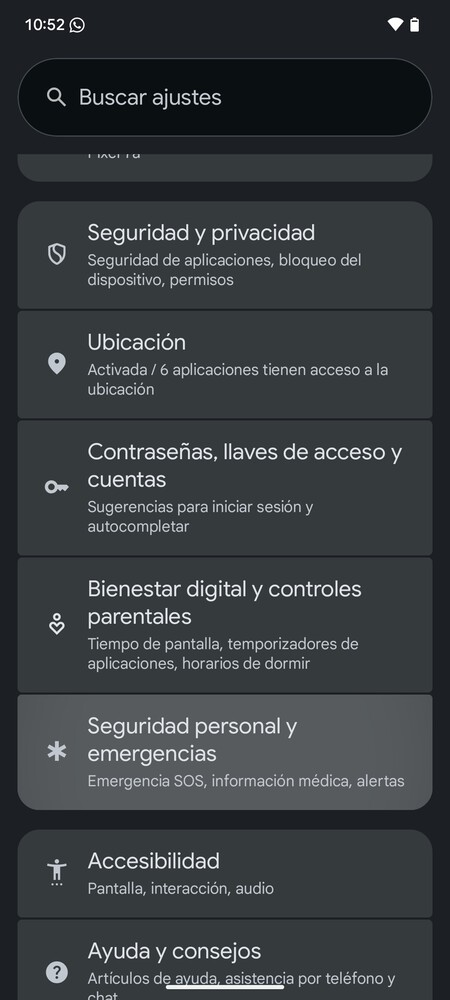
To check if you have this function activated, go to the settings of your Android mobile. Within the settings, click on the section Personal Security and Emergencies, which is usually located towards the bottom of the list.
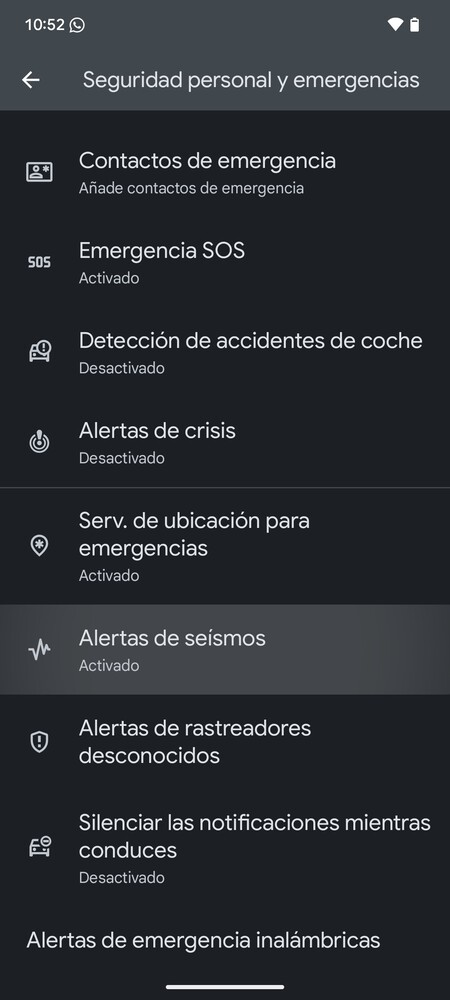
Once inside, click on the option Seismic alerts. This way, you can verify that these alerts are activated, ensuring you will be notified in the event of seismic activity in your vicinity.
Keep in mind that the configuration may vary or be labeled differently depending on the manufacturer of your mobile. Therefore, you can utilize the settings search function and look for keywords such as earthquake or seismic. This method will help you locate the relevant settings without tedious browsing.
In summary, configuring your Google earthquake alerts can provide an additional layer of safety during seismic events. This feature is particularly crucial for those living in earthquake-prone areas, offering a proactive approach to emergency preparedness. By following the steps above, you can ensure that you are equipped to receive timely notifications that may help you and your loved ones stay safe during an earthquake.