

Let’s explain How to make a song with artificial intelligence so that you can create unique compositions using specific tools. Thus, if you want to make a joke or create a melody for some project, artificial intelligence can help you.
We are going to start the article by giving you some tips to consider before starting. Then we will offer you a list of tools or applications to create music with AI, and finally, we will tell you how to use two of them effectively.
Some tips before starting
Before you start, you must take into account what kind of song you want to create. When using AI, everything will be more effective if you are clear about the genre or genres you want to explore. You should also decide if your composition is something relatively serious, a joke for friends, or a piece meant for a project.
It is also recommended to be clear about the lyrics or concept of the theme you wish to express through the song. If you already have the lyrics, an AI can generate music in the desired style. However, if you only have a conceptual idea, you can ask the AI to develop the lyrics from it or directly generate lyrics first.
To create the lyrics, you have several options. You can use regular chatbots such as ChatGPT, Co-Pilot, Deepseek, or Gemini, among others. Yet, some music creation tools also include their own systems to generate lyrics.
Once everything is set, you will need to choose an AI music creation tool, something we will assist you with shortly. Generally, these tools are quite straightforward to use.
Do not settle for the first result you receive, as it might not meet your expectations. Reiterate the process or refine your prompt, making necessary adjustments to hone in on what you want. Gradually, you will achieve something closer to your vision.
Lastly, it’s essential to know that the music you create may not belong solely to you. Since you are not a musician crafting a song with your skills, but rather generating music through algorithms, you often cannot register it as your own or claim exclusive ownership. Furthermore, monetizing this music is rarely permissible, as many platforms can detect it as AI-generated.
Tools to create music with AI
Now, let’s present a small list of AI tools to create music based on your text requests. With each, we will provide a brief description and a link for access.
- Suno: Known for its user-friendly interface, Suno allows users to describe their desired song while providing creative freedom, enabling genre-specific music composition. Link: Suno.com.
- Riffusion: Similar to Suno, Riffusion offers two modes: a prompt-based system or an advanced panel where you can manually select genres or input lyrics. Link: Riffusion.com.
- UDIO: This program breaks down the music creation process into three steps: defining the style, inputting lyrics, and specifying the overall vibe or feeling of the song. Link: UDIO.com.
- Boomy: An excellent alternative for creating AI-generated songs, Boomy even features options to publish your music on streaming services. Link: Boomy.com.
- Soundraw: This tool employs a unique mechanism where you can select genres and dictate the duration and tempo to create your song. Link: Soundraw.io.

How to create music with Suno

Creating music with Suno is simple. First, visit Suno.com. Once there, do not focus on the writing field, as you will create songs that you cannot hear initially. Create a free account or log in using the options provided in the upper right corner.
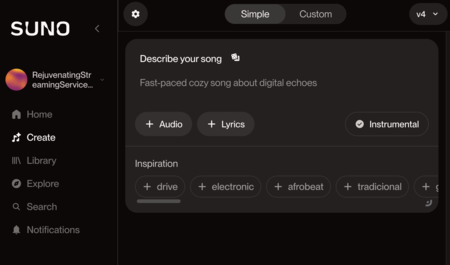
Now you will enter the main screen. On the left column, various sections will be visible, and you must press the section labeled Create. This will lead you to the creation screen, where you have two ways to craft songs: the simple and the personalized or “custom”.
If you choose the option Simple, you only need to describe the type of song you wish to create in natural language. Specifying the music type is essential; you can even add a reference audio or include lyrics. You have the option to create an instrumental piece, and under Inspiration, you can select a musical influence. Once you have everything set, click the button Create to initiate the session.
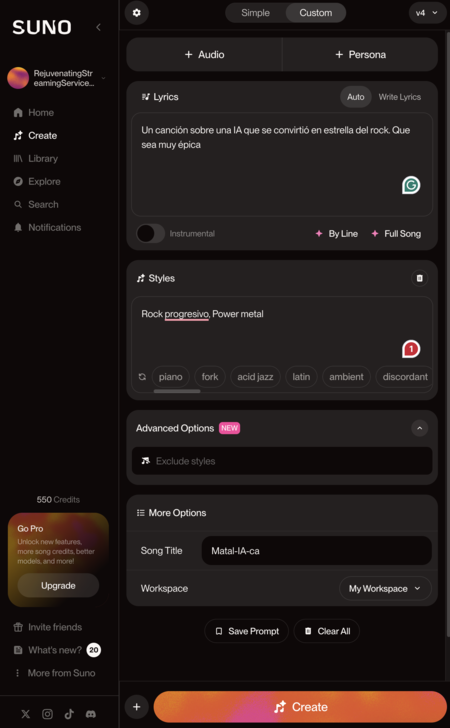
If you opt for the Custom option, you will encounter a screen with numerous additional options. Here’s what you will find:
- Lyrics: This space is for writing the lyrics you wish to be sung. A button labeled Make Random Lyrics is available for automatic generation of lyrics.
- Instrumental: This button is used for creating an instrumental song without lyrics.
- Styles: One of the most vital sections, where you must select the music style for your song. You can enter genres or subgenres freely, and the AI understands various terminologies. There’s also an option for a random style.
- Advanced Options: Here, you can exclude certain musical styles.
- Song Title: Enter the title of your song.
- Workspace: You can create different workspaces to organize your compositions.
- Create: This is the button to press for generating your song.
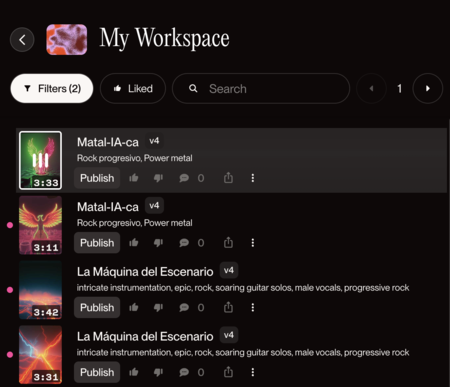
Next, you need to fill in all fields according to your desire, paying special attention to the music style and lyrics. Finally, click the button Create to generate your song. Each time you do this, two entirely different randomized songs will be created, which you can listen to or share.

Create a song with Udio
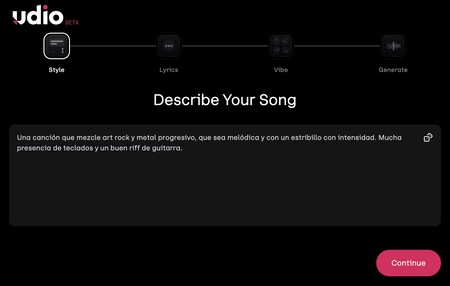
As a second method, let’s explore how to create a song with Udio, which employs an original system. First, navigate to UDIO.com. You will begin this process with the steps to create a song. Initially, you must describe your preferences in detail. Be precise about the style, rhythm, and even the instruments you want to include.
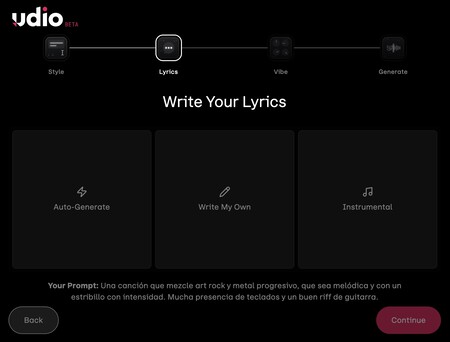
In the second step, you will have to choose how to handle the lyrics. You can opt for self-generated lyrics based on the theme you’ve provided earlier, or you can write your own or specify that it is instrumental.
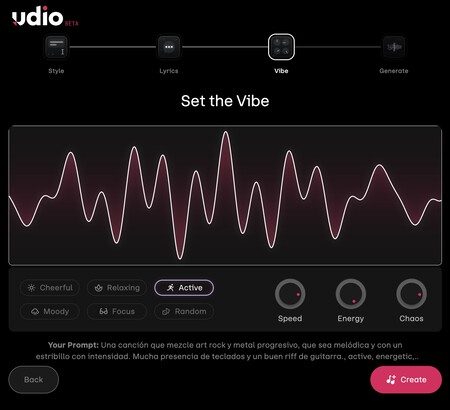
In the next step, you will move on to the most engaging part of Udio, where you can determine the mood or vibe conveyed by the song. Options include animated, relaxed, or active, and you can control the speed, energy, or chaos inherent in the music.

And that’s it! If you haven’t created an account previously, you will be prompted to log in or create one. Once you have an account, the system will generate two songs based on your specifications. While the results may not always match Suno’s quality, they’re generally good.