
Putting your phone on charge is a gesture that many of us perform daily, often without a second thought. However, there’s a key detail we often overlook that can negatively impact both the charging cable and the mobile port. One crucial aspect is the order in which we connect the charger to our devices.
The Impact of Connection Order
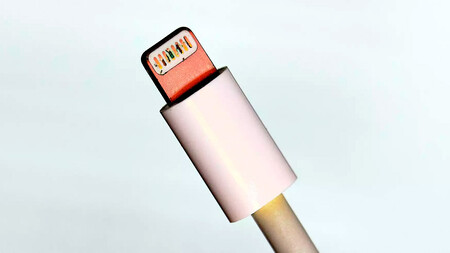
Some users connect their charging cable to their phone first and then to the power outlet. This seemingly harmless habit can lead to problems. A brief voltage spike occurs when plugging the charger into the outlet, which can create a tiny electrical arc where the cable plugs into the phone. Over time, this can damage the cable pins, leading to faulty connections or a completely non-functional cable.
This is how a Lightning cable can look after months of improper use.
If you’re concerned about damaging your smartphone with this habit, don’t panic. Most smartphones come equipped with internal safeguards designed to protect them against occasional voltage spikes. However, repeated exposure to this phenomenon may result in cable degradation over time.
Recommended Connection Order
The solution to avoid damage is straightforward—just reverse the order! Always plug the charger into the power outlet first and then connect it to your mobile device. By doing this, you contain the voltage peak within the charger, preventing it from impacting your phone.
Reputable manufacturers like Huawei and Samsung recommend this safer charging order:
- Plug the charger into the power outlet.
- Connect the cable to the charger (if separate).
- Finally, connect the cable to your mobile.
What to Do If Your Phone Doesn’t Charge
If your phone isn’t charging properly, inspecting the cable and the charging port for damage is a good starting point. Look for blackened pins—indicative of heat damage—especially if you’re using a Lightning cable. For USB-C cables, damage may be less visible since the pins are enclosed.

Another common issue is dirt buildup in the charging port, which can obstruct the connection. If this is the case, clean it carefully with a wooden toothpick, making sure not to damage the port. Moisture can also enter the charging port, causing connectivity issues. If you suspect this might be the problem, try gently tapping the phone against your hand to expel any liquid, and place it in a well-ventilated area to dry out.
If the issue persists after checking your cable and port, it may be time to consult technical support or consider a battery replacement.