
Let’s explain What is and what can you do with Higgsfield AI, an artificial intelligence content creation platform that has been attracting a lot of attention due to its vast possibilities, especially its remarkable capabilities for creating videos with artificial intelligence.
We will start by clarifying what exactly Higgsfield is, to help you understand the type of platform it is. We will also discuss the functions it offers and conclude with some tips to maximize its potential.
What is Higgsfield AI
Higgsfield AI is a platform for creating artificial intelligence content. With a single subscription, you can produce everything from images to videos and much more, utilizing both AI and other third-party models like Google.
This platform has gained fame primarily for its ability to create high-quality videos using artificial intelligence. However, its services extend beyond videos, offering four different modes of creation.
It’s important to note that Higgsfield primarily operates in English. While you can understand its features in Spanish, crafting your prompts in English will yield more effective results.
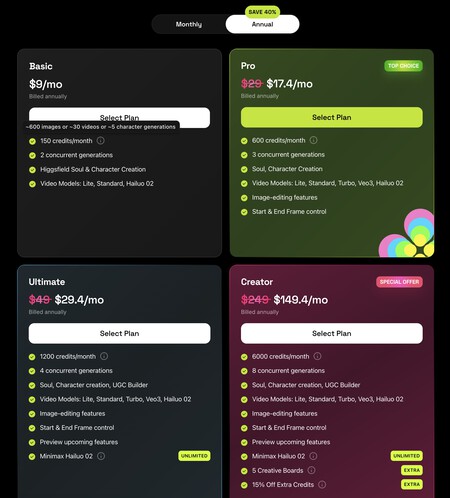
Higgsfield is a paid platform, with subscription plans starting at just 9 euros per month. You can also use it for free, although you will be limited to 5 credits per day, which allows you to make only basic videos costing all of your daily tokens.
In each content creation mode, Higgsfield offers various models to choose from. These models vary in video resolution and duration, but it’s important to know that free account users only have access to the most basic options. The selected model also determines the number of tokens spent, as well as the duration and other configurations.

What can you do with Higgsfield AI
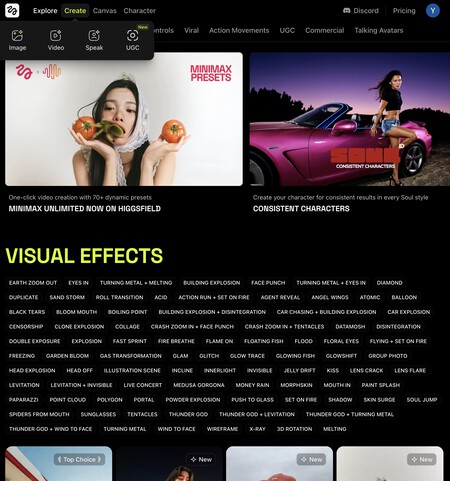
Next, let’s discuss the functions that Higgsfield AI provides to create content, along with its modes of creation and additional features. These are the creation modes available on the platform:
- Image: You can generate images using artificial intelligence by selecting between your own or GPT models and concrete visual styles. You can also upload a photo and create an image based on it simply by describing what you want with a prompt.
- Video: This option allows you to create a video from an image followed by adding a prompt. You can alter the camera movement, but note that videos must start from a photo, not text. Select from your models or Google’s.
- Speak: This function enables the creation of videos with audio, showing a person speaking.
- UGC: This mode generates video ads using AI. You can transform a selfie into a digital actor that can articulate everything you script, with options for language, accent, and music.
Higgsfield also allows you to create characters using your photos. You will need to upload more than 20 images where your facial features are clearly visible, allowing you to create content featuring your face in photos and videos.
There is also a Canvas feature, where you can add elements in photos. This feature allows you to append products, alter the clothing of subjects, or enhance images.
Additionally, the Explore section enables you to view creations made by other users, providing inspiration and helping you gather ideas for your own projects.

How to get the most out of it
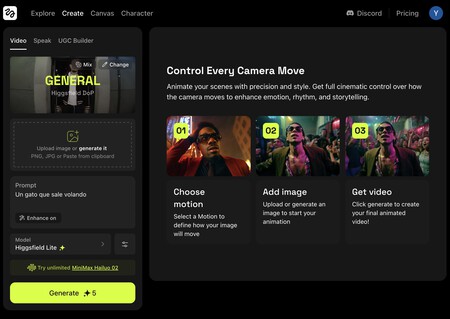
Higgsfield is user-friendly; you just need to click on the Create section, select your creation mode, and upload a photo to create a video from it. Generating videos may take some time, but the results are impressive.
Before diving into video creation, consider exploring other users’ creations for ideas, especially regarding camera movements. Pay close attention to the prompts used in these projects; they can be copied and modified to suit your needs.
It is also essential to devote time to planning your creation. With a free account limiting you to just one video per day, it’s worth making it count. Think about the image you will use as a starting point and what you want to happen in the video.
Some handy tips include selecting a starting and an endpoint image, allowing the AI to generate a video transitioning from one photo to another. Additionally, use the prompt enhancement tool to refine your text before submission.
You can also create a starting point photo for your video using the photo creation tool, providing more creative freedom without being confined to reality’s portrayal.
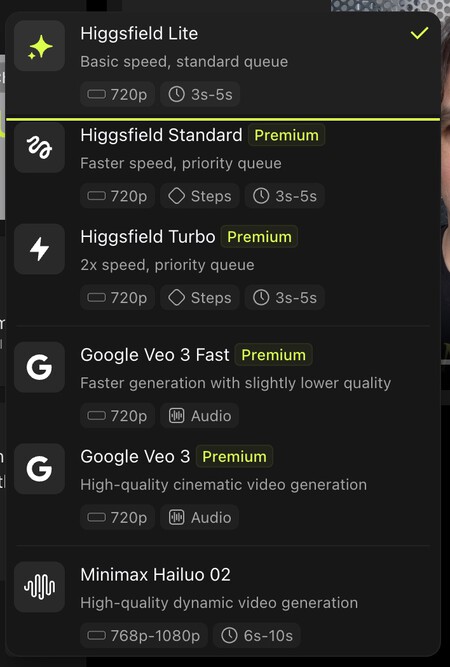
Lastly, choose your creation model wisely based on your objectives. The Higgsfield interface outlines the fundamental characteristics of each model, helping you to discern their benefits and potential distinctions.
Finally, pay close attention to the number displayed on the Generate button before starting your creation. This number indicates the token cost for the operation, which you can adjust by changing the video’s duration or resolution.
In Xataka Basics | 22 useful and not-so-well-known free artificial intelligence tools