
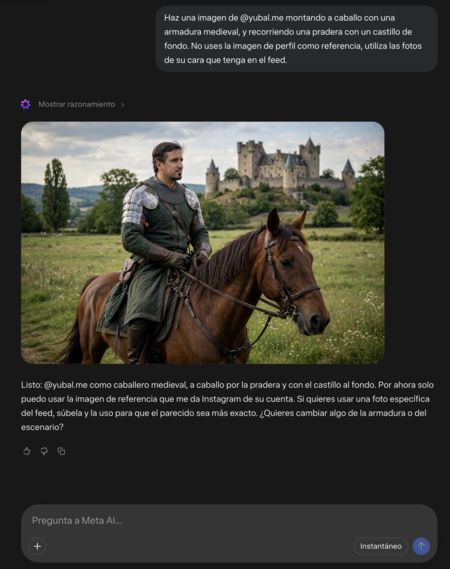
Meta AI has released a new function with which any user can create images with other people’s faces without permission. This opens the door to various potential abuses and unethical uses, as the function allows individuals to use your profile image or any photos you’ve published as a reference.
How Meta AI Uses Instagram Users’ Faces
Anyone using the Meta AI website or app can now generate photos of others by simply requesting it through a prompt that mentions the user by their account name. For instance, if someone wanted to create images of @Xataka, they could easily do so by specifying that in their request.
By default, Meta AI utilizes the user’s profile image as a reference for generating these images. However, users can also instruct it to pull from public photos in their feed, meaning that people can create images of someone doing almost anything, without any control from the individual concerned.
How to Prevent Unauthorized Image Creation
Fortunately, there are two effective ways to prevent Meta AI from accessing your photos to create images without your permission.
1. Deactivate Default Permissions
The first option is to deactivate the permissions that Instagram has activated by default. If you haven’t adjusted your settings, Instagram is set to allow Meta AI to use your photos for various purposes. To manually deactivate this:
- Navigate to your Instagram settings.
- Click on Share and reuse.
- Scroll to the section Allow people to reuse your content on Instagram with AI Features at Meta.
- Disable the options for Publications and Reels.
By taking these steps, you will prevent all your public photos and reels from being used to generate any content via Meta AI.
2. Set Your Account to Private
The second method is to make your account private. When an account is set to private, Meta AI does not have access to the content posted by that account. If your account is already private, you don’t need to change anything. However, it’s wise to deactivate permissions just in case the policies change in the future.
As the digital landscape evolves, it’s crucial to understand how your content can be used and to take the necessary steps to ensure your privacy. Staying vigilant about your settings can help you maintain control over your images and how they are used.