
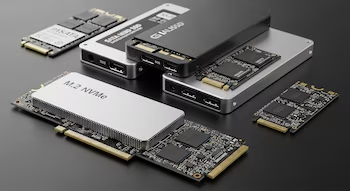
Solid State Drives (SSDs) offer remarkable speeds compared to traditional hard drives, yet they face inherent limitations as they approach maximum capacity. Performance can degrade significantly once an SSD hits around 90% capacity due to the way these devices manage data.
Why an SSD Loses Speed When It Is Full
Unlike traditional hard drives, SSDs face a structural issue in their NAND memory; they cannot simply overwrite data. Instead, they must read, delete, and then write new data. When the drive is nearly full, the SSD runs out of clean blocks available for writing.

This scarcity of clean blocks forces the SSD controller to engage in lengthy processes, leading to slower opening times for files and applications, increased wait times, and heightened latency in the operating system. Keeping your SSD below 90% capacity is not just advisable; it is a crucial step for maintaining speed and overall health.
Write Amplification: The Real Enemy of the Saturated SSD
The Write Amplification Factor (WAF) phenomenon illustrates why SSD performance plummets as it fills up. Data is written in small units called pages, but can only be deleted in larger blocks encompassing several pages. When the SSD nears capacity, the controller must execute multiple steps for each write operation: reading the block, moving valid data, deleting the block, and finally writing the new data.

This results in a multiplication of the workload, dropping writing speeds dramatically—from 10,000 MB/s to under 1,000 MB/s—effectively reducing operational efficiency. Additionally, this excessive work causes faster wear on memory cells, thereby shortening the lifespan of the SSD.
Garbage Collection and Over-Provisioning in SSDs
To alleviate the issues caused by lack of space, modern SSDs employ Garbage Collection systems that reorganize data and free up blocks in the background. This system relies heavily on the TRIM command, which informs the SSD which files can be safely deleted.
However, exceeding 90% capacity hampers the efficiency of garbage collection due to a lack of temporary space. Manufacturers implement a solution known as Over-Provisioning, where a portion of NAND memory remains invisible to the user, acting as a leeway for the SSD’s internal processes.
For example, a drive advertised as 1 TB may actually have 1.1 TB available, ensuring a cushion of free space. But if the primary partition is completely filled, even this additional space may be inadequate.
As specialists suggest, users should avoid exceeding 80-85% of total SSD capacity to maintain peak performance and prolong SSD life. Keeping a buffer of free space enhances everyday performance and reduces unnecessary wear caused by internal clean-up procedures.