
Let’s explain how to design your own business cards using artificial intelligence and how to prepare them for printing. This approach allows the AI to manage the intricate aspects of the card design process, letting you focus on what you want to convey on them.
Before getting started, it’s essential to consider several key factors regarding your business cards. We’ll discuss traditional methods and tools capable of generating images from text, including ChatGPT, Co-pilot, Gemini, and more. Additionally, we’ll explore other alternative platforms that you can utilize.
Before Starting: Important Tips
Before diving into the design of your business card, you must first decide what type of design you want. Whether you envision it as casual, professional, or vibrant, having a clear idea will guide your choices. Consider if you want to include an image or specific colors that reflect the essence of your brand.
It’s also important to think about the target sector for your design. If you’re in the tech industry, for instance, incorporating graphic elements or symbols related to technology may resonate better with your audience.
Furthermore, having your company logo handy is crucial. For AI-generated designs, you can upload the logo for it to integrate seamlessly into your card design. In some tools, manual entry is also an option.
Be clear about the elements you want on your business card. You should definitely include your name and position. Consider adding your phone number, email, and even a physical address if it aligns with your branding strategy.
Defining the placement of each element on the card is equally important. Even if using a platform like ChatGPT, having a clear layout in mind allows for better control over the final design.
Lastly, always review the final result before deeming it complete. AI can make errors, leading to misspellings or aesthetic deficiencies. Don’t hesitate to create multiple iterations until you achieve the desired outcome.
Create Your Card with ChatGPT and Similar Tools
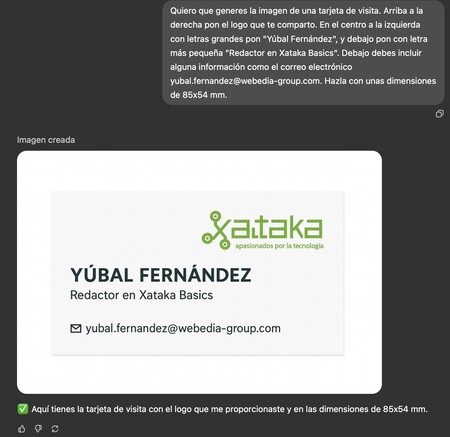
To create your business card using a generative AI with image capabilities like ChatGPT, use a clear prompt to describe what you want. For example:
“I want you to generate an image of a business card with the company name ‘[Company Name]’, its logo on the right, my name ‘[Name]’ on the left, and my position ‘[Position]’ below in smaller print. Include email ‘[Email]’ with dimensions of 85×54 mm.”
With this prompt, ChatGPT will generate a card design. Make sure to enter your details accurately and feel free to attach elements like your logo for integration, adjusting the prompt based on the initial result.
You can also specify colors or fonts and incorporate other details that resonate with your vision. Don’t hesitate to refine your prompts to enhance the design until it meets your expectations.
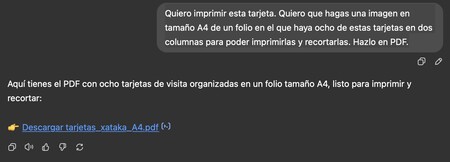
Once your design is complete, you’ll need to convert it into a printable format. You can ask ChatGPT or the AI tool you used to generate a PDF, specifying the A4 size and indicating how many cards you want on one page. Here is a suggested prompt:
“I want to print this card. Create an A4-sized image with eight of these cards arranged in two columns for easy cut-outs. Generate this in PDF format.”
This prompt will allow AI to prepare a preview for printing, and feel free to repeat the process until you achieve the desired format.

Ideogram: An Alternative Option
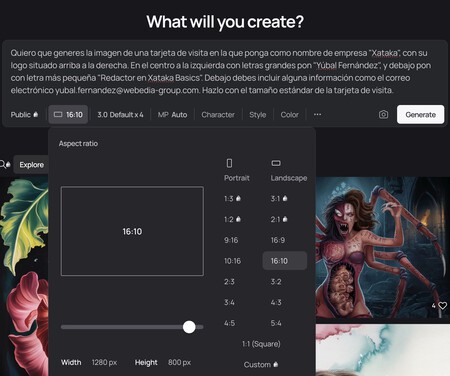
When creating images, Ideogram is a solid alternative designed exclusively for generating visuals. It offers several free credits, allowing you to try it out without financial commitment. For best results, provide detailed descriptions in your prompts.
However, there are a few disadvantages to consider. You cannot upload a logo unless you opt for a paid version, and generating PDFs is also not an option. Therefore, if logos are crucial for your design, this might limit its effectiveness in a professional setting.
Nonetheless, Ideogram remains a robust option, delivering quality results similar to prompts used in ChatGPT. You can also select various formats that suit your tastes.
If you wish to use another image as reference or for stylistic inspiration, you can apply that in Ideogram as well. The website ideogram.ai provides tools for this process.
Make Your Card with Canva
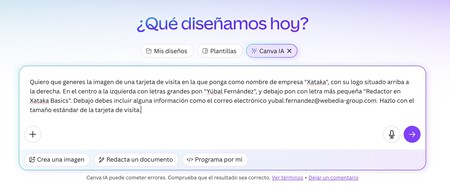
Finally, you can explore Canva, a tool focused on making professional design accessible, which also employs AI. Go to Canva.com, and when prompted, select Canva AI. There, you can describe your business card requirements, similar to the prompts used with ChatGPT.
When crafting your prompt, ensure you include names, images, and all relevant data. Specify that you want the text in your desired language to avoid receiving English text by default. While Canva AI is decent, it may not be the best tool for this specific task.
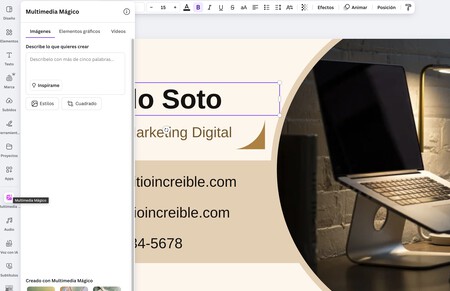
Nevertheless, Canva offers a template system where you can search for business cards. Simply navigate to the template search option and type in “professional business card.” Select a template that suits your needs, and you can customize it in their editor.
While editing your design in Canva, various AI tools become available. By selecting Edit, the AI recognizes elements on your card, allowing you to modify them easily. You can add text and various other enhancements until your design matches your vision.
You can even incorporate new elements created by AI in the Content section on the left. These can include images, graphic elements, and background enhancements, all generated based on your descriptions. This flexibility allows you to personalize your card significantly, and you can also upload your logo for incorporation into the template.
By utilizing these AI tools, designing your own business cards can be an enjoyable and creative process. Explore these options, and you’ll surely create an eye-catching and professional card that represents you effectively.