
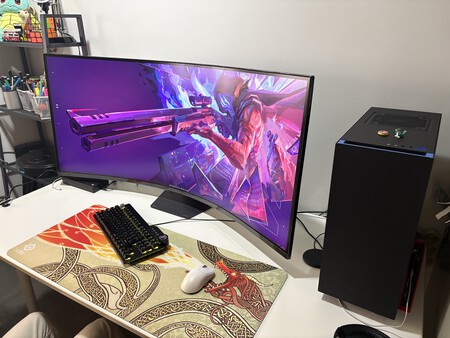
The first thing I did when the LG UltraGear 52G930B arrived at my home was to find a desk large enough to accommodate it. This isn’t a joke. The monitor spans 120 cm in width, and its 1000R curvature draws the edges of the screen towards the viewer, necessitating a greater desk depth than its width might suggest at first glance.
Next, I wondered if my Nvidia RTX 4070 GPU would be adequate to truly make the most of this setup. The short answer is yes, but there are nuances I’ll discuss later.
The LG UltraGear’s 52-inch display is one of the largest gaming monitors worldwide—52 inches of screen real estate, a 21:9 aspect ratio, and a 5K2K resolution of 5,120 x 2,160 pixels. The 1000R curve seems exaggerated at first, but it quickly becomes the most interesting aspect of the product. Mark the launch price: 1,799 euros.
First Things First: It Won’t Fit Just Anywhere
Before diving into the monitor’s image quality or how it performs while gaming, we must address the physical space issue. This is the first critical decision that influences every other aspect.
With its 120 cm width and a curve that brings the sides toward the user, the LG 52G930B requires a desk that is at least 80 cm deep for comfortable use. I initially placed it on a desk that was only 60 cm deep, and the edges of the panel were too close for comfort, forcing me to turn my head more than I wanted to see the entire field of view. On a desk with 80 cm of depth, the experience was improved, but it’s advisable to sit nearly a meter away. For anyone with a conventional desktop setup, measuring before purchasing is not just a recommendation; it’s a requirement.
Even in spacious desks, the LG takes up considerable space.
The included stand is robust and adjustable in height, tilt, and swivel, aptly reflecting the size of the display. I appreciated that it’s compact and doesn’t consume extensive desk space like other stands do. Its stability gives no cause for insecurity.
The overall finish is a standard matte black typical of the UltraGear range, with minimal RGB lighting, only featuring some LED strips and the brand logo. Controls are limited to a single joystick button that allows easy access to numerous settings.
The 1000R Curve: A Game-Changer in Immersion
Welcoming a 52-inch monitor with a 1000R curve into your home is a stunning experience, even for those already accustomed to curved displays. The difference between an 1800R curve and the 1000R on the LG 52G930B is considerably more pronounced than the numbers suggest. This isn’t simply a more pronounced curve; at this diagonal and 120 cm width, the 1000R curvature makes the screen feel as though it physically envelops you.
On a flat 52-inch panel in a 21:9 format, the distance from the center of the screen to the edges surpasses 40 cm, leading to visual fatigue during long sessions. The 1000R curve mitigates this issue by bringing the edges closer to the eye’s natural focal plane, making the entire screen appear at a uniform distance. This integration is something no flat panel can replicate.
In open-world games—which I frequently play—the immersion is instant and impossible to dismiss. The realism is elevated to a whole new level.
My first serious gaming session was with Red Dead Redemption 2. The territories I had traveled before suddenly felt fresh. From the first gallop through the Heartlands of New Hanover, the monitor transformed my previous experience. The expansive plains, buffalo herds at the frame’s edges, and storm clouds gathering on the horizon felt vividly real.
Exceptional Visuals with a 240Hz Refresh Rate
The LG 52G930B features a VA panel with a native contrast ratio of 4,000:1 and brightness of 400 nits. With enhancements like Deep Black Pro technology and DisplayHDR 600 certification, it offers remarkable visuals even in dark scenes. However, it’s best to tweak settings based on content for the best results.
Another appealing aspect of this monitor is its technical specifications suited for gaming. It supports a remarkable 240 Hz refresh rate with low response times, which I found ideal for fast-paced gaming. You won’t have to worry about motion blur.
Using the Monitor Beyond Gaming
Despite initially focusing on gaming, I also used the LG UltraGear for various daily tasks like writing and editing. The screen’s vast workspace is a significant advantage, though some may find the slight curvature uncomfortable for content that needs to appear perfectly straight. If this is a concern, a 1800R or 2300R curve might be preferable.
The Ultimate Training Monitor
During complicated weeks or poor weather, my cycling activities happen indoors. I enjoy using Rouvy, a cycling simulator featuring real video footage of routes. The experience on the LG 52G930B is mind-blowing.
At a meter away, the asphalt from the route fills my peripheral vision completely. It’s not just viewing a video while cycling; it’s an immersive experience that makes it hard to revert to any other screen afterward.
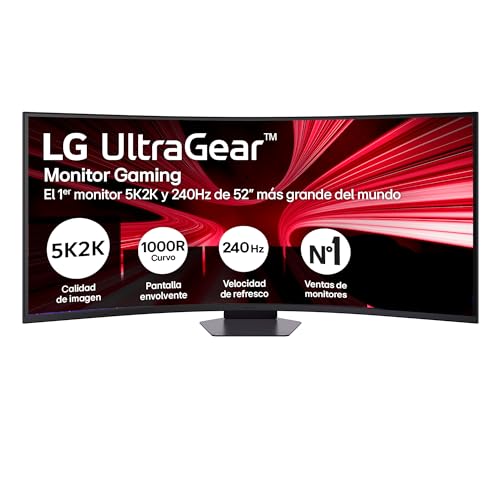
LG 52G930B-B – 51.6″ Ultragear Gaming Monitor, VA, 5K2K, 240Hz, FreeSync Premium
Price may vary. We earn a commission from these links.