
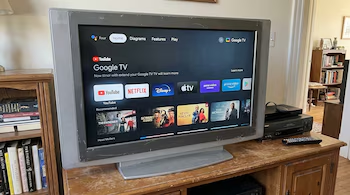
Transform Your Old TV into a Smart TV with Google Chromecast
Many people consider replacing their old television sets, even if they still function adequately. Instead of purchasing a new one, you can breathe new life into your old TV by converting it into a Smart TV with affordable Google options. This guide will explore how to use Chromecast to elevate your viewing experience without breaking the bank.
What is Chromecast?
Chromecast is a streaming device developed by Google that connects directly to your television’s HDMI port. It allows you to access the internet, install applications, and control smart devices right from your screen. Perfect for upgrading older TV models, this compact device turns your television into a versatile multimedia platform.
Key Features of Chromecast
Streaming Capabilities:
- Access popular streaming services such as Netflix, YouTube, Prime Video, and Disney+.
- Explore thousands of apps available on the Google Play Store.
Voice Control:
- With built-in Google Assistant, searching for content becomes easier. You can simply speak commands to find videos, gather information, or control compatible smart home devices.
User-Friendly Interface:
- Newer models of Chromecast include their own operating system and remote control, allowing direct navigation through menus and apps without needing a phone.
Installation Process
Converting your old TV into a Smart TV with Chromecast is straightforward:
What You Need
- A television with an HDMI port.
- A stable Wi-Fi connection.
- A power outlet for the Chromecast.
- A Google account for app downloads.
Setup Steps
Connect the Chromecast: Plug it into an available HDMI port on your TV.
Power Up: Connect the Chromecast to a power outlet.
Select Input Source: Use your TV remote to select the HDMI input where the Chromecast is connected.
Remote Pairing: Follow the on-screen instructions to pair the Google remote control.
Google Home App: Download the Google Home app on your mobile device. This app will help connect your Chromecast to your Wi-Fi network and allows you to log in with your Google account.
The entire process can be completed in under ten minutes, with no advanced technical knowledge required.
Additional Options for Older TVs
If your television only has RCA inputs (the traditional red, white, and yellow cables), you can purchase an HDMI to RCA adapter. This adapter allows you to connect Chromecast to older TV models that lack HDMI ports.
Enhance Your Viewing Experience
Once set up, Chromecast transforms your TV into a multimedia hub, granting you access to a plethora of streaming options and smart features. You can also use Chromecast to mirror content from your mobile or tablet, such as videos, photos, or even your device’s screen.
Conclusion
Instead of discarding your old television, consider converting it into a Smart TV with Chromecast. This simple and cost-effective solution allows you to enjoy modern streaming and smart home controls, making the most of your current technology without the need for an expensive new TV. Embrace innovation and extend the life of your beloved television with Google’s powerful upgrades.