
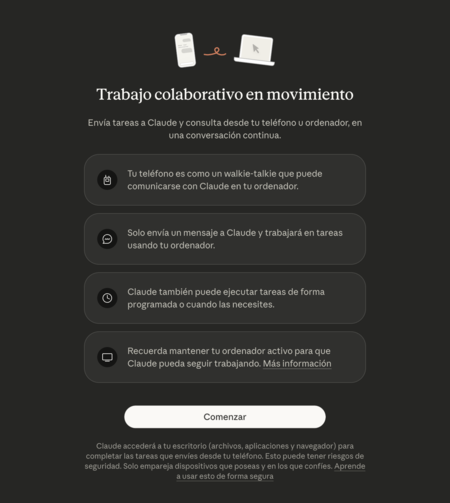
What is Claude Dispatch?
Claude Dispatch is an innovative feature from Claude that enables users to control their computers remotely via their mobile devices. This function is closely linked to Claude Cowork, which acts as a personal assistant designed to automate tasks on your computer. Essentially, Claude Dispatch serves as a remote control, allowing you to instruct Cowork to perform various tasks without being physically present at your PC.
Designed specifically to automate tasks involving files and applications, Claude Cowork is available as part of the paid version and operates seamlessly through the Claude desktop application or the Claude Chrome extension. Claude Dispatch functions within this ecosystem, making it possible to manage your computer activities remotely.
How Does Claude Dispatch Work?
By activating Claude Dispatch, you can control Cowork on your computer directly from the Claude app on your mobile device. This handy feature allows you to execute tasks on your PC even when you aren’t sitting in front of it, offering significant flexibility for multitaskers and professionals on the go.
However, exercise caution! While Cowork is programmed to act with care and requests permission for its actions, there’s always a risk of unintentional file deletions or unwanted online actions. If anything goes awry while you’re away from your computer, you have limited ability to intervene. Keeping this in mind, understanding how to set up and use this function responsibly is vital.
How to Activate Claude Dispatch
Activating Claude Dispatch is straightforward. Here’s a step-by-step guide:
- First, ensure you have the Claude app installed on your computer. Open the application and navigate to the Cowork section.
- In the left column, locate and click on the Dispatch option.
- Once in the Dispatch section, look for a list of available features and hit the Begin button to initiate the activation process.
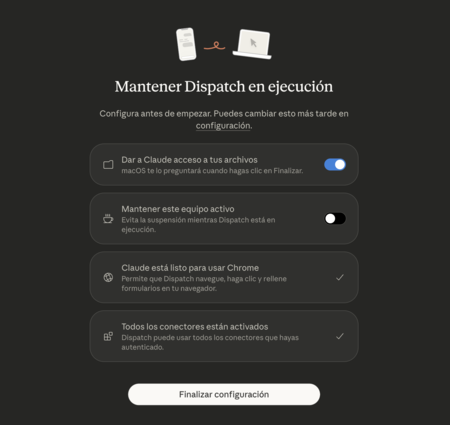
Next, you’ll be prompted to download the Claude app for your mobile device. Follow the instructions to activate the necessary permissions that Cowork needs for remote operation:
- Install the required browser extension.
- Grant access to files on your system.
- Adjust settings to keep your computer awake when Claude is running.
Once you’ve completed all these steps, click on Finish Settings to finalize the setup.
Finally, access the Dispatch section within the Claude mobile app. This area integrates with Cowork, enabling you to send instructions for tasks to be carried out on your computer.
Conclusion
With Claude Dispatch, controlling your computer remotely has never been easier. While it offers enhanced flexibility and functionality, staying aware of potential risks and operating cautiously is essential. Make the most of this powerful tool to optimize your productivity, but always ensure you have safeguards in place to handle any unforeseen issues.