
Windows Notepad: The Impact of AI on Simplicity
For decades, Windows Notepad has been a bastion of simplicity in the realm of text editing. It has undergone minor updates, such as font compatibility and encoding options, but its core essence remained untouched. Users flocked to Notepad for its minimalist approach, reveling in a program devoid of unnecessary bells and whistles. However, with Microsoft’s recent integration of artificial intelligence (AI) features, Notepad is on a transformative journey that some users perceive as a departure from its original charm.
The Introduction of AI Tools
Microsoft’s latest announcement regarding Notepad introduces three new AI features: Write, Rewrite, and Summarize. Each function aims to enhance user experience by simplifying the writing process. For instance, Write generates text based on user prompts, while Rewrite allows modifications to existing content. Summarize can condense lengthy texts into digestible summaries. This shift toward incorporating AI is perplexing for many who question the rationale behind embedding such advanced functions in a program designed for basic text editing.
Streaming Results for Enhanced Interaction
Moreover, Notepad now includes a feature known as Streaming Results. Unlike traditional text generation methods that present the entire result at once, this function allows users to view content in real-time. As users initiate a command, portions of text appear on the screen almost instantly, mimicking a more dynamic interaction. This update transforms Notepad from a static writer’s tool into a more responsive platform, a significant evolution that challenges its foundational simplicity.
Tables and Formatting: A Shift in Focus
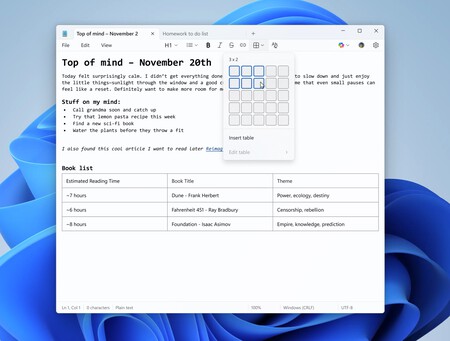
In addition to AI capabilities, Microsoft is also exploring the inclusion of tables in Notepad. Historically, table creation has been restricted to more robust applications like Microsoft Word or Excel. By integrating this feature, Notepad is expanding its role, inviting users to structure their notes more effectively. Yet, the question arises: if one requires tables, why not revert to a dedicated application designed expressly for such tasks?
The Broader AI Strategy of Microsoft
What’s happening with Notepad is more than just an isolated change; it reflects Microsoft’s broader strategy of weaving AI into nearly every aspect of its software ecosystem. From productivity tools like Word and Excel to business applications such as Dynamics 365, the push for AI integration is pervasive. Windows 11, Microsoft Edge, and Bing also carry AI functionalities, reinforcing the company’s commitment to a future where AI underpins user experience.
User Reactions and Future Considerations
The crux of the debate revolves around user sentiment. Some individuals welcome the added features, viewing them as enhancements that modernize Notepad. Others, however, lament the loss of its straightforward, no-frills design. As Microsoft continues down this path, it faces the challenge of balancing innovation with the core principles that have made Notepad a beloved tool.
Conclusion: What Lies Ahead for Notepad?
As AI continues to redefine productivity software, the path that Microsoft chooses for Notepad will remain crucial. The integration of tools like Copilot signifies an ambitious approach, yet the question remains: will these changes resonate with loyal users, or will they alienate those who have come to cherish Notepad’s simplicity? Ultimately, the success of AI in Notepad will hinge on Microsoft’s ability to innovate without compromising the essence that has always drawn users to this iconic application.