

WhatsApp is preparing for its biggest change in years: usernames. This new identification system, which alternatives like Telegram have been utilizing for a while, will offer an extra layer of privacy when contacting someone.
Although this feature is not yet available, we will explain what it is meant for and its significance. Additionally, we will outline the process to reserve your username.
What are Usernames?
WhatsApp usernames are a unique identification method that allows others to find you. Each user can select a name that no one else will have, making it easier to connect without sharing personal phone numbers.
Currently, when you want someone to contact you on WhatsApp, you need to provide them with your phone number. After searching for that number, they can find and message you. With the username, you will have an alternative means of being discovered and contacted. It will also serve as a way to log into your account.
Each user will be allowed a single username, and the first person to set it up will keep that name. This means that if you have a relatively common name like “Maria,” the username @maria could be claimed quickly. You may need to include additional characters, such as numbers or letters, to make your username unique.
It’s crucial to remember that your username will be permanent, so choose one that accurately represents you. Ideally, the name should be easy to remember and type, but given WhatsApp’s massive user base, this could be a challenge.
How Can You Get Your Name?
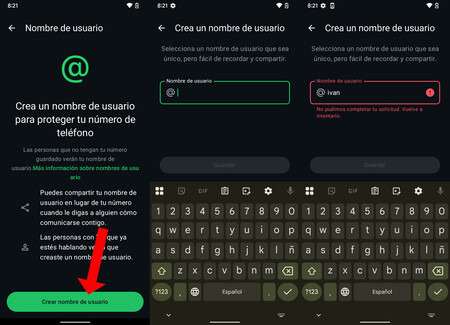
Image: Iván Linares
While WhatsApp has not formally announced this feature or its release date, it is likely that the beta version of the app will get it first. To be among the first to reserve your username, consider signing up for the WhatsApp beta on your mobile device. You’ll then need to wait for the feature to launch, which seems imminent.
Once WhatsApp begins allowing users to reserve their usernames, navigate to the application settings. Tap on your profile photo at the top of the screen to access your account settings, where you can edit your personal information.
Currently, you can edit name, information, phone number, and links. When the username feature is launched, a field for your username will also appear. By clicking on it, you will proceed to the username creation process.

That’s it! Now you will just need to try various names until you find one that is available. If you attempt “pepito” and receive a red indicator indicating that it is taken, you must go back and make adjustments until you find an available name.
In Xataka Basics | Send WhatsApp messages to yourself: How to do it and 11 uses for the function