
Navigating YouTube: How to Manage Inappropriate Content for Kids
In today’s digital age, YouTube has become an essential part of both entertainment and education. However, the platform’s vast repository of videos can sometimes lead to the unexpected appearance of inappropriate content, especially for younger audiences. This can be frustrating for parents who want to ensure a safe browsing experience for their children. Unfortunately, YouTube does not provide a direct option to block channels, leaving many searching for viable alternatives to safeguard their kids’ viewing habits.
Understanding YouTube’s Limitations
YouTube made significant changes to its channel management options a few years ago. One key change was the elimination of the ability to block entire channels from appearing in search results or recommendations. While this may seem convenient for some users, it poses a challenge for parents trying to manage what their children watch.
Currently, the only way to influence YouTube’s recommendations is to ask YouTube to suggest less content from specific channels. This can be done in the home screen’s suggested videos section. However, it’s important to remember that this will only modify your recommendations and not block the channel entirely.
Comment Management
While content blocking options are limited, you can manage the interaction settings concerning comments. YouTube allows you to block comments from specific users. If you find a particular user leaves toxic or inappropriate comments, you can navigate to their profile and select the “Hide user from my channel” option. This will effectively remove their previous comments and block them from future interactions on your videos.
Activating Restricted Mode
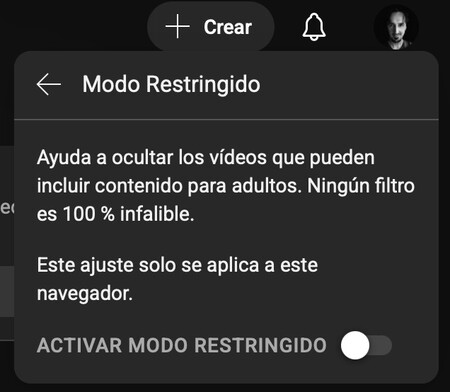
YouTube provides a Restricted Mode, which acts as a safeguard against adult content. When enabled, this mode attempts to filter out videos that may contain inappropriate material for younger audiences. It’s crucial to point out that the effectiveness of this feature is limited, and it may not catch all unsuitable content.
To activate Restricted Mode, follow these steps:
On Mobile: Tap your profile image, then go to Settings > General > Restricted Mode.
On Desktop: Click your profile image, access the dropdown menu, and select Restricted Mode.
Keep in mind that this setting only applies to the specific device you are using, which is vital if children use multiple devices in the house.
Using YouTube Kids
For parents seeking a more controlled environment, YouTube Kids is designed specifically for younger users. The platform curates content based on age-appropriate categories, offering a safer alternative for children to enjoy videos. YouTube Kids can be downloaded via the App Store or Google Play.
Though it offers a more tailored experience, it’s important to recognize that YouTube Kids still has its limitations. While it aims to filter out inappropriate content, it can still inadvertently showcase videos that may not align with parental expectations.
Reducing Channel Visibility
If you wish to minimize the presence of specific channels from your recommendations, although not entirely block them, you can manually request that YouTube recommend less content from those channels. This is done by clicking on the three-dot menu next to a video and selecting “Don’t recommend channel.”
This option will help manage recommendations on your home screen but will not eliminate the channel’s videos from search results or direct links.
Disabling All Recommendations
As a more radical option, you can choose to deactivate your YouTube history entirely. By doing this, you will erase all previously watched videos, and the home page will appear devoid of recommendations. This action can be helpful if you want to start fresh with your viewing algorithm. Here’s how to do it:
- Click on your profile photo.
- Navigate to Your data in YouTube.
- Turn off your YouTube watch history.
Hiding Problematic Users
Lastly, if you encounter users on your channel whose comments you find disagreeable, you have the option to hide them from your channel. This method involves reporting the user and selecting the “Hide user from my channel” option, ensuring their comments will no longer appear.
Navigating YouTube can sometimes feel overwhelming due to its vastness and the variety of content available. While direct blocking options are limited, implementing these strategies can significantly enhance the safety of your family’s viewing experience. Ensuring that children have access to appropriate content is a shared challenge among parents; being proactive and informed about available options can help in shaping a more secure online environment for them.