
The Evolution of Automatic Saving in Microsoft Word
One of the most entrenched habits among users of Microsoft Word is to ensure they save the document as soon as they start working on it. This is not just about saving; it’s also about choosing an easy-to-remember location for later retrieval. For many, this ritual translates to clicking Control + S (or Control + G) or clicking on the iconic 3½-inch floppy disk icon—an artifact that newer generations might barely recognize. However, with the latest developments in Word, this norm is shifting.
Tell the Automatic Guardian
Microsoft wants Word to embrace automatic saving in the cloud. In practical terms, this means that the next time you create a document, it will be automatically generated in OneDrive or any other cloud service you have set as your default. This integration aims to streamline the user experience and make document management less cumbersome.
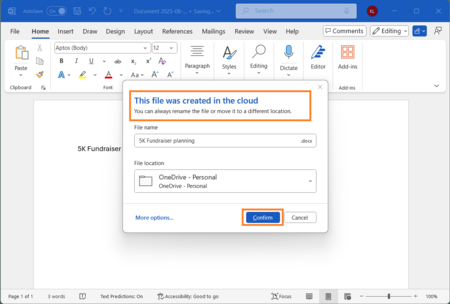
Instead of using the first fragment of the text as a name, which is how it currently functions, Word will now apply a naming format like “Document + Date.” For instance, a document created today will automatically be titled “Document 28-08-2025.” This feature enhances organization and makes retrieving documents easier later on.
Users will still have the flexibility to rename their documents at any time or discard them entirely. Upon closing the document, Word will present an emerging window asking whether the user wants to rename it, keep it, or delete it. This interface change is meant to simplify file management, much like the experience already offered by online competitors.
The functionality resembles what is already available with Google Docs or Word Online, where documents are automatically stored in Google Drive or OneDrive without any manual intervention. This seamless integration not only improves user experience but also underscores Microsoft’s strategic direction in maintaining the relevance of Word and the entire Office ecosystem in an increasingly competitive landscape.
According to a Statista analysis, Google Workspace has emerged as a formidable alternative for personal, educational, and business users alike. While Word and Office still dominate the office suite market with over 45% share, Google products have carved out a significant user base.
The shift to automatic cloud-saving has met with mixed reactions. On Microsoft’s announcement page, some users criticized the change, stating, “I do not understand the logic behind this function” or “You have no idea how your customers use Word.” The concerns indicate a reluctance among some users to transition away from traditional methods of file management.
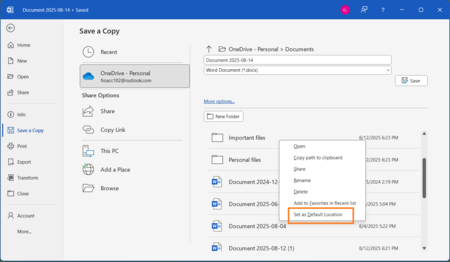
Although this new feature will eventually be rolled out to all users, its current availability is limited to members of the Insider program. Microsoft assures users that opting for this automatic saving feature will not be mandatory. Users who prefer the traditional method will still be able to revert back to it.
Moreover, Microsoft has indicated that the new settings in Word will allow users to select their default cloud storage supplier, not limited to OneDrive. Users can also disable automatic saving and opt for saving documents directly on their local drives. The rationale presented by Microsoft revolves around enhancing both security and convenience, reducing the risk of file loss and facilitating access across multiple devices via cloud storage.
Beyond these specific changes lies a larger narrative: Microsoft Word, with a legacy exceeding 40 years, must now navigate a landscape teeming with competitors. Many applications have emerged with varied philosophies and functionalities, rapidly evolving to meet user demands.
In summary, the evolving landscape of Microsoft Word ensures that it remains an integral tool for users while adapting to the changing dynamics of digital document management. As the line between traditional and modern approaches continues to blur, we can expect further innovations aimed at enhancing user experience.
Images | Microsoft