

Let’s explore how to turn AI into a personal fashion assistant that can guide you on what clothes to wear and how to combine them. This can be achieved through several methods—ranging from basic inquiries to more complex setups involving templates tailored to artificial intelligence. These templates can serve as a guideline whenever you seek fashion advice.
We’ll begin with important tips to consider before utilizing AI as your fashion assistant. Next, we’ll cover some quick queries you can make, and finally, we’ll introduce a more advanced method for using specific commands with AI models like ChatGPT, Co-Pilot, and Gemini to create customized assistants.
Before Starting: Key Considerations
Before seeking assistance from artificial intelligence for your wardrobe choices, consider several crucial factors. First, you must define your expectations; the requirements for daily wear differ significantly from planning purchases or enhancing outfits for specific occasions.
Additionally, it can be beneficial to record your measurements so that AI can tailor suggestions accordingly. It’s also essential to identify your style preferences and color palette to avoid recommendations for colors or clothing styles you dislike.
In certain situations, attaching photographs can aid your requests, such as including images of your existing garments or yourself for body reference. However, keep in mind that any images uploaded to AI platforms will be stored on the company’s servers, so be cautious if privacy is a concern.
Furthermore, consider other factors like your budget when seeking purchase advice or the time available for getting ready, as this differs based on whether you have 30 minutes or just five to prepare.
Lastly, don’t settle for the first response from your AI assistant. Feel free to request a rephrasing or to refine your prompt by adding details based on its initial limitations. You might even ask for corrections in subsequent prompts to make the suggestions more relatable or casual.
Use an AI Wizard for Fast Decisions
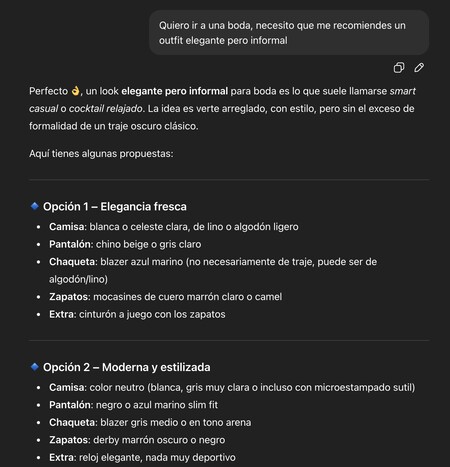
You can start by making simple and quick requests to AI. What you can ask depends on the occasion. For instance, if you’re attending a specific event but are unsure about your outfit, you could inquire like this:
I want to go to a wedding and need recommendations for an elegant outfit.
Just by providing the event details and your clothing expectations, AI can suggest various outfits. You can refine this request by adding color preferences or specifying garment types.
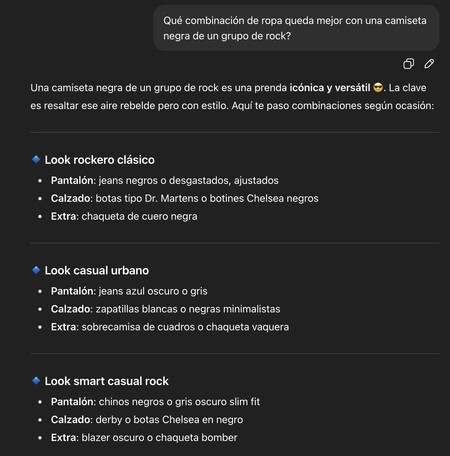
You can also specify a garment that you own and ask for styling suggestions. For example, you might ask how to combine a black rock shirt. The AI will use these specifications to curate recommended outfits.
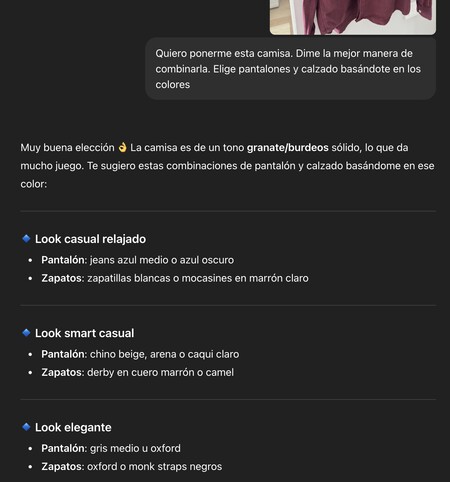
Moreover, you can take it a step further by attaching a photo of one or several garments and asking for the best combinations. The AI will analyze the type of clothing, its material, and color to provide suggestions tailored to your wardrobe.
If you prefer, you could also send a picture showing how you usually dress, requesting recommendations based on this personal style for different types of events. This extra context will help the AI generate more relevant ideas.
AI Converts into a Personal Stylist
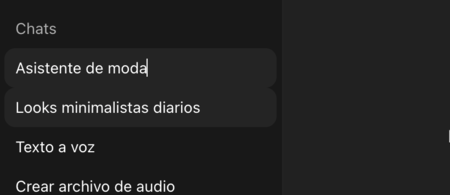
For a more advanced approach, you can use predefined templates that transform ChatGPT or any AI assistant into your personal stylist.
To start, always conduct your interactions with AI using the same chat. You may want to label it for easy recognition. You can input various commands to configure your assistant, ensuring that the responses you receive align with your specific needs.
Create a Closet: Golden Rules to Follow
To begin, catalog your closet with your available garments to allow intelligent requests. Use a template like this:
“Create my closet with the following list. For each item, note type, color, pattern, formality, and season.”
- TOPS: White T-shirt, Blue Oxford shirt, Gray Merino Jersey…
- BOTTOMS: Straight blue jeans, Beige chinos…
- LAYERS: Navy blue blazer, Beige trench coat…
- FOOTWEAR: White sneakers, Black derbies…
- ACCESSORIES: Brown leather belt, Gray scarf…
With this base, every future question about styling will use your existing wardrobe. Remember, most AI platforms allow you to create distinct chats, enabling you to easily return to your styled closet at any time.
In addition to this, you can provide a set of golden or commandment-like rules for everything you inquire to adhere to specific color preferences, garment priorities, or recommendations for inclement weather:
“Permanent rules:”
- Avoid combining [black + dark brown] without contrast in footwear/belt.
- Prioritize mid/high waist to elongate legs.
- In rain, always suggest non-slip footwear options.
- 2/3 outfits must include already inventoried garments.
Having a record of your closet along with guiding rules ensures that your requests and AI responses are relevant. You can prompt AI to suggest outfits using your available clothes while also allowing it to recommend purchases that would complement your existing wardrobe, always keeping your golden rules in mind.
Engage AI as Your Personal Stylist
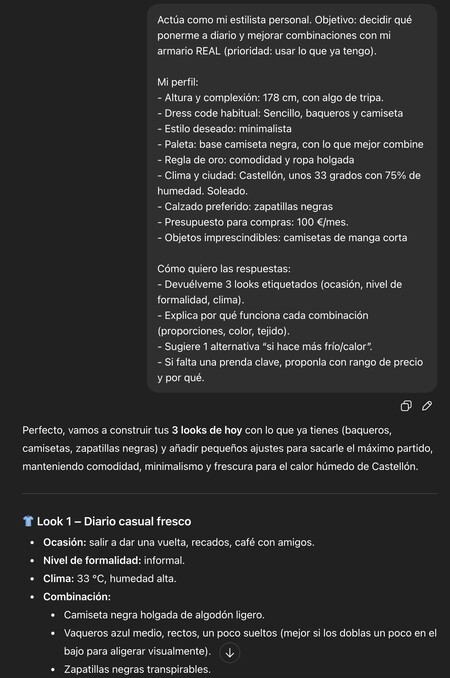
After configuring your closet and rules, you can now direct AI to act as your stylist. Start by providing your personal profile to aid AI in tailoring its suggestions to match your preferences.
Use a template such as:
“Act as my personal stylist. Objective: Determine daily outfits and enhance combinations with my current closet (priority: leverage what I already have).”
My profile:
- Height and build: [x cm], [proportion of torso/legs, if applicable].
- Typical dress code: [casual/smart casual/formal/mixed].
- Desired style: [minimalist/classic/creative/athleisure].
- Palette: Base [navy blue, gray], accents [green, burgundy].
- Golden rule: [comfort + light layers] NO: [specific garments, certain fabrics].
- Location and climate: [city], [temperature range], [frequent rain/wind].
- Favorite footwear: [white sneakers, Chelsea boots].
- Monthly budget: [€/month] (optional).
- Essential items (e.g., for rain, biking, meetings).
Desired answer format:
- Provide me 3 labeled outfits (occasion, formality level, weather).
- Explain why each outfit works (proportions, colors, fabrics).
- Suggest an alternative “if it’s colder/hotter.”
- If a key item is missing, propose it with a price range and reasoning.
By copying and pasting this template, filling in the necessary details, you can have AI consider various aspects and generate more insightful responses tailored to your needs. Adapt the template to suit your taste, ensuring that your preferences and comfort are prioritized.
Create Smart Combinations Daily
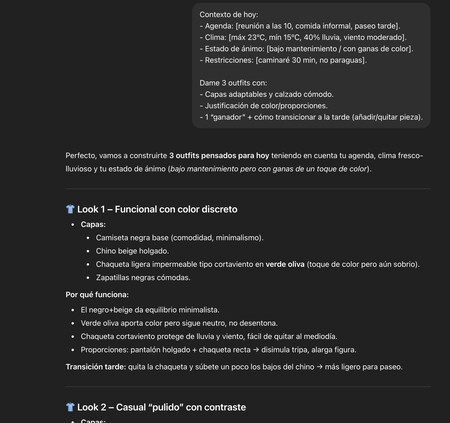
Utilize this template to request several intelligent combinations daily, considering your schedule, mood, and weather conditions:
“Today’s context:
- Schedule: [meeting at 10 AM, casual lunch, evening stroll].
- Weather: [high of 23ºC, low of 15ºC, 40% chance of rain, moderate wind].
- Mood: [low maintenance / in the mood for color].
- Restrictions: [walking for 30 minutes, no umbrella].
Give me 3 outfits with:
- Adaptable layers and comfortable footwear.
- Justification for color/proportions.
- 1 “winner” + how to transition for the afternoon (add/remove items).
The aim is to adapt this template daily to reflect the temperature, your agenda, feelings, or restrictions, allowing AI to provide you with personalized recommendations every day. This makes a noticeable difference in your daily dressing experience.
Utilize Information for Informed Shopping
If you’ve logged your closet or established golden rules, you can also leverage this context to enlist AI’s help for clothing purchases. While it’s easy to say, “I want to buy pants that go with most of my clothes,” you can be more specific.
For instance, mention what amount you allocate for clothing purchases each month. This way, you establish a budget that AI can reference when suggesting purchases. You could use a template such as:
“I allow for 1 purchase/month (≤ €80). Propose only if:
- It fills a specific gap (e.g., brown shoes that can go with X).
- Expands existing combinations (≥ 5 new looks).
- Matches my color palette and season.
This approach ensures variety in your wardrobe while preventing frivolous purchases that don’t enhance your closet based on your predefined criteria. Always require AI to suggest items that logically enrich your existing clothing collection.

Provide Feedback to the AI
Whenever the AI presents suggestions, you can refine them by indicating what it did well and where it failed. This will assist the AI in improving its recommendations for future queries. You might use a feedback template like this:
“Feedback:”
- Good: colors and layering.
- Bad: pants are too tight; I prefer a straight cut.
- Next time: always suggest alternatives without a shirt.
By incorporating feedback, the AI will learn and adjust, leading to improvements in its responses that consistently align with your preferences.
As you can see, implementing AI as a personal fashion assistant can infinitely enhance your decision-making process, from everyday dressing choices to strategic wardrobe expansions. Every interaction offers a chance to tailor recommendations and further hone the AI’s understanding of your unique style.