
Let’s explain How to create a web page from scratch using artificial intelligence, so that you do not need to pile code or settle for the templates you find on the Internet. It’s about creating a website simply by expressing what you want it to appear with a prompt.
We will start this article with a series of tips and important points to consider before getting to work. Then, we will guide you through the process using conventional AIs such as ChatGPT, and conclude with a list of other services that you can also use, explaining their general operation.
Before Starting: Things to Consider
Before diving into the creation of your website, you should have a few key points in mind. To begin, you must define the objective of the web. Consider whether it will be a personal website, a blog, a company site, or something else. This decision is crucial before proceeding with the design.
Secondly, you must have a design plan or have a clear vision of the type of page you want. For example, if you opt for a personal website, it could serve merely as a link index, a blog, or a site with a specific structure.
Additionally, clarity on the structure is essential. Create a schematic outline of what you want. You should know what sections you will have, such as Start, Services, Blog, or Contact, along with any other sections or buttons you wish to include. This outline will serve as guidance for the AI in the design process.
It is equally important to know your target audience. If it’s a personal website, you need to establish a tone, as these factors influence the design you choose, including colors and overall structure.
You will also need to have a domain and hosting to host the website. While AI can assist in creating the page, you must research and decide on the appropriate service for hosting.
Finally, review AI-generated results and don’t hesitate to request corrections or redo elements. Ensure that the texts are coherent and that all buttons and elements function correctly. AI can make mistakes, so it’s prudent to catch and rectify them before uploading your website to the Internet.
Create a Website Using an AI Like ChatGPT
The first method to create a website is to utilize generative AIs that generate text, including ChatGPT, Copilot, Gemini, and DeepSeek. However, you don’t only need to type a request for a website; you can do preliminary work to aid the AI.
To begin, you can ask it for a list of ideas related to your website’s objectives. If you’re unsure about the kind of website you want, conveying your needs to the AI can help it suggest suitable designs.
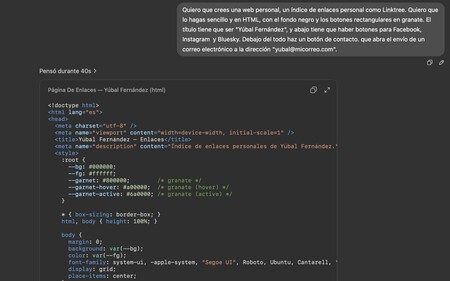

Next, instruct the AI to generate your webpage. Specify the programming language you wish to use, such as HTML, CSS, JavaScript, or more advanced options like React or Next.js. Additionally, describe every element you want to include on the page for which the code will be generated.
You can start with a prompt like this:
“I want you to create a personal website, a personal link index like Linktree. It should be simple and in HTML, featuring a black background with garnet rectangular buttons. The title must be ‘Yúbal Fernández,’ with buttons for Facebook, Instagram, and Bluesky below. Additionally, a contact button should open an email interface to ‘[email protected].'”
This is merely an example; you should tailor the prompt to fit your specific needs. The key is to describe the type of page you want to create and the programming language you wish to use; in this instance, it was HTML, but others might suit your needs just as well.
Once you have the code generated, there’s typically a button to execute the code within most AI platforms. This opens a window showcasing your website for live testing and appearance evaluation.
After testing, you can request modifications to refine specific design aspects. Because you are within the same conversation, the AI can take into account previous designs and discussions.
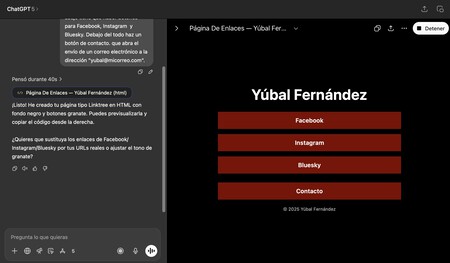
Bear in mind that the AI-generated code should only serve as a base. Always verify it, as errors may exist. Additionally, consider making manual modifications, such as adding or changing elements that require improvement.
Lastly, do not limit yourself to ChatGPT and the most popular AI options. Consider using Claude, as it offers better optimization for coding. Experiment with various AIs to find which one yields the best results for your needs.

Create Your Website with a Specialized AI
Additionally, there exist other AIs that are better tailored and customized for web design. Most of these belong to hosting companies, though some lesser-known third parties also offer valuable hosting and design solutions.
- WordPress AI: WordPress is the most popular website creation platform. In addition to being free, it offers an AI-assisted web creation feature, requiring a user account. Link: WordPress.com/es/creador-webs-ia.
- Ionos: This hosting service has its own AI capable of creating websites from scratch, but you must be a customer. Link: ionos.es.
- WIX Web Builder: This service offers a template system for creating websites, as well as an AI for custom designs. Link: es.wix.com.
- Butternut AI: A website creator that can be started for free, with options to regenerate your website as needed. Free for 5 days, with paid plans starting at $20 per month. Link: butternut.ai.
- FRAMER: A superb AI web page creator suitable for both personal and business websites, starting at $5 per month including hosting. A free trial is available. Link: FRAMER.com.
- Dora: A website creator featuring interactive elements like 3D images, starting for free, with credits upon registration for a subscription if needed. Link: Dora.run.
- B12: A startup that offers a specialized AI for website creation; simply provide a prompt, and it’ll generate your site. A free basic plan is available, but a paid plan is needed for custom domains or to remove ads. Link: B12.io.
- 10Web: Another service offering an AI trained to generate web pages, with plans starting at $10 per month. Link: 10Web.io.
- Webwave: An AI design service that provides custom web creation capabilities, complete with a free plan to help you start. Link: Webwave.me.
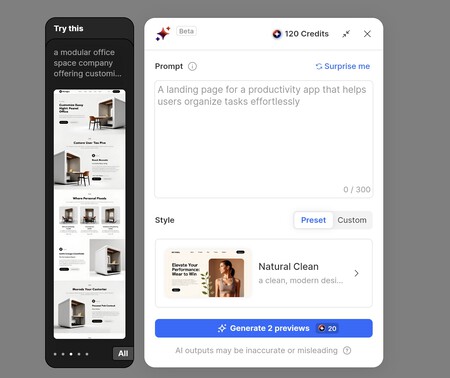
The workflow for these services typically follows a similar pattern. You write a prompt describing your desired design, with some platforms offering suggestions. We have used captures from Dora.
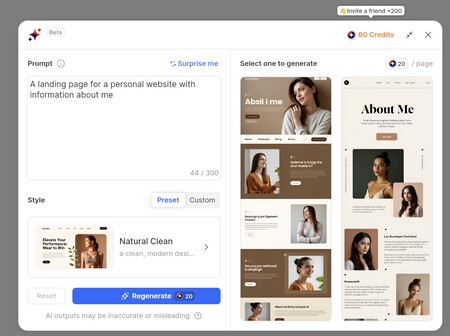
Upon submitting your prompt, you generally receive a result preview to choose from or could even be directed straight to the result.
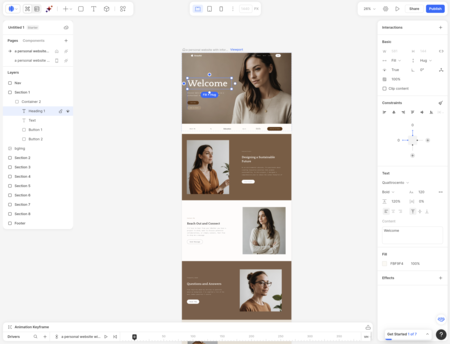
Once selected, the service brings you to your editing screen where you can adjust each web element. The options available depend on the service you choose, but in Dora, you can modify text, graphics, and designs.
The process inevitably has a manual component, as you’ll need time to adapt your website precisely as you desire. Ultimately, the service you choose will usually offer its own system for publishing your website online.