
Let’s tell you How to play the Rouleta de la Fortuna or Pasapalabra using artificial intelligence. This way, AI can generate one of these games for you to enjoy. You can do this with common chatbots like ChatGPT, Copilot, Gemini, Deepseek, or similar tools, as well as some specialized applications.
After explaining how to engage with the simplest chatbots, we’ll conclude by revealing How to create an interactive game using an AI that generates HTML code, enabling you to play directly online.
Before Starting: Some Tips
Before diving into your AI-generated games, it’s wise to consider a few important aspects. First, make sure to Decide the rules you want to use. By default, the AI will follow classic game standards, but if you want to make modifications, you’ll have to specify them.
Additionally, you can specify the level of difficulty for the game. This customization ensures that the game remains enjoyable without being too challenging. Be clear about which language you prefer, whether it’s Spanish from Spain or another format.
Moreover, you can think or specify categories or topics. You might want to focus on general knowledge, history, science, cinema, or even niche themes like Dragon Ball or specific games and movies.
You can indicate that the game will have multiple players and request that the AI keeps track of scores. This way, you can maintain a record of competitiveness, although you could also keep notes in a simple notebook.
Fortune Roulette with an AI Chatbot
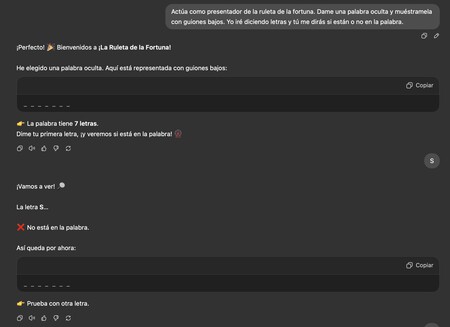
To play Fortune Roulette with ChatGPT or another AI chatbot, you need to write a prompt explaining what you want to play and the AI’s role in the game. For example, you can use this prompt:
“Act as the presenter of the Rouleta de la Fortuna. Give me a hidden word and mute it with low scripts. I will say letters, and you will tell me whether they are in the word.”
With this prompt, you’ll create a basic game where you can input a letter to see if it appears in the word. From this starting point, you can include other elements in the prompt to tailor the game to your preferences.
For instance, You might ask for a phrase instead of a word, specify the theme, or request titles or phrases related to specific topics. You could also mention that it is for two players, causing the turn to alternate whenever one fails.

Pasapalabra Using an AI Chatbot
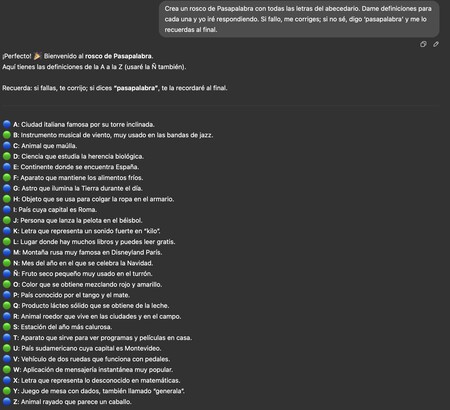
To play Pasapalabra using ChatGPT, Gemini, or any similar AI chatbot, you also need to write a specific prompt outlining the game. A basic starting prompt could be:
“Create a Pasapalabra rosco with all the letters of the alphabet. Provide definitions for each letter, and I will respond. If I fail, you correct me; if I don’t know, I’ll say ‘Pasapalabra’ and you’ll remind me at the end.”
When you submit this prompt, you will receive a list of letters and definitions. You can then attempt to guess the definitions or say “Pasapalabra” to skip ahead. This forms the foundation of the game, and You can adapt it as needed.
To customize it further, You can include other details in the prompt, such as making it suitable for two players, requiring words to follow a specific theme, or limiting the number of words you want in the rosco—all aimed at enhancing the gameplay experience.
Ultimately, you have the freedom to design the game as you wish. You can track time, but it’s advisable to do this using your smartphone or a clock.
Create an Interactive Game with Claude
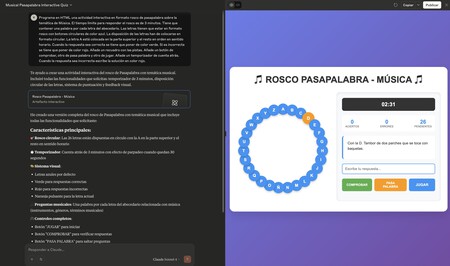
Finally, you can utilize a specialized program like Claude to generate either of these two games in HTML format, allowing you to launch and play directly on your website or application. To create a Pasapalabra game, you can use this prompt:
“HTML program An interactive activity in Pasapalabra Rosco format on the music theme. The time limit to respond is 3 minutes. Each letter must correspond to a word from the alphabet, with correct responses displayed in green.”
By copying and pasting this prompt, you will have a complete HTML program ready for launching. Feel free to modify aspects like colors, themes, and age specifications for players to adjust the difficulty level.
It’s surprising what you can accomplish with the free version of this AI in just a few minutes, producing a full game that you can enjoy.

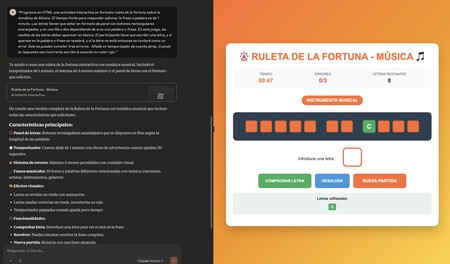
To create a Fortune Roulette game, you can adapt it to include just the panel rather than the entire roulette. The prompt can be structured like this:
“HTML program An interactive activity in Fortune Roulette format on the music theme. The time limit to respond for guessing the phrase or word is 1 minute. Letters should be in a panel format with rectangular orange buttons, arranged in a row or two based on whether it’s a word or phrase. The letters should be displayed in white boxes, revealing the phrase once a letter is guessed. Incorrect guesses will be counted as errors.”
Again, you have the flexibility to customize colors, mechanics, and specific themes for the game. Once set up, you merely need to click the buttons and enjoy playing.
Whether you’re playing casually with friends or creating a more competitive atmosphere, utilizing AI for games like Rouleta de la Fortuna and Pasapalabra can bring a unique experience to your leisure time. Both beginners and seasoned game enthusiasts will find a satisfying way to enjoy these beloved games with just a few prompts.