
Today, we’ll explain what you need to extend Windows 10 support through 2026. As you know, the previous version of this operating system is about to become obsolete, which means it will stop receiving security updates, making it increasingly dangerous to use. However, millions of individuals still rely on it, prompting Microsoft to take a step back to accommodate these users.
Last year, Microsoft stated that users could extend support by paying $30 for each additional year. Now, they have introduced a free method that involves simply using the Windows Backup tool. We’re here to guide you through the process.
Before we begin, it’s important to note that the only updates you will receive during this extra year are security updates. While your operating system will remain relatively secure, you won’t get any new features, as Windows 10 is officially retired.
Free Windows 10 Updates Until 2026
The first step is to navigate to the Windows settings. In the Accounts section, click on Your Info. To secure your free year, you need to sign in with your Microsoft account. Yes, linking your account to Windows is essential to unlock this offer.
Next, you’ll need to open the Windows Backup application installed on your computer. It may appear under the Spanish name, but you can also try searching for Windows Backup.
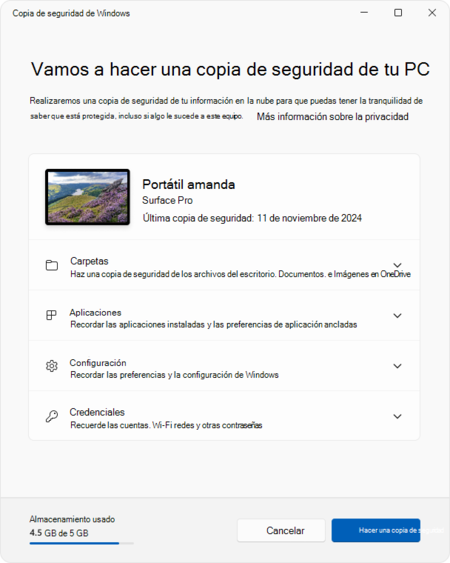
Once in the application, all you need to do is create a backup. This process will ensure that both your device settings, login credentials, installed applications, and folder content are securely stored. Each section can be personalized according to your needs.

Following these steps, when the time comes, Microsoft should allow your computer to continue receiving updates for Windows 10 for several months, extending to the next year. This information may not be communicated immediately, but Microsoft will notify you of this extension, and you might need to create another backup shortly thereafter.
In this way, if any unreported vulnerabilities are discovered that cybercriminals might exploit once official updates cease, Microsoft has committed to updating your Windows to mitigate risks and address security issues.
In conclusion, the transition from Windows 10 to newer operating systems can be daunting, and many users may feel reluctant to upgrade. However, the option to continue receiving security updates until 2026 presents a buffer for users who are not yet ready or able to transition. By following the outlined steps and utilizing the Windows Backup tool, users can ensure their systems remain secure, albeit without new features. Ultimately, this is a short-term solution for long-term challenges as technology continues to evolve.