
I have long been a fan of Microsoft Flight Simulator. That’s why I followed its arrival on PS5 with special interest: I wanted to try it beyond the PC, not only for the opportunity to pilot an aircraft but for the joy of exploring stunning landscapes. I often use the game’s photo mode as a delightful tool for virtual exploration, capturing beautiful vistas from the comfort of my screen.
This fascination makes sense because Microsoft has worked diligently over the years to create ‘Flight Simulator’ as more than just an airplane game. In their latest release, Flight Simulator 2024, the company boasts the most detailed recreation of Earth to date, featuring improved elevation maps, over 500 cities reconstructed in 3D, and more than 100,000 square kilometers of rural photogrammetry. The level of detail is astounding and stimulates the imagination for exploration.
Fly Without Installing Anything, Directly from the Browser
The exciting news is that there is now a much lighter way to experience this adventure without needing to purchase a full game or install software. Google Earth announced that its flight simulation feature is now open to all users.
Google Earth is not attempting to market a complete flight simulator, which works to its advantage. According to Google’s help page, this feature is experimental and designed for casual exploration. It highlights that the flight physics are simplified, making it unsuitable for those seeking a detailed simulation experience. However, it offers a unique opportunity to explore the world visually.
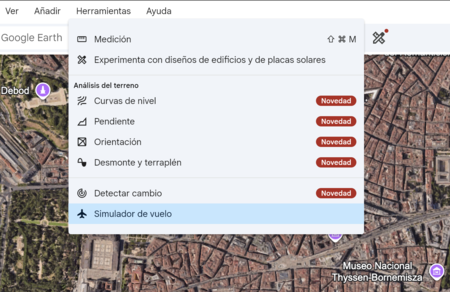
Getting started is straightforward. Simply open Google Earth on the web, navigate to Explore the Earth, display the Tools menu, and click on Flight Simulator. Within seconds, you transition from the traditional map to a flight view, ready to soar over the terrain.
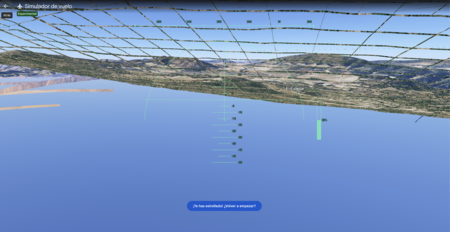
Once you’re flying, navigation is user-friendly. You can control the aircraft using the keyboard: Page Up to accelerate, Page Down to slow down, the up and down arrows to adjust altitude, and the side arrows to tilt the plane. You also have the option to toggle mouse control by clicking within the simulation. And if your flight goes awry, there’s a quick reset option to start over—a welcome feature for beginners.
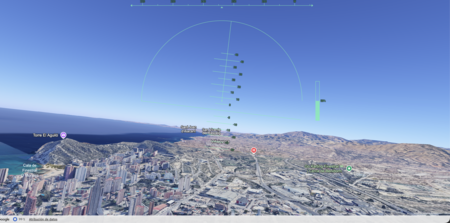
A stunning aspect is that Google Earth dynamically loads 3D buildings and high-resolution imagery while you fly. This feature transforms a simple function into a captivating visual experience, especially when exploring recognizable areas and switching the map to Satellite view. However, users should be aware that flying at high speeds or using a slow connection may lead to lags in loading, and there are known issues in certain locations. Thus, it’s essential to treat this feature as a light, experimental tool.
Of course, there’s also the alternative of actual flying—services like Skyscanner offer flights from Spain for under 40 euros, depending on the route and date. Viewing a landscape from a browser screen differs vastly from peering out the window at the world passing by beneath the clouds. This highlights the beauty of presenting both experiences: they cater to different senses and styles of exploration.

The fascinating aspect of Google Earth is its ability to transform a familiar tool into a playful exploration medium, free and easily accessible from the browser. Complex simulations aren’t always needed to ignite curiosity. Sometimes, a simple and well-executed feature is just enough to make us want to revisit the map and get lost in the beauty of our planet.