

What is Samsung TV Plus and How Does It Work? Samsung TV Plus is a free content service integrated into Samsung Smart TVs. This means there’s no need for downloading or registration; you get instant access to various channels right from the start.
What is Samsung TV Plus
Samsung TV Plus is a free entertainment service designed by Samsung, installed directly on their Smart TVs. You won’t need any external devices, as this service is pre-installed, allowing for immediate access without downloads.
This service is ad-supported to provide users with content at no cost. It does not require registration, meaning you won’t need to create an account or enter any bank details. Instead of a traditional user account, the content is linked directly to your TV.
Importantly, you cannot uninstall this service, but you are not obligated to use it. It remains accessible for whenever you wish to utilize it.
Upon turning on your television, Samsung TV Plus will be visible, but you can also access it via the app bar within the TV interface, functioning like any other application you might install.
Samsung TV Plus offers a range of free channels, which often increase over time, making it beneficial to check regularly for new additions.
Additionally, Samsung TV Plus is available on mobile devices, specifically on Samsung Galaxy devices running Android 11 or higher.
How to Set Up Samsung TV Plus
You don’t need to install Samsung TV Plus, as it’s pre-installed on compatible Samsung TVs. Simply connect the TV, and the service will be ready for use.
However, an internet connection is necessary to utilize this online channel service fully.
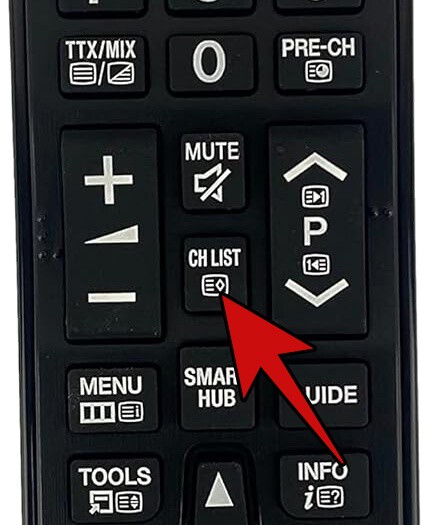
If you want to organize your channel list, press the List or CH List button on the remote. A column with channels will appear; at the top right, click the pencil icon labeled Edit. Here, you can select a channel to block, change its number, delete it, or rename it. You can also reorder channels or mark favorites to create a custom list.
How to Use Samsung TV Plus
To access Samsung TV Plus, turn on your TV and press the Home button on your remote. An application bar will appear at the bottom, allowing you to click on the TV Plus icon.
What Channels Does Samsung TV Plus Offer?
As of December 16, 2025, Samsung TV Plus boasts over 70 channels. Notable channels include Xataka TV, which features product tests, tricks, reports, and recommendations.
Entertainment Channels
- 4001 Canal Sur Andalusia
- 4004 Style and Life – Rakuten TV
- 4007 The 1
- 4035 The 2
- … (additional channels)
Series Channels
- 4002 Tell Me How It Happened
- 4235 RTVE The Promise
- … (additional channels)
News Channels
- 4005 Euronews LIVE
- 4551 24H
- … (additional channels)
Crime Channels
- 4293 The Commissioner
- … (additional channels)
Sports Channels
- 4603 Tennis Channel
- … (additional channels)
Children’s Channels
- 4771 Clan
- … (additional channels)
How to Watch Samsung TV Plus on Your Mobile
You can watch Samsung TV Plus on your mobile via its official application, available on Google Play for Samsung phones and tablets. Other Android devices cannot install this app.
For broader access, including on devices not made by Samsung, you need to use Kodi. This application can be downloaded from the official site.
In summary, Samsung TV Plus is a comprehensive and free source for entertainment, news, and more, presenting an appealing option for consumers seeking accessible and diverse content options.