
What is Zapier?
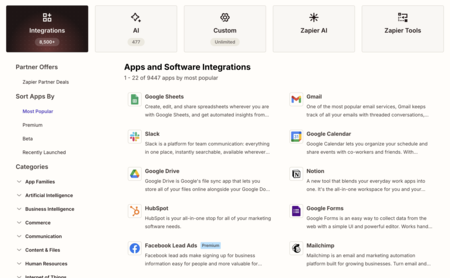
Zapier is a powerful automation platform that facilitates seamless workflow creation between various applications and services. Unlike traditional coding methods, Zapier allows users to set up these automations visually, making it accessible even for non-technical users. It supports integration with over 8,000 applications—including popular AI systems—enabling users to create custom automations that operate without their manual intervention.
How Does Zapier Work?
At its core, Zapier employs a system of workflows, also known as Zaps. Each Zap consists of a trigger and one or more actions. The trigger is the event that initiates the workflow, while actions are the tasks executed in response.
For instance, you could create a Zap that sends a notification to Slack every time you receive an email in Gmail. Here’s the breakdown of this process:
- Trigger: Receiving an email in Gmail.
- Action 1: Save the email to Google Drive.
- Action 2: Send a notification via Slack.
The interface is designed for ease of use, which enhances its appeal over other platforms like Make.com or IFTTT, although it may offer slightly less flexibility for highly complex automations.
What Can You Do with Zapier?
The capabilities of Zapier are virtually limitless, as they correspond to the vast number of applications it can connect. Here are some popular ways to utilize Zapier:
Automate Repetitive Tasks
You can automate mundane tasks such as:
- Data Syncing: Automatically transferring and synchronizing information between different platforms.
- Creating Tasks: Set up a process that automatically generates tasks in project management tools.
Email and Form Management
Zapier simplifies email and form management through features like:
- Data Saving: Automatically saving form submissions or email data.
- Automated Responses: Sending instant replies to customer inquiries.
Social Media Automation
You can maintain your social media presence without lifting a finger:
- Automatic Posting: Schedule posts to be automatically shared on social media platforms.
- Notifications: Receive alerts in messaging apps like Telegram or Slack based on activities in other apps.
Reporting and Event Scheduling
You can enhance your productivity further by automating:
- Periodic Reporting: Generate and send periodic reports effortlessly.
- Event Creation: Automate the creation of calendar events based on specific triggers.
If you’re unsure how to start, Zapier provides an integrations page where you can select two services to see potential automations, and a templates page for more complex workflow inspirations.
How Much Does Zapier Cost?
Zapier offers a variety of pricing plans suited for different needs.
Free Plan
The basic free plan is a great starting point for beginners. It allows you to:
- Create two-step Zaps.
- Access most applications (excluding some premium features).
- Utilize its AI tools for creating automations.
- Execute up to 100 actions per month.
Paid Plans
The paid plan costs €26.54 per month and includes:
- Multi-step Zaps.
- Full access to all applications.
- 750 actions per month.
- AI bot connections.
For those requiring team collaboration, the team account is available for €91.60 per month for up to 25 users, offering:
- 2,000 actions per month.
- Shared Zaps and connections among team members.
AI Agents and Additional Costs
Using AI agents or chatbots incurs additional fees. While there are free plans available with 400 activities per month, higher usage necessitates further payments.
Zapier’s tiered pricing ensures that whether you’re an individual looking for basic automation or a larger team in need of extensive capabilities, there’s a suitable plan to meet your needs.
Overall, Zapier stands out as a versatile tool capable of streamlining countless workflows, making it an invaluable asset for both personal productivity and team collaboration.