
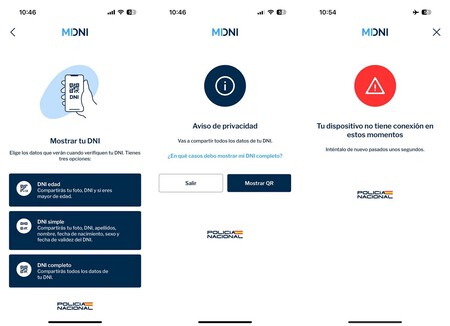
Starting April 2, 2026, Your DNIe in the MiDNI app is as valid as the physical one. This change means that whether you’re at a hotel, a police checkpoint, or any situation requiring ID verification, presenting your DNI through the MiDNI app will be accepted just as if you had the physical card. With this pivotal shift, understanding how to navigate the MiDNI app becomes essential. Let’s dive into everything you need to know.
What is the Digital DNI (DNIe)?
The DNI, or National Identity Document, is issued by the Spanish Police to authenticate the identity of Spanish citizens. Over the years, it has evolved significantly. The Electronic DNI (DNIe), introduced in 2006, incorporates an integrated chip that enhances its security and functionality. The latest version, DNI 4.0, can be linked to mobile devices using the MiDNI application.
The DNIe allows for various online transactions, facilitated by special readers that interact with its chip. This includes tasks such as filing tax returns or signing documents electronically, supported by two critical certificates: an authentication certificate and a signature certificate.
What is MiDNI?
MiDNI is the official application that enables users to store their DNI on their mobile devices. Similar to the miDGT app for driving licenses, MiDNI not only provides a digital ID but also allows for several administrative processes. This official app is developed by the Spanish National Police and ensures the same legal validity as a physical ID.
Upon utilization, the MiDNI app connects to the National Police servers to validate your identity, generating a temporary QR code that can be scanned for verification. However, it’s vital to note that an internet connection is necessary for the app to function properly.
Legal Validity
Starting April 2, 2026, The MiDNI app will be legally recognized just like the physical DNI. Whether you’re checking into a hotel or completing any face-to-face transaction, presenting your ID via the MiDNI app will suffice. However, it’s essential to remember that the DNIe app must be used; simply showing a photo of the document or using another application will not be valid.
What You Can Do with MiDNI
The MiDNI app allows users to prove their identity in person as long as there’s internet connectivity. Here are some capabilities and limitations:
| What You Can Do | What You Cannot Do |
|---|---|
| Prove identity in person with internet connection. | Prove identity without internet access. |
| Establish legal relationships in person. | Prove identity for online transactions. |
| Check into hotels and perform face-to-face procedures. | Use for border crossing. |
Linking Your DNI in MiDNI
To link your DNIe with the MiDNI app, you’ll first need to register your ID. This requires an electronic ID reader connected to your computer. Visit midni.gob.es to start the registration process.
Next, download the MiDNI app from Google Play or the App Store. The app will guide you through the activation steps, including establishing a password for additional security.
Changing the DNIe PIN
If you’ve forgotten your DNIe PIN, you need to visit a police station or a DNIe update point to change it. You’ll need to enter your ID into the designated slot on a machine and follow the on-screen instructions. It’s crucial to reset your PIN to ensure continuous access to your digital ID.