
Reviving the USB Drive: Innovative Uses You May Not Have Considered
Once an indispensable tool for transferring files and saving essential data, USB drives have languished in obscurity in the age of cloud storage and mobile devices. Many of us have a collection of these gadgets lying forgotten in drawers, raising the question: Is it time to breathe new life into our old USB drives?
A recent video from the Xataka YouTube channel dives deep into the numerous ways that USB drives can still hold value in the digital age. Hosted by Ana Boria, the video examines creative methods to rejuvenate these devices that many consider obsolete, revealing surprising and practical applications.
Transforming USB Drives into Multifunctional Tools
1. Freeing Up Space on Mobile Devices
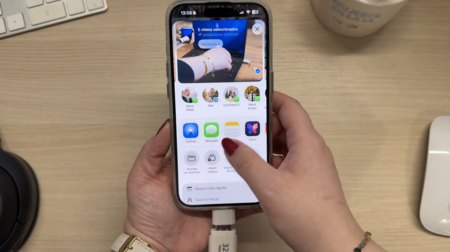
One of the most immediate uses for a USB drive is as a portable solution for freeing up memory on smartphones. For those with limited internal storage, a USB drive combined with the right adapter can be a lifesaver. “With a pendrive and a compatible adapter, you can transfer all your photos, videos, and files to the USB without sacrificing your memories,” explains Ana. This practical approach not only extends your device’s functionality but also preserves cherished content.
2. Installing Operating Systems
Beyond basic file transfer, USB drives can be utilized to create installation media for various operating systems, including Windows. Ana illustrates the step-by-step process to make this quick and straightforward. This feature is particularly useful for tech enthusiasts and professionals who need to set up or troubleshoot systems using other people’s machines.
3. Running Portable Applications
For those who frequently work on unfamiliar computers, another highlight from the video is the ability to carry portable applications on a USB drive. This method ensures access to the software you need without the hassle of installations, making it easy to stay productive regardless of the device you are using.
4. Using Live USBs for Operating Systems
For more advanced users, Ana suggests executing operating systems in Live USB mode, a standard approach for many Linux distributions. The video shares various tools that simplify this process for Windows users, making the ability to boot directly from a USB effortless and accessible.
5. Enhancing Digital Security
Lastly, a particularly intriguing option presented is using USB drives as physical keys for two-step verification. This approach not only enhances digital security but also introduces a layer of safety for your online accounts that may not have been considered before.
Conclusion: The USB Drive’s Second Chance
The insights from the Xataka video clearly demonstrate that forgotten USB drives still have a lot to offer. Whether it’s freeing up space, installing operating systems, or boosting digital security, this undervalued tool deserves a second chance. Interested in discovering these functionalities for yourself? Check out the full review on Xataka’s YouTube channel and see how you can integrate these tips into your daily tech routine!
What unique uses have you discovered for your USB drives? Share your experiences in the comments and help others unlock the potential of their forgotten devices!
Images | Xataka