
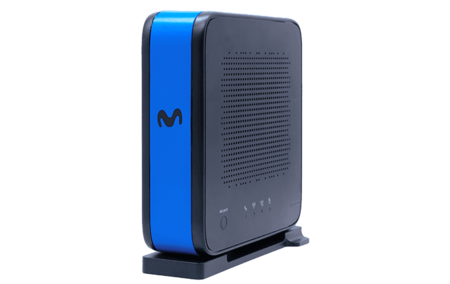
Movistar has finally embraced the WiFi 7 technology with its new Smart WiFi 7 router, which has been available for fiber customers for a while now. This launch has sparked discussions about whether it’s worth switching from the previous Smart WiFi 6 model. While the latest technology boasts significant improvements across the board, the real benefits largely depend on the devices you have at home. Here’s a detailed look at the key differences between the two routers, the costs involved, and who might benefit from the upgrade.
Design: Aesthetic Evolution
The design philosophy of both routers is quite similar, with each featuring a vertical form that can be discreetly placed in various corners of a room. However, the aesthetic features diverge sharply. The Smart WiFi 6 sports a white and gray exterior, while the new Smart WiFi 7 presents a sleek black and blue design positioned edge-on. The buttons for reset, WPS, and the telephone jack are nearly identical, although the power switch has been upgraded to a more modern button style.
Internal Upgrades: Technology and Connectivity
Internally, the differences are where the true upgrades lie. The Smart WiFi 6 comes with nine antennas (5×5 in the 5 GHz band and 4×4 in the 2.4 GHz band). In contrast, the Smart WiFi 7 features ten antennas, with nine configured for MU-MIMO technology and an additional one for DFS support. Notably, the Movistar router does NOT operate in the 6 GHz band, a significant feature of the WiFi 7 standard.
Smart WiFi 6 Router | Smart WiFi 7 Router |
|---|---|
Nine antennas:
| Ten antennas:
|
Four Ethernet ports, one SC/APC optical port (GPON). | Three Gigabit Ethernet ports, one port up to 10 Gbps, one SC/APC optical port (GPON and XGS-PON). |
WiFi 6 (802.11ax, compatible with 802.11 ac/n) | WiFi 7 (802.11be, compatible with 802.11ax/ac/n)
|
WPA3 Security | WPA3 Security |
On the connectivity front, the Smart WiFi 7 retains three Gigabit Ethernet ports but adds a significant feature: a single port capable of up to 10 Gbps, which can exploit the maximum speed of symmetrical fiber connections. Additionally, the optical port has been enhanced to support XGS-PON networks, making it more future-proof.
Performance Enhancements
According to Movistar, the Smart WiFi 7 router can provide up to 2.5 times faster speeds, 50% lower latency, and 70% more capacity compared to its predecessor. This increase in performance is crucial for households equipped with numerous devices like cameras, TVs, and smart appliances that demand substantial bandwidth.
Understanding WiFi 7 Advantages
WiFi 7 (802.11be) is the successor to WiFi 6, offering significant improvements such as channels reaching up to 320 MHz, which is double the width of WiFi 6. It also features 4K-QAM modulation, which optimizes data transmissions, and introduces MLO (Multi-Link Operation), enabling devices to communicate over several bands simultaneously. In theory, WiFi 7 could offer speeds up to 46 Gbps compared to 9.6 Gbps with WiFi 6.
However, it’s vital to note that these improvements are only realized if your connected devices are WiFi 7 compatible. Older laptops and phones will continue to connect under the previous standards without experiencing marked advantages in speed.
Cost Considerations
The easiest way to acquire the Smart WiFi 7 without additional fees is by subscribing to Movistar’s 10 Gbps fiber service, which incurs just a five-euro increase on your monthly bill. Other users may also receive the router at no extra cost with new registrations. However, for those not in the eligible plans, the router can be purchased separately at:
- Self-install mode: 60 euros.
- Technician installation: 110 euros.
Keep in mind that the router is provided on a transfer basis, necessitating its return if you cancel service or switch providers to avoid penalties.
Is the Upgrade Worth It?
In short, whether you should upgrade heavily depends on your circumstances. If offered at no cost on a new line or for the 10 Gbps option, it’s certainly worthwhile, as it improves handling of multiple connections and includes a future-proofed 10 Gbps port. However, if you’re looking at a 60 or 110 euro cost for the upgrade without other incentives, you might find that the current Smart WiFi 6 suits your needs just fine, especially if your household devices haven’t yet adopted WiFi 7 compatibility.