

In today’s digital age, most people use their smartphones for basic tasks. However, many iPhone users remain unaware of the powerful capabilities hidden within their devices, particularly through the use of Shortcuts. Recently, I was at a cafe with a friend who demonstrated his expertise in using these Shortcuts, and it made me realize how many others could benefit from such knowledge. This article explores how you can leverage these shortcuts to transform your iPhone experience and make daily tasks easier.
Unlocking iPhone Potential with Shortcuts
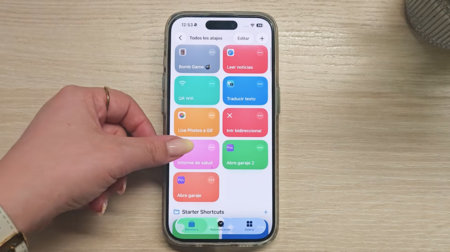
Ana Boria—a tech expert known for her reviews on devices including the Plaud Note Pro—has created an informative video designed to help iPhone users harness the power of Shortcuts. This tool enables users to automate tasks that would otherwise require several steps, such as scheduling text messages, instant news reading, and generating QR codes for Wi-Fi sharing.
Watch and Learn
If you want to dive deeper into Shortcuts, check out this video on the Xataka YouTube channel. It kicks off with a straightforward method to generate QR codes for Wi-Fi sharing—something that Android users might find is simpler on their devices. Instead of going through complex settings, merely follow Ana’s instructions to set up this Shortcut.
Getting Started with Essential Shortcuts
One of the most significant advantages of using Shortcuts is the customization it offers. Ana explains how to configure multiple options according to individual user needs. Whenever you travel abroad and face language barriers, for instance, certain Shortcuts can automatically detect the language, making communication easier. What’s more, you don’t even need additional apps to set this up.
Explore Further Utility
Ana also highlights indispensable Shortcuts for iPhone users, including features that allow you to:
- Read the last ten articles from your favorite websites quickly.
- Access personalized notes using parameters from the Health app.
- Automate various actions based on specific triggers like time or location.
Embrace the Shortcuts Experience
While setting up these Shortcuts might seem daunting at first, the video provides all the links and instructions needed to download and configure them efficiently. I encourage everyone to explore these features and share their experiences, either here or on YouTube. With a little time invested, you can fully unlock the potential of your iPhone and streamline your daily tasks.

Don’t miss out on experiencing how these Shortcuts can change your iPhone usage for the better. Start exploring today!
Images | Xataka