
There was a time when everything was easier. If the USB port was white, it was slow; if it was black, it was standard; and if it was blue, it was the fastest. That rule that helped us easily identify USB-A generations is now a relic of the past. The arrival of new standards, charging functions, and clever marketing has led to a chaotic color landscape, with green, orange, and even purple ports that convey little to the average user.
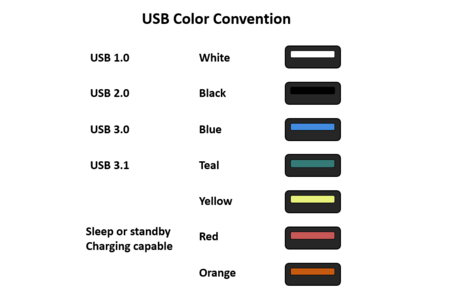
Image: StorageReview
The Original Color Coding
The current confusion stems from efforts by the USB Implementers Forum (USB-IF) to create a standardized color code. Initially, the colors carried specific meanings: white represented USB 1.x, black indicated USB 2.0 (480 Mbps), and blue (or turquoise) marked the faster USB 3.0 (5 Gbps). However, these meanings have diluted over time.
First Confusion: Charging Ports
The introduction of charging ports marked the beginning of the color confusion. As manufacturers started using colors to signify power functions rather than just data transfer, ports began appearing in yellow, orange, or red. These colors usually indicate features such as “Always On” or “Sleep & Charge,” allowing devices to receive power even when the computer is turned off or in sleep mode.
Speed Variations and New Symbols
To distinguish USB 3.1 (10 Gbps) and 3.2 (20 Gbps), the standards suggested a turquoise blue or red color. The situation became increasingly complex as marketing efforts began to dictate port appearances.
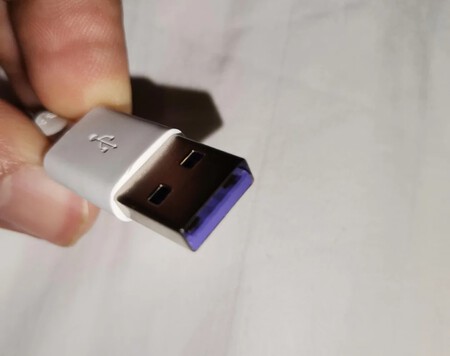
A purple USB cable for a Huawei device indicates that it supports SuperCharge, its fast charging technology. Image: Reddit
Corporate branding took over when companies started using distinctive colors for their products. A notable example is Razer, which has made its ports a vivid lime green. Similarly, a purple port is commonly associated with Huawei, signaling compatibility with its SuperCharge fast charging system, although it technically remains a USB 3.1 port.
Confusion in Naming
The chaos isn’t limited to colors. The USB-IF has also contributed to confusion through frequent renaming of standards. What was once known as USB 3.0 is now labeled “USB 3.1 Gen 1,” and USB 3.1 has transformed into “USB 3.2 Gen 2.” This convoluted renaming makes it increasingly challenging for users to understand what they are purchasing without delving into fine print.
The Real Culprit: USB-C
The ultimate demise of an intuitive color-coding system is the USB-C connector. This seemingly simple, reversible port can vary widely in speed—from slow USB 2.0 to lightning-fast Thunderbolt 4. The only way to differentiate these variations is through logos (like the lightning bolt seen in Apple products) or by consulting the device specifications. Sadly, color has lost its meaning.
Image | Xataka
In Xataka | How to prepare a USB to use it on your mobile phone, tablet or Smart TV and expand its memory.