
Planning a trip can be challenging, especially when you’re unsure of your destination. Fortunately, AI technology like Claude simplifies the process by asking targeted questions to curate your perfect itinerary. Let’s delve into how to effectively plan your route with Claude, making your travel experience seamless and enjoyable.
Understanding Claude’s Functionality
The primary function of Claude is to assist you in planning routes when you’re not certain about where to go. Instead, you can focus on the type of trip you want. This unique approach culminates in a detailed Google Maps module that includes places to visit, schedules, and a complete itinerary tailored to your preferences.
Initiating Your Trip Planning
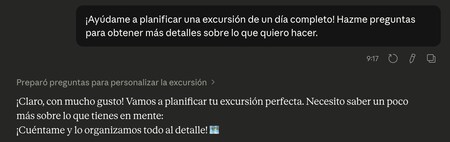
To kick off your trip planning with Claude, you need to input a generalized prompt. This prompt does not have to be specific; the AI will guide the conversation with questions. A recommended starting prompt might be:
Help me plan a full day trip! Ask me questions to get more details about what I want to do.
Generating Options through Interaction
Once you’ve entered your prompt, Claude will begin asking you a series of questions to better understand your trip’s characteristics. Here’s how this interactive process unfolds:
1. Your Group Size and Starting Point
Claude will first inquire about how many people are traveling with you and your departure location. This helps create a tailored itinerary that considers transport options and group dynamics.
2. Choosing the Type of Excursion
Next, you’ll be asked what type of excursion you fancy. Options include nature, coastal, cultural, or gastronomic excursions. You can also specify an alternative option if you have something particular in mind.
3. Assessing Your Desired Effort Level
Finally, Claude will ask how much effort you’re willing to exert during the trip. This can range from minimal walking to engaging in long or sporty routes, allowing Claude to match your physical capabilities with appropriate activities.
Personalizing Your Experience
After answering the initial questions, Claude will delve deeper with additional queries based on your responses. For instance, if you’ve indicated a cultural excursion, Claude may ask about specific cultural styles or eras you wish to explore. This ensures a customized experience, enhancing your travel satisfaction.
Outcome: A Tailored Itinerary
At the end of this interactive process, Claude will generate a comprehensive itinerary, displaying a Google Maps module with the planned route. You’ll be provided with a button to open the route in Maps. It will show you the timings for visiting each site, making it easy to enjoy your day without stressing about logistics.
In summary, using Claude to plan your trip is an effective way to ensure you have a great time. By engaging in a user-friendly dialogue, Claude crafts an itinerary that matches your preferences, making your travel experience enjoyable and memorable. So, the next time you’re unsure of your destination, just let Claude direct you to the perfect getaway!
For more insights into using AI for travel planning, check out our tips and tricks in Xataka Basics.