
Artificial Intelligence Takes Flight in Excel with Copilot
Artificial Intelligence (AI) is no longer just a futuristic concept; it has become a part of our daily work environments, especially in one of the most widely used tools—Excel. Microsoft’s Copilot is the latest iteration of AI’s integration into spreadsheets, designed to simplify data management and enhance productivity. However, this innovation does not fully transform Excel into an autonomous project manager. Instead, Copilot offers a range of supportive features, albeit with specific limitations and potential for error.
Understanding Microsoft Copilot
Microsoft is currently testing Copilot as a native function within the Excel calculation engine. This feature allows users to write instructions in natural language directly on their spreadsheets, producing results that seamlessly align with traditional Excel outputs. This integration means you can continue to work with defined ranges, tables, and data names without altering the document’s existing structure, and results automatically update when your data changes.
What Can You Do with Copilot?
While Copilot enhances Excel’s functionality, it is critical to recognize its limitations. For instance, you can’t request complex tasks like “merge subsidiary books, convert everything to euros at the official exchange rate, eliminate duplicates, and generate a quarterly consolidated balance with comparative charts.” Instead, Copilot operates within a more restrained scope—it understands natural language commands but only applies them to the data already present on the sheet.
Microsoft has identified four key functionalities Copilot can assist with:
Brainstorming Ideas: Users can request a list of concepts or keywords based on a brief description. This could involve asking Copilot to rewrite text in a lighter or more formal tone, streamlining the writing process.
Concise Summaries: You can highlight a range of data and ask for a succinct summary that captures trends or significant variations. This is beneficial for converting complex tables into clear, understandable reports.
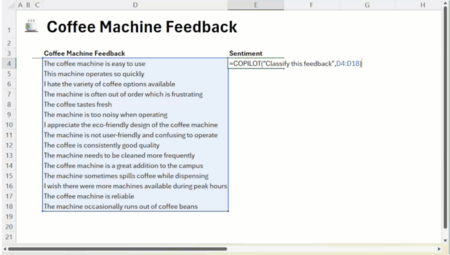
Direct Classification: Copilot can categorize a column of comments or survey responses, returning labels like “positive,” “neutral,” or “negative” along with brief categories. This automates the often tedious process of data organization.
Dynamic Lists and Tables: By describing a desired table—detailing columns for tasks, responsibilities, dates, etc.—users can have a framework for organization created promptly.
Real-World Applications
In a practical example provided by Catherine Pidgeon from the Excel team, imagine a sheet filled with feedback about a new office coffee maker. Copilot can analyze the comments and generate a new table displaying the sentiment of each comment (positive, neutral, or negative) and categorize them into relevant groups like “taste,” “noise,” or “capacity.” In just a few moments, users can transform a messy column of feedback into actionable insights.
Utilizing Copilot is straightforward. You simply enter =co-pilot() into a cell, following it with your natural language instruction or the data range you wish to analyze. This fluent integration makes it easy for users to adapt quickly to the feature, requiring minimal training while offering a familiar Excel experience.
Caution is Key
Despite its innovative capabilities, Copilot does have inherent limitations. The function operates solely within the confines of the workbook; it does not access external data or web documents. Additionally, results generated by Copilot should always be scrutinized before being incorporated into reports or strategic decisions. Microsoft explicitly states that Copilot is not suitable for high-risk scenarios that carry legal, regulatory, or compliance implications. Furthermore, it has operational limits, including a cap of 100 calls every ten minutes and 300 calls within an hour.
The reliability of AI tools like Copilot is an ongoing concern. AI can sometimes produce inaccuracies, commonly referred to as “hallucinations.” Although improvements are continuously made, users should maintain a healthy skepticism. This cautionary note is increasingly familiar to anyone who uses chatbots or AI-driven tools, where potential errors come with a disclosure.
Will there come a time when such errors are eliminated? There’s no definitive answer. Even with the most advanced technologies, complete reliability is a goal yet to be met. This sentiment holds true in Excel as well; while Copilot represents a significant leap forward, it does not replace the comfort that comes from personally verifying data integrity.
Availability of Copilot
Currently, Copilot is not universally accessible. Microsoft has started rolling it out to users in the beta channel on both Windows and Mac. The company has announced plans to include Copilot in the web version of Excel through its Frontier program in the coming months. Users need not take any action to activate this feature; it automatically appears when specific criteria are met, allowing for flexibility in adoption.
As organizations continue to navigate the evolving landscape of technology, the emergence of features like Copilot in Excel signifies an important step in the integration of AI tools into daily operations. This development encourages users to embrace change while remaining vigilant about accuracy and decision-making. With Copilot onboard, the future of data management in Excel looks promising.