
The Rise of Flyoobe: A Solution for Windows 11 Installation Dilemmas
With the support for Windows 10 ending in October 2025, many users find themselves at a crossroads. They can either choose to buy a new computer that meets the stringent requirements for Windows 11 or explore alternative installation methods for older hardware that does not officially meet these specifications. Enter Flyoobe, a tool created to help users navigate around Microsoft’s restrictions while empowering them with greater control over the installation process and the operating system itself.
A Growing Need for Compatibility
Microsoft has set specific requirements for Windows 11, including TPM 2.0, Secure Boot functionality, and compatible processors. Consequently, millions of functional PCs will be left behind once the support for Windows 10 concludes. This has created a demand for tools like Flyoobe—a platform enabling users to maximize the potential of their hardware, circumventing the restrictive measures that Microsoft has put in place.
The Magic of Flyoobe
The secret to Flyoobe’s effectiveness lies in its utilization of the Windows Server installation variant. This method allows the tool to bypass the checks for TPM, Secure Boot, and CPU compatibility, presenting users with a standard Windows 11 experience minus the obstacles imposed by Microsoft. Flyoobe automates the process of downloading and assembling the necessary ISO, making installation not only possible but also user-friendly.
Beyond Basic Bypass Methods
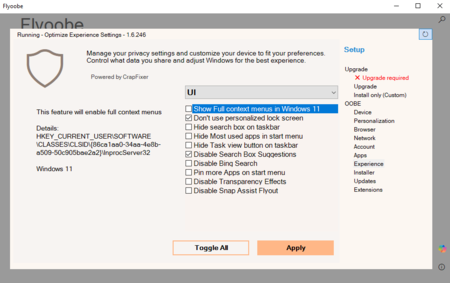
Unlike its predecessor, Flyby11, which focused primarily on removing hardware restrictions, Flyoobe offers features that allow users to tailor their Out-Of-Box Experience (OOBE). This is especially helpful for those who prefer a customized installation rather than accepting Microsoft’s default settings. Users can select everything from a preferred browser to the removal of pre-installed bloatware during the initial setup.
Latest Updates for Enhanced Experience
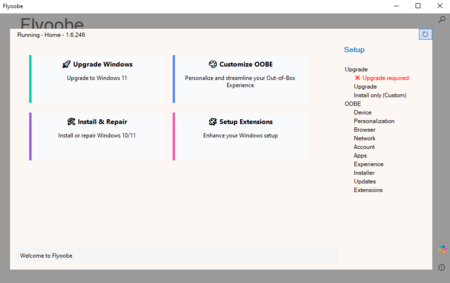
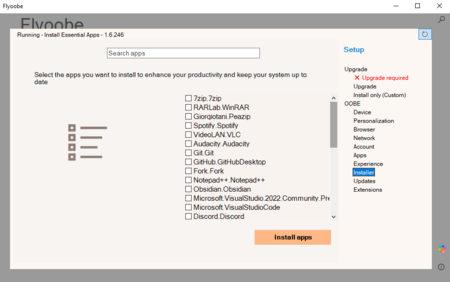
The most recent version of Flyoobe, which can be accessed via GitHub, boasts a revamped interface and four clearly defined main options. A significant highlight is its improved bloatware elimination tool, designed to more effectively identify and remove unnecessary applications that come pre-installed with Windows 11. Additionally, it includes a comprehensive application installer and a search feature for quickly locating specific options, thereby streamlining the user experience.
Alternatives to Flyoobe
While there are other tools such as Rufus that allow users to create modified installation media, Flyoobe offers a comprehensive solution for those seeking an intuitive and effective method for bypassing Windows 11 requirements. Another contender on the market is Tiny11, a streamlined version of Windows 11 designed to run efficiently on devices with lower specifications. Flyoobe combines the features that made Flyby11 popular with its innovative approach to user customization, creating a versatile application for installation and setup.
What You Should Consider
It is important to recognize that Microsoft does not guarantee updates for devices deemed incompatible with Windows 11. While many of these devices may still receive security patches, there is a legitimate risk that future updates could fail or that Microsoft might block access altogether. Additionally, if your processor lacks compliance with specific requirements—such as the popcnt requirement or the SSE 4.2 instruction set—installing Windows 11 may not be feasible. These requirements are essential for running Windows 11 24H2 and forthcoming updates. Many older processors, such as the first generation of Intel Core i7 (released in 2008), meet these criteria.
In today’s rapidly-evolving tech landscape, Flyoobe serves as a crucial tool for users determined to continue using their existing hardware while benefitting from updated operating systems. With its enhanced features and customizable options, Flyoobe not only addresses immediate needs but also empowers users to take control of their computing experiences.