

How to Recover Deleted Messages on WhatsApp Safely
In recent years, using WhatsApp as a daily communication tool for work, studies, or personal life has become commonplace for millions. Yet, accidentally deleting an important message can lead to anything from simple annoyance to significant complications.
This seemingly trivial action can result in the loss of essential data, leading to frustration, especially when recalling that WhatsApp does not officially provide a way to “undo” the deletion if the message just vanished from the chat.
In this scenario, it is crucial to understand the steps available to recover that content without resorting to external applications , which often involve risks to privacy or device security.
There is a legal and safe way to attempt recovering deleted messages that does not require any external programs or risk personal data.
The Meta application includes a cloud backup tool that, if kept active, allows users to restore messages and files up to the last backup date. This feature is not only suggested for its simplicity but also respects the privacy and terms of use of WhatsApp.
Depending on the phone’s operating system, backups are stored on Google Drive for Android users and on iCloud for iPhone users. The key lies in having the backup configured and updated; without it, recovery will not be possible.
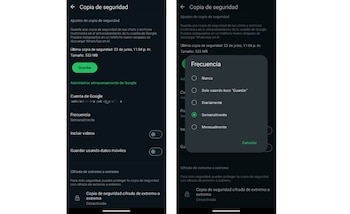
Before attempting to restore deleted messages, it is necessary to check if a recent backup exists. This can be done by accessing WhatsApp, going to Settings, selecting the “Chats” section, and then “Backup.”
This section displays the last backup date and time, indicating how far back messages can be recovered. If this section shows that the function is disabled or the last backup is outdated, it will be necessary to activate it or modify the backup frequency.
WhatsApp allows users to schedule backups daily, weekly, monthly, or even manually, which is crucial for ensuring deleted message recovery as broadly as possible.

If an updated backup is available, the procedure to restore deleted messages begins by uninstalling the WhatsApp application from the device.
Then, reinstall it from the official store, open the app, verify the original phone number, and when the program starts, choose the option to restore chats from the last available backup.
During this process, WhatsApp will reconstruct the message history and files that were stored in the backup. This method ensures that all content saved up until the backup time is recovered, provided the account is still associated with the same phone number.
It is essential to consider that messages and files sent or received after the last backup and before the reinstallation cannot be recovered, as they were never backed up.
Various applications and services online claim to recover deleted WhatsApp messages. However, using them poses high risks to privacy, device integrity, and sometimes legality.
Many of these tools request excessive permissions, access sensitive information, install malicious programs, and may violate WhatsApp’s own terms of service, which could even lead to account suspension.
WhatsApp solely suggests using the official backup systems offered by the platform to protect information and comply with usage regulations. Avoiding unauthorized solutions safeguards personal data and ensures the device operates safely.