
How to Watch YouTube Without Ads and in the Background for Free
If you want to enjoy YouTube without annoying ads and have the freedom to listen to videos in the background, you’re not alone. While YouTube Premium offers these benefits for a monthly fee, there are alternative ways to experience ad-free viewing without spending a dime. In this guide, we’ll explore how to accomplish this using safe and reliable browsers, avoiding any malicious apps.
Key Benefits of YouTube Premium
YouTube Premium offers three primary advantages:
- Ad-Free Viewing: Watch videos without interruptions.
- Background Playback: Listen to audio while using other apps.
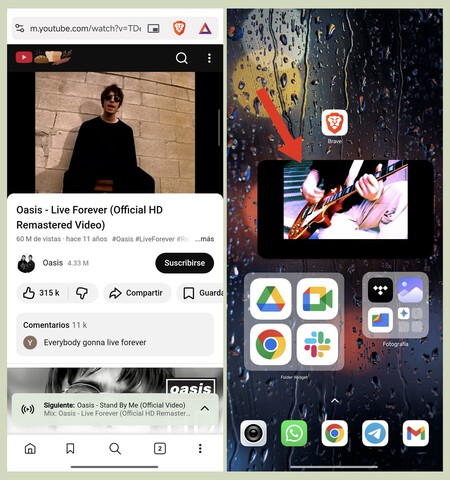
- Picture-in-Picture (PiP): Watch videos in a floating window while multitasking.
Fortunately, you can achieve similar functionality using specific browsers instead of the standard YouTube app.
Recommended Browsers for Ad-Free YouTube
A few browsers come equipped with features that help you watch YouTube without ads and enable background playback securely:
Brave
Brave is an excellent choice for mobile users. It has built-in ad blocking capabilities and supports Picture-in-Picture mode. To enable background playback, follow these steps:
- Open Brave Settings: Go to your app’s settings.
- Navigate to Multimedia: Find the multimedia section.
- Activate Background Playback: Toggle on the background playback option.
Brave allows for seamless video playback while enabling you to use other applications.
Firefox
Mozilla Firefox is another trusted browser option. It includes built-in ad blocking, allowing you to watch YouTube videos without interruptions. To use Firefox:
- Simply install the browser on your device and navigate to m.youtube.com.
- Enjoy ad-free video streaming without any additional settings.
Vivaldi
Vivaldi is a versatile browser that focuses on user customization, privacy, and security. While it may not support as many features as Brave, it effectively removes ads from YouTube. It’s a reliable option, especially for those who prefer a European alternative. Just like Firefox, make sure you use the mobile site m.youtube.com.
Accessing YouTube on Your Computer
When it comes to desktop browsing, all three browsers—Brave, Firefox, and Vivaldi—work remarkably well for watching YouTube without ads. Their built-in ad blockers provide a seamless viewing experience on your computer:
- Install Your Preferred Browser: Download Brave, Firefox, or Vivaldi from the official website or app store.
- Visit YouTube: Navigate to youtube.com or m.youtube.com.
- Enjoy Ad-Free Viewing: The ad-blocking features will take care of the rest.
Conclusion
Watching YouTube without ads and enjoying background playback can be achieved easily without paying for YouTube Premium or installing untrustworthy applications. By utilizing browsers like Brave, Firefox, and Vivaldi, you can enhance your YouTube experience while ensuring your safety and privacy. So go ahead, choose your favorite browser, and take your YouTube viewing to the next level!