
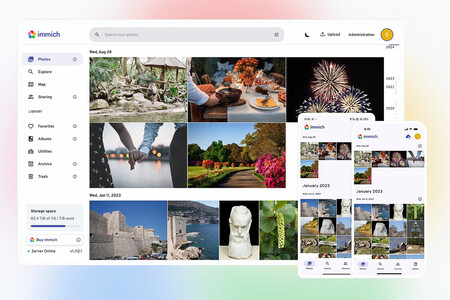
For years, I have been obsessed with photos—not in taking them, but in managing them.
I spent a long time searching for the perfect solution that didn’t depend on Google Photos, and a little over a year ago, I discovered an alternative that was perfect for me after a lengthy and educational search process.
This was the Open Source app Immich, which can be installed on any PC or NAS to create a self-hosted version of Google Photos, avoiding dependence on cloud services.
Immich is nearly perfect but lacks one thing: support for Android TV
Immich is fantastic for many reasons, but if I had to point out a flaw, it would be that it’s not designed for TV usage. Most photo managers, which should enhance your photo enjoyment, need to consider the TV interface better.
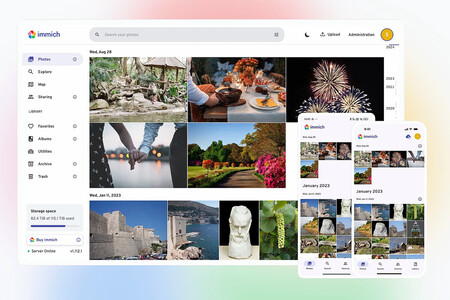
The Open Source project Immich provides a fantastic alternative to Google Photos. Source: Immich (GitHub)
While Immich has easily installable versions for Docker Compose, Portainer, Unraid (which I use on my NAS), and TrueNAS Scale, there is no official app for Android TV or Google TV, nor for tvOS. I don’t own an Apple TV, but I really wanted the app for Android TV. That’s where a parallel project called Immich-Android-TV comes into play, maintained by a developer known as giejay on GitHub.
When I discovered this project, I thought I could finally enjoy photos comfortably on my TV with my little ones, but initial excitement soon turned into disappointment. Although the app allows for viewing photos, I encountered many limitations.
The main issue was not being able to easily access photos from years ago. In both Immich and Immich-Android-TV, the photos are shown in reverse chronological order: the newest first, then the oldest.
In the web, Android, and iOS versions, the Immich app allows users to enjoy a timeline—a sidebar on the right to easily select photos by day, month, and year. This feature is absent in the Android TV client.
If I wished to view recent photos, it wasn’t a problem, but there was no quick way to access photos from a decade ago. I would have to scroll down in the photo matrix to find those dates. With only a few photos, that could be easy, but my current library has about 155,000 photos and around 23,000 videos. Scrolling to 2015 would likely take hours of pressing the “down” button on my Google TV remote.
There were other significant limitations, and the issue of relying on an Open Source project often means it’s maintained by one person. Frequently, this person works on it as a hobby, which results in limited dedication. You can ask for features, but they may not be a priority for the project’s future or may take a long time to arrive. If they do arrive, they might not meet your expectations.
That was before.
Now, many people—though not quite everyone—can take any app idea and bring it to life.

The situation is even more powerful when you have starting points in the form of Open Source projects: the necessary code is already available, so much of the work is typically done; you just need to modify it to your liking.
That is precisely what I did with Immich-Android-TV.
A couple of weeks ago, I had some vacation days to take but didn’t go anywhere. I had already experimented with programming using AI, but that—a points counter for the card game “pocha”—was almost trivial.
This was much more significant. I wanted to take the Immich-Android-TV code to make it do exactly what I wanted it to do. So one morning, I decided to try something crazy. With no expectations. No hope.
How wrong I was.
I ask, the AI programs
A small warning: this part of the article may seem a bit heavy, but feel free to skip it if you prefer. It’s important for me to explain the “vibe coding” process, where you basically chat with an AI to have it program for you.
In my case, I opened a terminal on my Mac Mini M4. Meanwhile, I created a fork of giejay’s project on GitHub. Then I cloned the repository to my Mac using “git clone” and launched Droid, a tool I had been testing almost as a toy. It works similarly to Claude Code, Codex, or Gemini CLI and enables you to access APIs from various AI platforms.
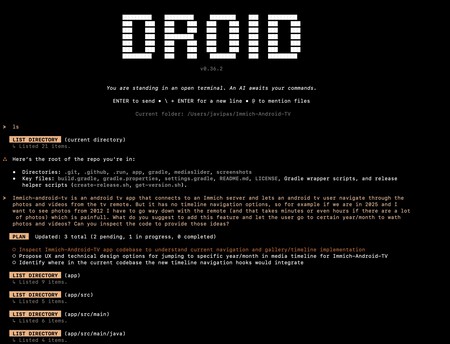
As soon as I launched it, Droid—configured with a gpt-5.1 API key—identified my directory and presented a text box for me to request what I wanted. I explained (in English, though I ended up switching to Spanish later) what the Immich-Android-TV project was about and what I aimed to achieve.
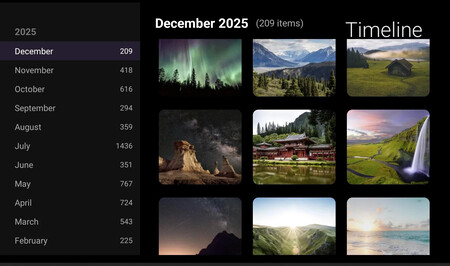
Essentially, I wanted a “Timeline” option that would allow me to navigate quickly through months and years to view the photos from specific months and years. This feature did not exist in the official project, which I had wanted since discovering the development.
Droid/gpt-5.1 then set to work, and after what I believe was three or four minutes, it created a detailed roadmap divided into phases. After reading it, I simply replied “go ahead” and waited.
The modifications to the code finished shortly after. I was unsure what to do next—how to test it? Once again, I just needed to ask. The AI provided instructions for installing Android Studio and launching an emulator for an Android TV Smart TV in 1080p resolution.
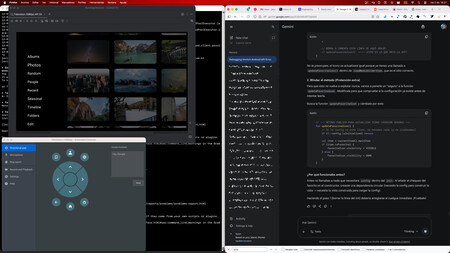
The Android TV emulator in Android Studio on the left (with the remote control simulator below) and Gemini 3 Pro on the right. Behind the emulator is the terminal where I edit files using nano, copying and pasting outputs to Gemini and compiling.
Once I completed this step, I could test my fork after compiling the Kotlin code (./gradlew installDebug), which directly installed the created APK package in the emulator via ADB. This initiated a surprisingly robust debugging process: the compilation would fail, I copied the output of the compiling command, sent it to Droid, and it identified the problem, tried to fix it, and told me to test again. Eventually, when it compiled successfully and I could test it, the option was there among the other sections, but it didn’t work.
To find out why, once again, I only needed to ask, while trying to stay proactive. I asked what I could do and what it needed from me to pinpoint the issue. The AI indicated that I should execute a command to copy and paste the output. After several messages, the chatbot didn’t seem to crack the case, and the Timeline kept attempting to access the Immich API, returning a 400 error that gpt-5.1 could not solve in my tests.
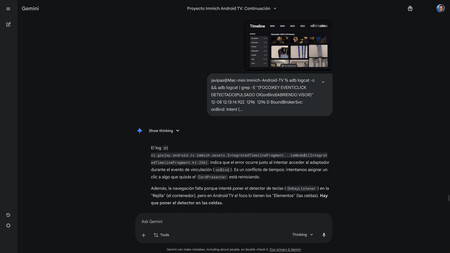
Gemini 3 Pro in action. At that moment, there was a specific issue with the Timeline execution. Gemini instructed me to create a log with a specific command, and I simply copied and pasted the output into the terminal for it to identify the problem.
It was then that I switched to Gemini 3 Pro, which is available for free in both Fast and Thinking modes at the official Gemini site. First, I asked Droid to generate a txt file with a prompt detailing what I wanted to achieve, the problems I was encountering, and which files were involved. This file served as a clear prompt, and upon loading it into Gemini, the model set to work on the solution.
This marked the continuation of the previous conversation with Droid but now on the web. In reality, this form of vibe coding isn’t ideal because the user (me) has to constantly update the AI on what’s happening. You end up copying and pasting a lot, along with giving instructions or clarifications. While this can be cumbersome, it makes you more aware of what the AI is doing at every moment. There are tools like Claude Code or Gemini CLI that further automate things, but I began this initial phase using a “copy-paste” method.
This feels like a miracle
The process with Gemini 3 Pro was similar, but the surprise was that the AI advanced and corrected both the problem I had faced in my initial attempt as well as others that emerged afterward. I don’t recall precisely how long it took, but it was probably less than four hours, and by the end, I accomplished what I had longed for: an Immich-Android-TV with a Timeline:
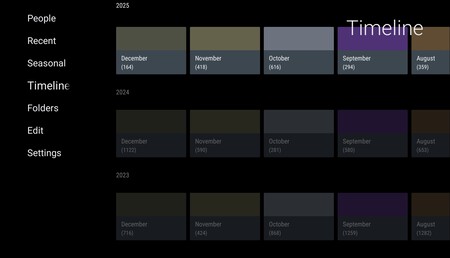
The interface wasn’t stunning by any means, but that didn’t bother me much. What mattered was that it worked. If I wanted to see photos of my little ones from a decade ago, I wouldn’t have to hold the “down” button on the remote for hours. I could just search for the year and month and enter that moment in time.
The feeling of having achieved this is hard to explain. It’s something I never thought I could do (although, in reality, I didn’t do it alone). I studied advanced computer engineering, but that was a long time ago, and I never had a strong inclination to program. If I dedicate some time to it, I can understand certain code, the basics, the structure, but it’s still quite challenging for me.
Writing that code, especially in certain languages, would be unfeasible. But AI solves all this, acting like a pretty decent programmer who executes and implements what you want. You just need to be clear about what you want; if you also have some knowledge, you have an advantage. For a seasoned programmer, it’s a remarkable edge.

For me, achieving this seemed virtually impossible. What I had read everywhere, what those who had done something similar recounted… I finally grasped it. AI may disappoint many across various fields; about 95% of companies may not see a return on investment, it might miscalculate, and sometimes advise bizarre solutions like using glue for pizza cheese. I understand that generates criticism, jokes, and disenchantment. I get that some may claim AI is utterly dumb.
However, achieving something like this shows that in many other areas, AI can be marvelous. Even if it never improves further, even if it turns out that scaling doesn’t work… turning an idea into something real without knowing how to do it feels almost magical.
But there was more.
The Epilogue: Do (almost) what you want with your app
Creating a Timeline in Immich-Android-TV made me realize that I could adapt the application however I wanted. Over the last few days, I seized moments of free time to keep modifying the official project to turn it into what I wanted it to be.
In that video I shared on the subreddit r/Immich, the latest changes are not included, but it gives an idea of what I achieved in those early days. And as I said, there was more to come.
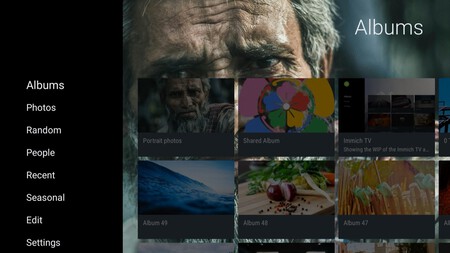
Official Immich-Android-TV version interface
One of the things that had kept me from using the official project was its interface. And once again, it was simply a matter of asking. So I requested that there be an option in Settings to hide file names, which always appear in the official version, and that I feel detracts from usability.
While we were at it, I asked for the thumbnails to have rounded corners. I also wanted the option to select whether I wanted a grid of three, four, or five columns, as the official version permanently allows only four. These changes took me just a couple more hours:
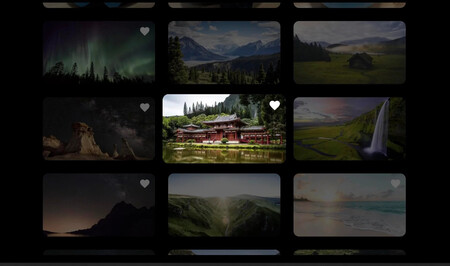
The interface of my fork of Android-Immich-TV. Three columns, rounded corners, no photo names, and favorites synchronization.
Moreover, I also wanted to manage favorites from the Android TV app. In Immich, users can mark or unmark photos and videos as favorites, but in the official version of Immich-Android-TV, this information was not displayed nor could it be controlled.
Another couple of hours later—perhaps longer, as I faced challenges with managing favorites within the Timeline—and once again, magic unfolded. Now I could mark photos and videos as favorites with a long press of the remote’s central button.
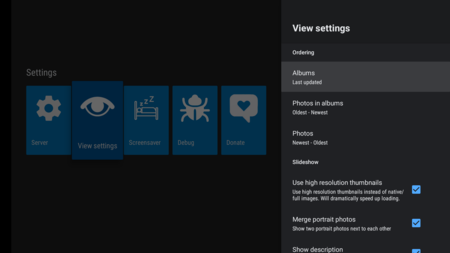
The design of the Settings section in the official version.
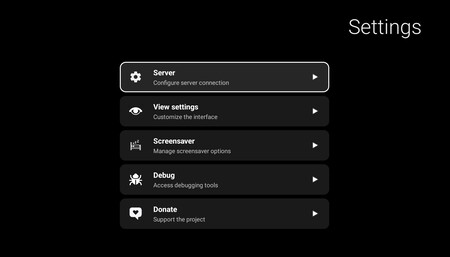
And the one I ended up achieving in my fork.
I also made these interface changes in other sections, such as the Timeline or the Settings of the client, which I wanted to modify using some user interface suggestions created—who else—by the AI.
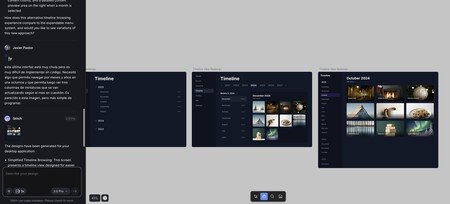
Stitch, Google’s app for designing user interfaces, in action. The design of the main Timeline was great, but after several hours of trying to convert it into code using AI, I faced only problems. Ultimately, I opted to revert and apply the third redesign, which AI had no issues programming.
Specifically using Stitch, a Google Labs service that allows you to transform sketch ideas and UI designs into reality. Once again, you can describe what you want naturally, though it often helps significantly if you start from an initial image. I used the first version of the Timeline I obtained and then asked for improvements.
Recently, I managed to create two new sections that did not exist in the official Immich-Android-TV version. The first was the “On this day” section, which shows the photos from today taken in previous years. The second displays a section featuring only the photos and videos tagged as favorites.
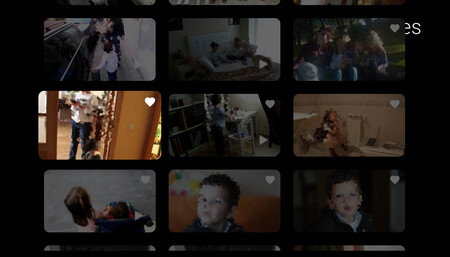
Favorites section showing only videos. My family’s TikTok for viewing videos of my little ones nonstop. Magical.
And to top it all off, I wanted to have an option in Settings to show only videos when browsing sections. If you have kids and record tons of videos like I do, trust me: this is like a wonderful family TikTok where you can’t stop watching endless videos almost in a doomscrolling fashion on your home TV with a simple click of your Google TV remote.
I reiterate: the AI, in this case, seemed magical and almost miraculous.
Now, a necessary clarification: this is a personal project, which allows for charmingly imperfect results. The code generated by the AI may not be the best. The changes I made might not be what others would have chosen. The interface may not be perfect or to everyone’s liking. However, this is a living, ongoing project that harms no one and brings me special joy.
That said: it’s imperfect. If you want to take a look or even try it out, here’s the GitHub repository and here’s the Releases section, which hosts the latest versions I’m releasing. I can’t guarantee that they will work for you or that they won’t have errors, and I certainly can’t guarantee that if you’re interested and comment or request changes, I will implement them. But if I don’t, you can also do it yourself, as I did. This is the wonderful combination of Open Source and the potential that AI presents.
There’s more. My technological wonderment has become limited over time. Like many of our readers, I find technology advancing rapidly, but often, these changes are subtly discernible as they tend to be iterative improvements.
Most things no longer astonish me or do so only for a brief moment. The Vision Pro excited me, but I wouldn’t pay 4,000 euros for it, and smartphones that used to captivate us when we first saw them in action have turned into a commodity. Just like PCs, which have also become transformational, or the internet—absolutely disruptive.
To me, AI has accomplished what PCs and the internet have. Regardless of what happens in the future, even if it doesn’t improve much more, it will transform how we work and enjoy. That’s a certainty. Does it fail? Of course. Is it imperfect and even dangerous? Just as the internet was and still is. Is there a bubble? Certainly. But this has the potential to be even greater. This small project has reaffirmed that belief.
In Xataka | We have a philosophical problem with generative AIs: they’re affirming everything we ask of them.