Google Maps has become an indispensable tool for navigation, but it’s just got more personal . Users can now customize the icon of their vehicle during GPS navigation, bringing a touch of individuality to an otherwise generic experience. This new feature allows you to select from eight different vehicle models and colors, making your navigation not only functional but also visually appealing. Here’s a step-by-step guide on how to take advantage of this exciting new feature.
1. Start a Route
To kick things off, you’ll need to initiate a route within the Google Maps app. This can be done from anywhere, but you must ensure that your starting point is your current location. Simply enter your destination as you normally would, and tap “Directions.”Once you have entered the destination, you will see your current location marked by a blue icon. Tap on this icon to proceed to the customization menu.
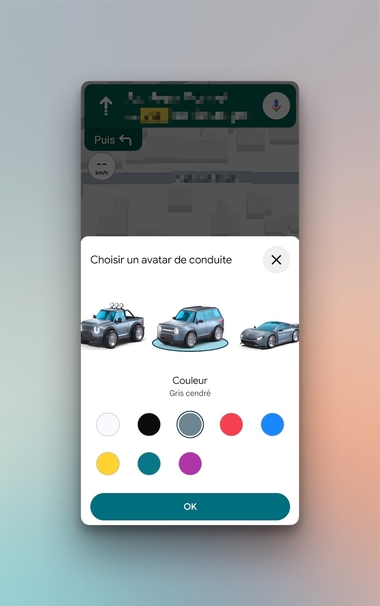
After tapping the blue location icon, a menu will pop up, allowing you to select your vehicle avatar from the eight available models. This adds a level of personalization to your GPS navigation that many users may find enjoyable.In addition to choosing the shape of your vehicle, you can also opt for one of the eight available colors: glacier white, midnight black, ash gray, poppy red, sky blue, sun yellow, teal, and sunset magenta .
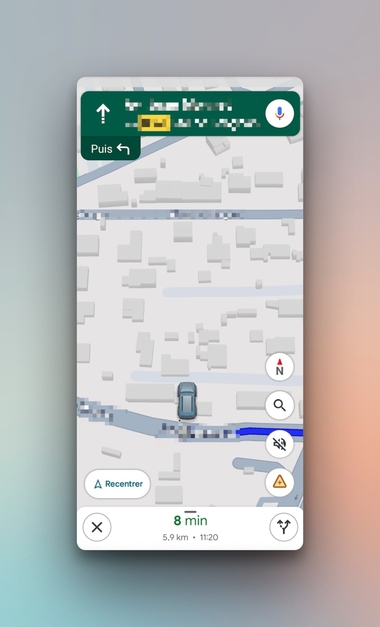
Once you have made your selections for the driving avatar and its color, clicking the “OK” button will confirm your modifications. This feature is as easy as it is fun.Once confirmed, you’ll notice that the icon now resembles your chosen vehicle, adding a layer of personal touch to your navigation experience.
In summary, Google Maps has made navigation not just about getting from point A to point B but also about expressing your own style. This new feature promises to enhance the user experience by allowing for deeper customization, ultimately making your drives more enjoyable and reflective of your personal tastes.To wrap it up, incorporating your personality into everyday tasks can make them more enjoyable. So why not start customizing your vehicle icon today? Whether you’re heading out for a quick grocery run or embarking on a long road trip, having a vehicle avatar that represents you can make all the difference in your navigation experience. Embrace this new feature and enjoy a more personalized Google Maps journey.