
Understanding Spotify’s Privacy Settings: A Complete Guide
The recent announcement that Spotify users can send direct messages prompted a critical reflection on the app’s privacy settings. As a fervent user of Spotify, I’ve always believed that what I listen to—and when I listen to it—should remain a personal matter. This new feature necessitates a thorough review of not just my listening habits but how much information I’m willing to share.
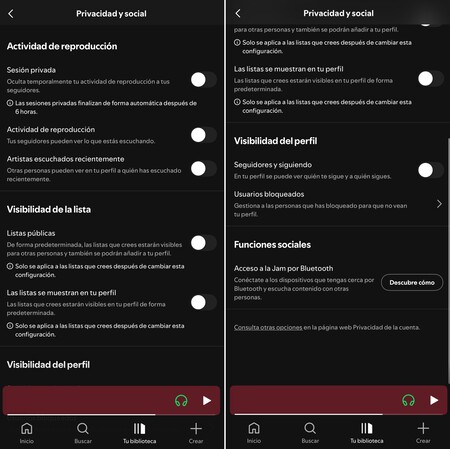
With this understanding, I opened the Spotify app and navigated to Configuration and Privacy > Privacy and Social. Within this section, I found the panel that outlines what is shared with others and what remains private. I took the time to explore the various options available to me.
Exploring Spotify’s Privacy Options
One of the lesser-known options is the Private Session . This feature allows you to listen to music without your activity being displayed on your profile. However, it automatically expires after six hours . For now, I opted not to activate it, choosing instead to make more permanent adjustments to my settings.
Next, I encountered the Reproduction Activity setting. When enabled, Spotify can broadcast your listening activity to your followers, meaning they can see what you are listening to in real-time. I decided to turn this off. Personally, I don’t wish for my listening habits to be publicly visible minute by minute.
Managing Your Recently Heard Artists
Moving on, I found the option to control Recently Heard Artists . This feature can display a list of the artists you have listened to lately. I prefer to keep this information to myself, so I chose to disable it as well.
Public vs. Private Playlists
Another important setting pertains to Public Lists vs. Private Lists . By default, any new playlist I create on Spotify is public, which means anyone with the link can access it and it will appear on my profile. This raised a flag for me, as I value my privacy. Fortunately, I can easily mark playlists as “Private,” ensuring that they are hidden from public view— even with the direct link . Furthermore, in the desktop version, I can selectively choose which playlists are visible on my profile. This allows for a finely tuned control of my shared content.

Controlling Profile Visibility
Another important setting I adjusted was Profile Visibility . I disabled the follower and following options so that no one can see whom I follow or who follows me. This dramatically reduces the chance of unwanted scrutiny around my social connections on the platform. Less noise equals less exposure, which is ideal for maintaining a personal listening environment.
The New Messaging Feature
While exploring these privacy settings, I also checked out the incoming Messages in Spotify feature. Currently, this functionality is still in rollout phase and isn’t yet available in Europe. Personally, I’m not drawn to this new social aspect, as I view Spotify primarily as a musical refuge rather than a social networking tool. Spotify has stated that they will introduce privacy controls that allow this feature to be completely disabled. There will also be additional measures for blocking unwanted users or rejecting message requests.
Limiting Data Sharing
As a final step, I checked two other sections to enhance my privacy. I disabled personalized advertising and removed the option to share my data with Facebook. This not only limits the crossover of information between third-party applications but also ensures that my Spotify account is not linked to a social network that I don’t wish to integrate with my music experience.

The Takeaway
In conclusion, my essential experience with Spotify remains unchanged. I still have the freedom to search, choose, and play my music as before. However, my sense of control has significantly improved. My playlists are no longer published without my consent, my activity does not appear in the feeds of others, and my profile no longer displays recently heard artists or my social interactions. Moreover, if I ever require an extra layer of privacy, the Private Session feature is always available.
Images | Xataka with Gemini 2.5 Flash | Screen Capture
In Xataka | Spotify is no longer a music player. It is an “audio Netflix” that aims to consume your entire day.