
We are going to give you all the information about Android 17 so you can learn about everything that Google’s next mobile operating system offers. For now, we will share all we know at the moment, but between now and its launch, we will update the article periodically to always keep it up to date.
As usual, the basic version of Android 17 will first reach Google’s Pixel phones, while other manufacturers will adapt it with their own customization layers, which may include additional functions. However, our focus will be on the base version of Android and what we know about its upcoming features.
When do we expect Android 17 to be released?
Google launched the first developer beta of Android 17 last February. These early versions are very unstable and not recommended for casual users, showcasing visual innovations gradually being implemented. The main aim is to prepare the software base, giving developers time to adapt their apps.
If Google maintains the accelerated pace initiated in 2025, it is anticipated that the first public beta will arrive in May 2026, coinciding with the Google I/O annual event. This public beta will introduce the primary visual novelties, followed by successive versions implementing additional features.
The final version is expected to roll out between June and July for Pixel phones. After that, other manufacturers will adapt Android 17 to their customization layers, launching it on their devices between the latter half of 2026 and early 2027.
What news do we expect from Android 17?
Let’s delve into the confirmed news of Android 17. While these are subject to change and may not roll out simultaneously in the betas, we can highlight some key features that are expected.
‘Aluminum OS’ and the end of ChromeOS
One of the most disruptive changes in Android 17 may be the introduction of a unified operating system called ‘Aluminum OS’. This project aims to consolidate Android and Chrome OS into a single platform that could work across mobile devices, tablets, and laptops.
The ambition here is to create an OS that can effectively function on both mobile and desktop formats, moving beyond the current scope of Android. Users can expect enhanced functionality across various types of devices, shifting the focus from solely mobile and tablets.
Confirmed Features
- Remapping controls for gaming: Android 17 will support native button remapping, allowing gamers to customize control setups for better gameplay experiences.
- Virtual command function: This feature enables screen touches to be translated into commands from a physical controller, making it easier to play games originally designed for touch screens.
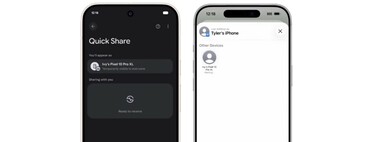
- Universal clipboard: Google is introducing a method to copy and paste seamlessly between Android devices and PCs, mimicking a feature that has long existed in other ecosystems.
- AI integration: With features like AppFunctions, intuitive AI capabilities will be integrated, allowing tasks to be executed via natural language commands.
- Visual enhancements in Material 3: Expect design updates that offer transparency effects and require third-party apps to adapt to system themes.
- More control over user freedom: A new policy will require developers to authenticate their identity for APK installations, which may raise concerns within the community.
Which phones will be compatible with Android 17?
The first beta of Android 17 maintains the update cutoff at the Pixel 6, clarifying which Google devices will be eligible for the new OS.
Compatibility for other manufacturers will vary. By the latter half of the year, we expect to see official lists of compatible phones. Generally, if your device is one or two years old, it is likely to receive the update. Samsung has proven to be quick in adopting new Android versions, so we hope to see similar timelines beyond Google devices.
How to install Android 17?
If you wish to update to the beta version of Android 17, visit google.com/android/beta. Locate your device in the Devices eligible for the program section and click the Participate button to enroll.
After enrollment, check for new system updates on your mobile. If the update is available, you’ll see the option to install it. Likewise, once the final version is released, it will be accessible from your phone settings.