
Carrying Your ID on Your Cell Phone Made Easy
With the launch of MiDNI, the official app from the Government of Spain, carrying your ID on your cell phone has never been easier. Previously, my wallet was a necessary burden just for my physical ID. I’ve long since ditched cash payments with my digital driver’s license, so the only item that kept my wallet in my pocket was the DNI.
Why Go to the Police Station?
Recently, as my driver’s license was about to expire, I made my way to the police station for renewal. This visit also served an essential purpose: in-person activation for MiDNI, which is required to begin using the app.
Steps for MiDNI Activation
Unlike MiDGT, MiDNI requires prior registration. Essentially, you must link your phone number to your identity. This can be done through three methods:
- Via the National Police website, using your physical DNI and a DNI reader, which I don’t possess.
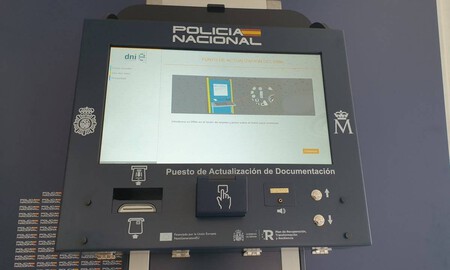
- At a Documentation Update Point (PAD) located in police stations and documentation units.
- In-person at the documentation units of the police.
The best option? Utilizing the PAD. This setup functions similarly to an ATM, where you insert your ID with the chip facing up. Following prompts, you’ll enter your email, phone number, and set a password. Once completed, simply verify your account with the code sent to you. It really is that straightforward!
Usability Issues and Quick Solutions
However, there’s a notable usability glitch on the system. When presented with a digital keyboard, it may confuse users accustomed to mobile devices. For instance, when trying to enter the ‘@’ symbol, many might mistakenly think that pressing and holding ‘2’ will suffice. A more user-friendly option would be a dedicated button for ‘@’.
Why Choose PAD?
The PAD option is particularly attractive because it doesn’t require an appointment. If you’re already at the police station for your DNI renewal, why not register your new digital ID while you’re there? But even if you’re simply passing by, this quick process can be accomplished in mere minutes, especially now that you’re familiar with entering symbols!
Keep Your Physical ID Handy
Although carrying your ID on your phone is convenient, it’s essential to keep your physical DNI nearby. The National Police indicates that MiDNI and physical DNI are meant to be “complementary.” Here are specific scenarios when physical ID is still necessary:
- If your phone runs out of battery, goes offline, or gets damaged, you’ll need your physical ID.
- MiDNI cannot be used as a travel document for crossing borders or in other countries.
- For online operations requiring authentication or an electronic signature, MiDNI is insufficient.
Additionally, until April 1, 2026, it won’t be mandatory for both public and private entities to accept your digital ID. Nonetheless, this is undoubtedly a step in the right direction.