
We trust our password managers as if they were digital fortresses. However, according to expert Marek Tóth, just stepping onto the wrong website and clicking where it doesn’t correspond can put that armor at risk. The technique he presented at DEF CON 33 doesn’t target applications but rather the extensions we use daily in our browsers. In his tests, he confirms that this gesture can activate a data theft system without the user even realizing it.
The research, made public at one of the world’s foremost computer security conferences, documents how eleven extensions of password managers could be manipulated to leak data. Tóth stated that he notified the manufacturers of these vulnerabilities in April 2025, and by mid-August, several still hadn’t issued corrections. The study includes practical tests, designed websites to demonstrate the failures, and an estimate of the potential impact: approximately 40 million active installations could be exposed.
How the Attack Works and Why It Affects You
The technique described by Tóth is based on hiding the elements that extensions insert on a web page, allowing the user to interact with them without noticing. With minimal changes in opacity or overlap, the attacker can trigger self-filling actions in the background . This can be achieved in various ways, from manipulating the root element of the extension to altering the entire body of the site, alongside several variants using overlap techniques.
The most concerning scenario arises when a trap website isn’t necessary; instead, it suffices to exploit a legitimate web page with a security flaw. In such cases, Tóth explains, attackers can capture login credentials. The risk grows because many managers fill data not only on the original domain but also on subdomains, thus expanding the attack surface without the user noticing.
According to data published by Tóth and collected by Socket, as of August 19, password managers such as 1Password, Bitwarden, ENPASS, and even iCloud Passwords , along with LastPass and LogMeOnce, were still found to be vulnerable. On August 20, Socket updated its report stating that Bitwarden had sent version 2025.8.0 with a patch, and other managers, including NordPass, Dashlane, Keeper, ProtonPass, and RoboForm, had already implemented corrective measures. However, due to the rapidly changing landscape of cybersecurity, this list may change at any time as more companies release updates.
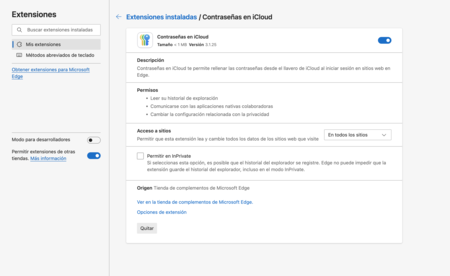
Extension of password manager for the browser
Manufacturers’ reactions have been mixed. Socket reports that 1Password and LastPass categorized the ruling as “informative,” a classification typically denoting no immediate changes are necessary. In contrast, Bitwarden, ENPASS, and Apple (iCloud Passwords) acknowledged that they are working on updates , while LogMeOnce has not responded to attempts for clarification. Some companies admitted the existence of risk connected to external vulnerabilities on the sites visited.
While some developers are still deciding how to respond, Tóth and the Socket team agree that there are practical measures users can take to reduce their exposure. One effective strategy involves disabling manual self-filling and opting for copy-paste instead. It is also advisable to configure auto-fill only for exact URLs, thus preventing it from activating on subdomains. In Chromium-based browsers, users can limit extension access with options like “When clicking,” ensuring explicit authorization for each use.
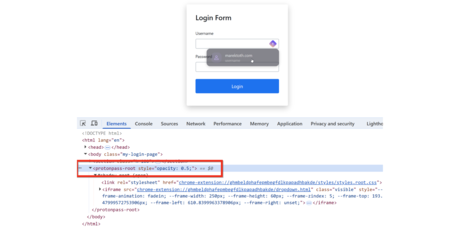
The researcher illustrates how invisible elements can overlap on the page, deceiving the user into activating the password manager without realizing it.
However, not every situation results in an immediate breach. For an attack to succeed, the extension must be active, the browser must not have restarted, and the user must interact at just the right moment. Moreover, the analysis focused solely on eleven extensions; thus, there is no evidence that all solutions available on the market are vulnerable, although the expert warns that this pattern could be replicated in other types of extensions as well.

The weak point lies in the Document Object Model (DOM), the structure that websites use to organize buttons, forms, and menus. Password managers insert their elements into this structure, and when a malicious page manipulates them—whether by moving, hiding, or forcing them—the user risks clicking without realizing it. That same vulnerability extends to other extensions, including cryptocurrency wallets and note-taking applications.
Images | Xataka with Gemini 2.5
In Xataka | How to change all your passwords according to three cybersecurity experts.