

As sweltering heat grips the streets, many of us search for quick relief. While some resort to creative fixes like aluminum foil on windows, a popular solution has emerged: portable fans. However, several individuals have taken to connecting these fans directly to their smartphones via USB-C ports. Before you jump on the bandwagon, consider the potential consequences of this seemingly harmless summer hack.
The Hidden Dangers of USB-C Fans
While the USB-C port on your mobile phone allows for a multitude of connections, the implications of linking a portable fan are not as benign as they appear. Sure, it might temporarily cool you down, but it can also lead to significant damage. Many of these USB-C fans are constructed with low-quality components, which generate voltage spikes when plugged into your device. This lack of proper filtration can jeopardize your phone’s integrity.
The Technical Breakdown
According to experts, the issue primarily stems from the type of motors used in these fans. Many rely on DC motors that quickly switch current between coils, leading to brief but volatile overvoltages. These fluctuations can quite literally fry the components inside your smartphone, including the battery and motherboard. Devices are designed to operate on a stable 5V, not the fluctuating highs that these miniature fans can produce.
Expert Warnings
A recent video from the YouTube channel LeftyMaker rigorously demonstrates why connecting such fans is risky. Using an oscilloscope, the creator highlighted voltage spikes exceeding 20 to 40 volts. Given that smartphones aren’t built to endure such extremes, the likelihood of damage increases dramatically.
Can Damage Be Prevented?
Theoretically, one could mitigate the risks with a simple fix: installing a capacitor in parallel with the motor. While this solution may sound straightforward, it requires technical skills that most users may not possess. Without such a modification, many have experienced immediate issues, like flickering screens, shortly after powering on their fans.
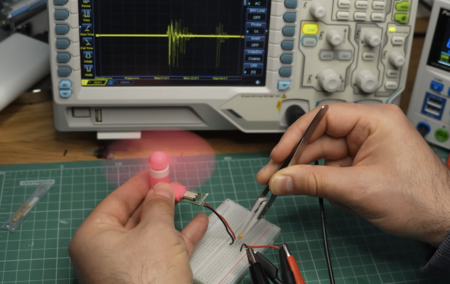
Fan measurements | LeftyMaker video screenshot.
What to Do Instead
So, what should you do if you’re feeling the heat? Rather than risk your device’s health, consider alternatives. Use a power bank to operate your fan, which tends to handle voltage spikes better than smartphones. Ideally, opt for fans with their own battery systems, reducing the chance of damaging your phone while providing relief from the heat.
In conclusion, while USB-C fans may seem like an appealing summer gadget, their risks far outweigh the temporary coolness they provide. If you have one, it might be best to give it to someone you don’t particularly like—or better yet, leave it on the shelf altogether!