
Chrome is part of the digital routine for millions of people to the point that we often stop questioning its inner workings as we browse. We rely on it for almost everything—managing sessions, extensions, passwords, and searches. This reliance makes it all the more surprising to discover a folder larger than 4 GB tied to an AI model downloaded by the browser itself. We’re not speaking of minor updates or temporary files; this is a substantial addition that many users likely did not anticipate finding.
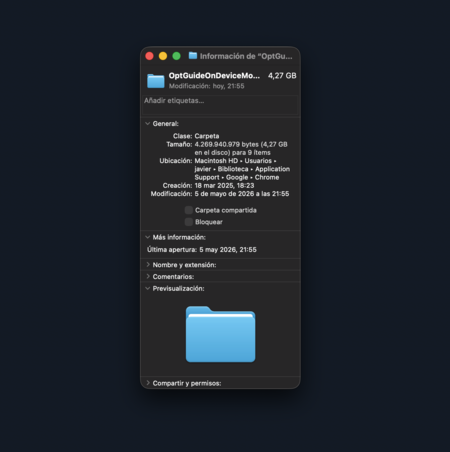
The discussion first gained momentum with a post by Alexander Hanff on That Privacy Guy. His key observation was that Chrome had downloaded a multi-gigabyte AI model to his computer without issuing any clear warning during the process. Curious, I checked my own device from Spain and found the same folder, labeled OptGuideOnDeviceModel, within Chrome’s internal files. On my macOS, that folder measured 4.27 GB in size, regardless of the fact that features like the Gemini sidebar aren’t yet available in this region.
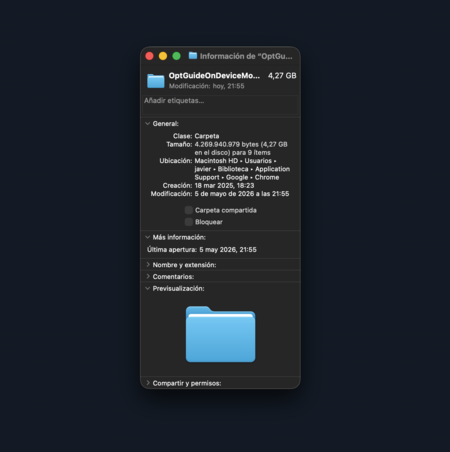
Gemini Nano downloaded to my computer
The Gemini Nano model doesn’t operate like a conventional download that requires user consent and manual installation. According to the Chrome developer documentation, these AI features intend to function seamlessly, with model management occurring automatically in the background. The initial download might be triggered when an AI feature embedded within the browser needs to utilize Gemini Nano for the first time. Essentially, the model could end up on a user’s computer without any obvious action on their part.
An AI Model That Goes Beyond an Integrated Chatbot
This model isn’t limited to simply integrating a chatbot within Chrome. Google has indicated that Gemini Nano is also used to identify technical support scams directly on the device. These scams are often fleeting and can evade conventional tracking systems. In this context, Chrome can provide the model with elements from the website the user is viewing to extract risk indicators. Thus, AI can also serve as an additional layer of security within the browser.
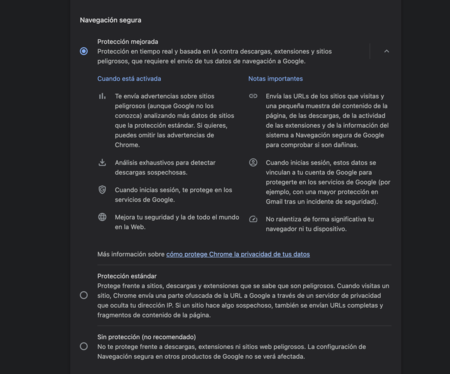
Gemini Nano also boosts security features in Chrome
However, this brings to light a significant concern. While AI in the browser can facilitate reasonable applications—from fraud detection to enhanced writing, translation, or summarization functionality—the issue manifests when users are unaware of what has been downloaded, the rationale behind it, and how to manage it. Hanff aptly critiques, “Chrome didn’t ask. Chrome does not inform the user. If the user deletes it, Chrome simply downloads it again.”
Conversely, some voices play down the gravity of the situation. An argument on Reddit claimed that the model downloads only upon using an AI feature that requires it and can be turned off in Chrome’s settings. Hanff countered that his logs showed otherwise: the browser could remain idle on a page and still manifest signs of downloading. Google’s documentation suggests a middle ground—downloads can be triggered by built-in functions and continue operating in the background even after closing the initiating tab.
Chrome does provide measures to reduce AI feature visibility, but these controls aren’t neatly compiled in an easily understandable panel. Users can disable or hide certain visible options, such as Gemini in regions where it’s available, typing assistance, search history, or AI-driven search. However, to delve deeper, one must explore more technical settings like those found in chrome://flags. This delve into the internal workings can drastically change user experience as it may involve modifying features the user wishes to retain.

Firefox offers an easy way to disable AI features
In contrast, Firefox presents an interesting counterpoint by consolidating its AI controls in a designated section within the settings. Since Firefox 148, users have had access to “AI Controls,” allowing them to restrict current and future improvements easily, without scouring for settings scattered throughout the browser. Firefox also separates sections for on-device AI, translations, and chatbot providers, providing a clearer understanding for users regarding what functions they can activate, block, or retain.

The emergence of Gemini Nano in Chrome is part of a larger trend in which browsers aspire to be more than mere portals to the internet, initiating AI tasks directly on users’ devices. This shift can present genuine advantages, particularly if it enhances security or streamlines functionality. Yet, this development also highlights a key divide: while some users may be perfectly fine with Chrome’s automatic downloads of local models, others will demand clarity about their purpose and desire the ability to make informed choices.
Images | Xataka with Grok | Screenshot
In Xataka | It doesn’t speak, it doesn’t climb stairs, and it doesn’t even always obey: this is the robot that the creator of the Roomba has been trying to develop for 30 years.