
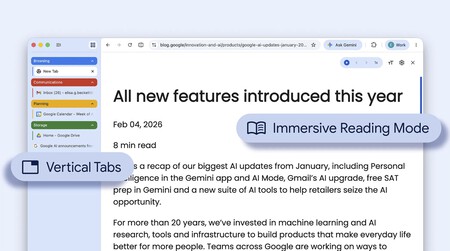
It seemed that AI had arrived in our browsers. In fact, it seemed that the new batch of browsers with AI could change everything, but the truth is that at the moment they have not changed anything. Neither Comet, nor Atlas, nor Dia have managed to conquer us in that aspect. The integration of Gemini in Chrome or Copilot in Edge does not seem to convince us much either. They are striking options, but they remain in the background.
The curious thing is that the evolution of browsers has not caught the AI fever, but is gaining momentum with practical, pragmatic, and almost everyday options: small details that improve usability and really add up.
Vertical Tabs to Power
The first of these options is an old acquaintance: the ability to organize our browsers using vertical tabs instead of horizontal ones has been gaining ground among more and more users, but the curious thing is that this feature is, indeed, old.
Google has just integrated the option to enjoy vertical tabs in Chrome.
In fact, Opera already had this choice almost 20 years ago with its “visual tabs,” but ended up abandoning them. Today, it does not officially support that option, although it can be added through extensions. Firefox adopted this path as well; it did not have them as standard but experimented with that concept via extensions back in 2009.
Those who copied and used that option more recently include Microsoft Edge in 2021, Brave in 2023, and Vivaldi, which has had them for years. The latest browsers to join this trend are Firefox and Chrome, which have recently released this feature. The pioneer that made them fashionable again was probably Arc, a browser with many striking ideas now being inherited by its successor, Dia.
The success of vertical tabs likely correlates with the dominance of widescreen displays (16:9, 21:9) in our digital lives, creating too much horizontal space and not enough vertical space, making vertical tabs more ergonomic than ever.

As we open more tabs in traditional horizontal layouts, identifying them becomes increasingly difficult, even using favicons. Vertical organization remedies this issue remarkably, and Chrome’s adoption of this option confirms its value, suggesting it will likely become indispensable for many users.
Two Better Than One
The second significant trend making its way through the browser market is integrated split-screen functionality. Many users, including myself, often utilize two browser windows side by side, but now browsers are enabling this directly.
The Maxthon browser was among the first to offer this option, integrated even before Windows 10 launched in 2015. Others have followed suit, including Vivaldi, Microsoft Edge, and later Opera also added this feature.
Google eventually caught this trend, introducing the split-screen feature in February 2026. Recognizing that this functionality “helps people multitask and get more done on the web” is crucial for modern web browsing.

This feature was accessible through “Snap” and positioning browser windows side by side for some time, yet now you can open a link directly in the other panel without creating a new tab. This amalgamation of vertical tabs and split-screen functionality allows for more efficient multitasking.
It’s fascinating how these practical and simple enhancements have proven more popular and utilized than many AI-driven features. While AI may eventually enhance our browsers significantly, for now, these modest improvements are what truly resonate with users, and it is fantastic that they do so.