
Let’s tell you how to convert GPTs or Gems into Skills so that if you want to go from ChatGPT or Gemini to Claude, you can take the automated versions of your artificial intelligence with you. And if you’re going to switch, remember that you can also migrate the memory of everything other AIs know about you.
Claude’s Skills are a series of instructions that you can upload to a chat so you don’t have to repeat them every time you want to do something specific. They can be very complex, although we will teach you how to migrate simple GPTs or Gems, those that are simply instructions.
Convert GPTs or Gems into Skills
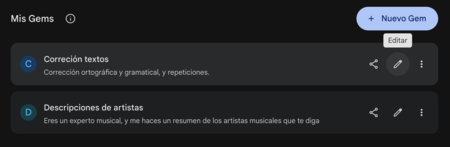
The first thing you have to do is enter ChatGPT or Gemini and go to the GPTs or Gems section. Once inside, you have to click on the edit button of the GPT or Gem that you want to convert into a Skill.
This will take you to a screen where you can see the name, description, and instructions of the Gem or the GPT. These are the data that we are going to use later, so keep the window open.
Now what we are going to do is create a Claude Skill with that data. For that, you must open Claude, and within his website, you must go to the section Personalize from the left column. Inside, click on the section Skills where you will be able to see all the pre-generated ones that the AI has already created.
You will enter the Skills page, where by default you will see several examples of those created within Claude himself. Here, click on the + button above, and in the menu that opens choose the option Write the instructions for the skill to make it easy.
This will open the field where you have to enter the name of the skill, the description, and the instructions. Copy and paste the description and instructions of the GPT or the Gem so that the skill is similar, and then put the name you want, which can also be the same.
One of the peculiarities of the Skills is that Claude will review them every time you ask him for something to use them automatically without having to attach them in case what you want corresponds to what the skill is capable of doing. That’s why, you can add to the instructions the request that he not do this, that it only uses the skill if you explicitly ask for it or if it is added.
And that’s it. What was once a simple GPT or Gem is now a simple Claude Skill. Now you just have to choose it from the menu from Claude’s new chat. You will have to press the + button, go to Skills, and choose yours. Once you have it selected, you just have to add the text you want, and Claude will process it according to the instructions of the skill you have loaded.