
Understanding Claude’s Skills
Creating your own Claude Skill allows you to personalize Anthropic’s artificial intelligence, making it more suited to your specific needs. Claude’s Skills act as a foundation of instructions that are stored within the AI, enabling you to activate them easily without needing to repeat your requests in every chat.
In essence, Skills serve as customizations that add a command layer to Claude’s generic functionalities. By doing so, you create a version of the AI tailored to perform specific tasks efficiently.
What Are Claude’s Skills?
A Skill is essentially an encapsulated procedure directing Claude on how to execute designated tasks, adhering to predefined rules and conditions. With Skills, you no longer need to reiterate instructions for routine tasks, reducing the potential for annoyance during interactions. For instance, if you require SEO analysis, a loaded Skill enables you to simply request the analysis without reiterating guidelines each time.
Steps to Create Your Own Claude Skills
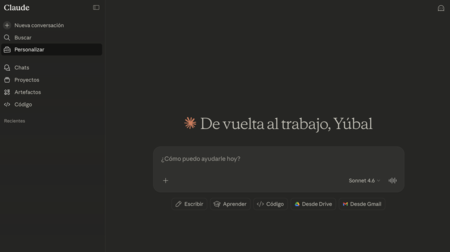
To develop your Skill, start by accessing the AI interface and navigate to the Personalize section in the left column. Note that this feature is available under a paid subscription.
Personalizing Your Experience
Upon clicking Personalize, you’ll see two available options. Select Skills to proceed to the Skills page. Here, you’ll notice examples of pre-existing Skills within Claude. Click the + button at the top and choose Write the instructions for the skill.
Necessary Fields for Your Skill
A successful Skill requires filling three essential fields: a name, instructions, and a knowledge base if applicable. The name should be distinctive and formatted in lowercase letters, using hyphens instead of spaces. This aids in organization and clarity.
Next, provide a short description. This serves as a summary and appears when you hover over the Skill in your list. A well-thought-out name and description ensure both you and the AI can comprehend its function readily.
Writing Effective Instructions
The most critical part of Skill creation lies in crafting detailed instructions. This part defines the role, tone, and operational rules of the AI automation. Here are some vital aspects to consider:
- Personality: Define the tone and character. For instance, should it mimic a strict professor or a casual content creator? This helps establish its interaction style.
- Objective and Rules: Clearly specify the main task and constraints, such as “Your job is to find grammar mistakes.” Additionally, you may indicate topics to avoid.
- Format: If necessary, outline a preferred response structure, such as starting with a summary followed by bullet points.
If needed, you can even use Claude to help generate these instructions. Open a new tab, initiate a conversation, and ask for assistance in crafting Skill instructions.
Finalizing and Implementing Your Skill
Once your Skill is created, selecting it is simple. In Claude’s chat, use the + button, navigate to Skills, and choose yours from the list. After that, just input the text you want analyzed or processed, and Claude will function based on your instructions.
Furthermore, you can mention specific tasks your Skill handles without explicitly selecting it. In this case, Claude will automatically identify and apply the relevant Skill.
By following these steps, you can effectively tailor Claude to suit your unique requirements, enhancing your productivity and interaction experience.