
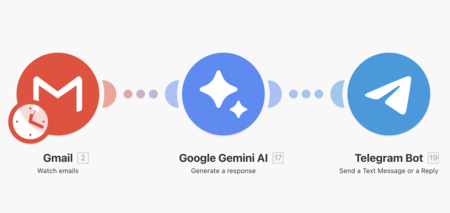
Let’s explain to you what is a workflow or work flow, an increasingly popular type of automation. This concept has existed for some time, enabled by specialized tools, but has taken a new step with the inclusion of artificial intelligence.
These workflows allow you to create advanced automations. For instance, when you receive an email in Gmail, AI can process it and send you a summary via Telegram, eliminating the need for you to open or read the email.
What is a Workflow?
A workflow is a structured sequence of steps, tasks, or processes designed to achieve a specific objective. The number of steps can vary based on your goal.
Essentially, it resembles a chain of tasks you can configure. To achieve the outcome, tasks are executed one after another, utilizing the results from each step for subsequent ones.
The term workflow can apply to various contexts. In the business realm, it might encompass a series of actions that employees undertake, such as a vacation request process where the manager reviews and approves it before Human Resources records it in the system.
In this article, we focus on workflows in the context of software and tools that automate task completion across multiple steps. Such automation boosts productivity and reduces the time required for various tasks, whether in domestic settings or the business arena.
Types of Workflows
There are several types of workflows, including sequential workflows, where each task is completed in order before proceeding to the next. Then there are parallel workflows, allowing multiple tasks to run simultaneously and converge later to save time.
You also have conditional workflows, which follow specific rules. If one condition is met, a task is executed; otherwise, the process shifts to a different step.
Automated workflows utilize software to minimize human error and expedite task completion. These workflows can either incorporate or omit artificial intelligence, depending on the intended tasks.
Common tools for automated workflows include Zapier and Make.com. Your choice of a free or subscription model often depends on the volume and complexity of your tasks.
How Automated Workflows Work
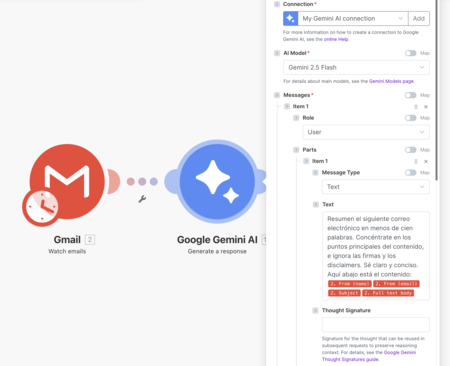
The tools for creating automated workflows act as blank canvases where you design your automation steps. They often include template systems to assist with process building and to provide inspiration.
You can create workflows by linking tools to various online services, from email applications to AI systems that process information. Depending on the service, you may need to log in, grant access, or configure it using an API key.
When crafting a workflow, the service will prompt you to specify what actions you want at each step. If you incorporate AI, you can customize prompts and determine final steps.
The initial step of a workflow is a trigger, which activates the process. This trigger can be manual—like clicking a launch button—or automatic, such as receiving a specific email or message.
From there, you build each step until completion, where you can decide to send an email with results, generate/edit documents on Google Drive, or set up a Telegram bot to deliver messages.
Be Cautious with Privacy
It’s crucial to be aware that using automated workflows can pose risks to your privacy. For instance, if you integrate Gmail, consider that all emails involved in the workflow will be accessed by the service you use. Exercise caution with sensitive content.
Additionally, if you leverage AI for content processing or use Telegram for notifications, be mindful that messages may also be stored on the servers of the companies managing these services. This applies to many private tools you might use. I mention this not to deter you but to ensure you’re fully aware when deciding on implementing a workflow for your tasks.