
Recent Instagram Password Reset Alerts
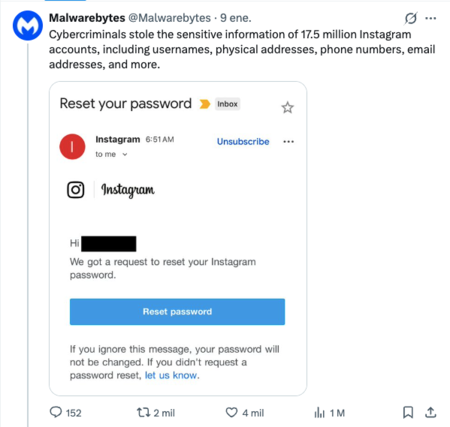
If you’ve recently received a prompt from Instagram asking you to reset your password, you’re not alone. As reports pile up on platforms like Reddit and X/Twitter, this appears to be a widespread issue at the beginning of 2026. Some users report receiving these notifications multiple times a day.
Understanding the Situation
What Has Happened?
A surge of unusual activity among Instagram users has prompted a wave of password reset requests. Many are receiving emails that seem legitimate, even when no password reset was requested.
Two Versions of the Story
On January 9, 2026, Malwarebytes, a well-known antivirus software company, revealed a data leak concerning Instagram, claiming a group of cybercriminals had acquired sensitive information from 17.5 million accounts. This purported data leak included usernames, physical addresses, phone numbers, and email addresses, raising concerns about the authenticity of the reset requests.
The alleged breach has spawned two conflicting narratives:
Malwarebytes’ Perspective: They argue that a doxing kit was identified on a cybercrime forum. According to them, the massive password reset emails could either result from automated brute-force attacks or a preemptive defensive measure by Meta (Instagram’s parent company) in response to suspected compromises.
Instagram’s Response: Instagram insists that no breach of its systems occurred. They explain that an issue allowed a third party to request password reset emails for some users and assure everyone that the accounts are secure. They concluded their statement with an apology for the inconvenience caused.
Why This Matters
For Instagram, this incident is classified as a “software problem” rather than a systematic breach. They maintain that without access to their servers, they do not view it as a hack. However, the alleged leak comprises sensitive data that could dramatically blur the lines between digital and physical safety.
The exposure of personal details can jeopardize real-world security. Reports indicate that parts of the purported database are being sold on the black market, especially targeting high-profile accounts such as influencers and business profiles.
What Should You Do Now?
To protect your account:
Avoid Clicking Links: Steer clear of any suspicious links in the reset emails you may receive.
Change Your Password: Log into the Instagram app and go to ‘Settings and activity’ > ‘Account Center’ > ‘Password and security’ > ‘Change password’. Opt for a long, complex password that’s unique to Instagram.
Enable Two-Step Authentication: This feature can be found in the ‘Password and Security’ section of the app. Avoid using SMS for additional security.
In case of any doubts about received emails, confirm their authenticity via the ‘Emails from Instagram’ feature in the app settings. If you identify any suspicious emails, delete them immediately.
By staying informed and taking action, you can better safeguard your account against potential threats.