
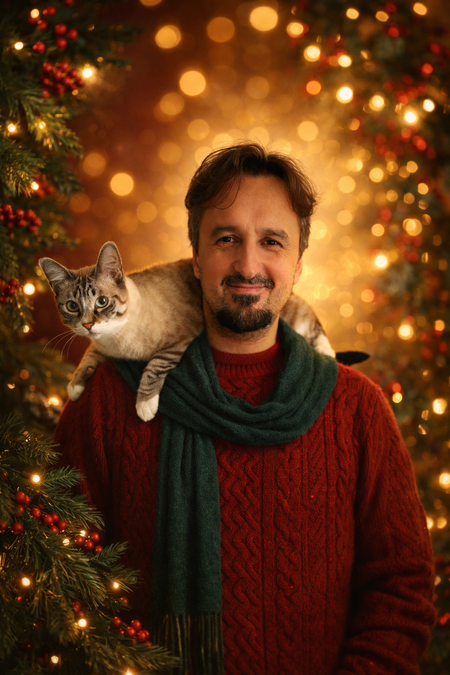
Let’s explore 18 quick Christmas images you can create with ChatGPT Images, a section for generating images based on personal photos using ChatGPT. We’ll cover both simple images that you can create directly through the app with a few clicks and more complex designs.
For each option, we’ll provide the prompt we used, making it easy for you to copy and paste, simply adding the photo you’d like to use as a background. You can also make modifications to the prompt text, allowing you to customize the resulting image to your tastes.
As always at Xataka Basics, if you have any prompts you’re particularly proud of for the results, we encourage you to share them in the comments section. This way, all Xataka readers can benefit from the knowledge of our readers.
Festive Portrait
One of the default image styles in ChatGPT Images is the festive portrait. To use this, simply navigate to the Images option and upload your photo. It will preserve your facial features while changing your clothing to something more Christmas-themed, and it will frame you in a completely festive background. You can also add text to create a Christmas greeting.
You can use the prompt:
“Transform the uploaded photo into a warm, elegant Christmas portrait. Keep the face, skin tone, expression, and features exactly the same. Change the style to a soft, golden lighting typical of the holidays. Surround it with festive elements like pine branches, warm lights, and a subtle bokeh glow. Add deep red, forest green, and cozy textures evoking classic Christmas cards. The final image should feel elegant, warm, and timeless, never cartoonish.”
Sugar Cookie
Create an image of a sugar cookie with a photo of your pets, making them look adorably festive. ChatGPT will add Christmas-themed motifs, which you can edit if desired. You can find this style under the Images section in ChatGPT.
You can use the prompt:
“Using the provided image as a reference, create a perfectly shaped delicious sugar cookie, decorated with soft royal icing inspired by the theme or image. If the image shows a person, create a simplified version of their face in icing that is recognizable but not photorealistic; if it contains an object, animal, or scene, translate its most recognizable traits into a friendly icing design. The cookie should have a simple, easy-to-cut silhouette, and the design should be entirely iced with thick, smooth lines rather than fine details, minimal shading, and clean, secure outlines typical of an expert baker. The colors should be vibrant, cheerful, and appropriate for the festive season, without replicating actual colors. Add simple seasonal details like holly, snowflakes, glimmers, a scarf, or a hat, all in basic icing shapes, avoiding any religious connotations. The final result should feel endearing, approachable, and clearly edible, showcasing handcrafted charm, clarity, and a strong resemblance achieved through simplified icing decoration, not realism.”
Christmas Ornament
Another option is to turn any photo into a Christmas ornament that you can hang on your tree. This works with a photo of yourself, your pet, or even an object. It will have a glossy, smooth finish, looking somewhat like ceramic mixed with candy, although you can modify this in the prompt.
You can use the prompt:
“Convert this into a sculpted ornament made of bright molded glass, finished with a high-gloss lacquer reflecting light from all angles. Its surface should feel perfectly smooth and cool, with a weight suggesting both fragility and permanence. The coating is a shiny glaze, somewhere between ceramic and candy: shiny enough for small lights to glide along its curves like soft glimmers. Include a visible metal hook and a hanging ring exactly at the top center of the person or object, aligned vertically. The hanger should stand out clearly, designed for hanging without altering the overall shape. Make the background color similar to the input image.”
Christmas Tree Bauble
With a small modification of the previous prompt, you can ensure it’s a bauble for a Christmas tree. Instead of a silhouetted figure, you just need to tweak the description slightly to specify what you want.
You can use the prompt:
“Convert this into a Christmas tree ornament, one of the classic baubles that hang on it, made of bright molded glass, finished with a high-gloss lacquer that reflects light from all angles. Its surface should feel perfectly smooth and fresh, with a weight that suggests both fragility and permanence. The coating is a lustrous glaze, somewhere between ceramic and candy. Include a visible metal hook and a hanging ring exactly at the top center of the person or object, aligned vertically. The hanger should stand out clearly, positioned for hanging without altering the overall shape. Make the background color similar to the input image.”
Greeting Card
In the Discover Something New area of ChatGPT Images, you have the option to create a greeting card from a photo. In the prompt, include a Christmas message, although sometimes it defaults to English, so we modified it slightly to specify Spanish. You can still edit the prompt to dictate the phrase you want.
You can use the prompt:
“Transform the reference photo into an elegant, warm Christmas card, with a festive style, cozy lighting, subtle decoration, and maintaining a natural, photorealistic likeness. Optionally, you can add a discreet Christmas text or a short seasonal greeting that complements the image without detracting from the subject. The text must appear in Spanish.”
Snow Globe with Your Photo
You know those snow globes with liquid inside that snow falls when shaken? You can also create one featuring your face with a Christmas background. In the prompt, we’ll include a scene description, which you can manipulate to your liking.
You can use the prompt:
“Convert this photo into a giant enchanted snow globe, one of those you shake to make it snow. Inside the globe, the person from the photo should appear, dressed in a red velvet Christmas outfit with subtle shiny accents and delicate snowflake jewelry. My hair flows naturally with tiny crystalline snowflakes trapped everywhere. I’m holding a bright mini Christmas tree with actual tiny lights in my open hands, the warm glow illuminating my face from below. Swirling snowflakes and silver glitter particles surround me in a mesmerizing spiral pattern. The background shows a dreamy miniature winter village with tiny Victorian houses covered in snow, warm glowing windows, miniature street lamps, and a small church with a bell tower. The village rests on fluffy artificial snow at the bottom. The snow globe itself has an antique gold base adorned with intricate engravings and Christmas patterns. The outside background is deep midnight blue with soft bokeh lights in various colors creating depth. Magical realism style.”
Dress as a Christmas Elf
You can ask ChatGPT to dress you as a Christmas elf, or even as Santa Claus or Olentzero. You can do this simply with a straightforward prompt or by using what you’ve learned from other designs to enhance it.
You can use the prompt:
“Change the person’s outfit to one that is Christmas-themed, such as a Christmas elf. Choose clothing that complements their face, hair, proportions, and overall style. Maintain the pose, expression, lighting, and identity unchanged. Ensure the new outfit looks natural, flattering, and well-matched.”
Christmas Polaroid Photo
Another idea is to frame your photo as if it were a Polaroid, with its classic border adorned with Christmas motifs. Being a Polaroid, you can specify that a text appears at the bottom, like the greeting.
You can use the prompt:
“Transform the uploaded photo into a Christmas Polaroid or festive instant photo for Christmas. Add a themed frame with decorations like snowflakes, ornaments, lights, or holly. Keep the person’s face and pose unchanged, ensuring the result is natural, high-quality, and cheerful. At the bottom of the Polaroid, the text ‘Merry Christmas’ should appear.”
Combine Polaroid with Festive Portrait
One great aspect of these prompts is that you can combine two to create a unique image. For example, let’s combine the creation of the festive image with the Polaroid frame, putting it all against another busy background. I experimented with this for the article’s cover photo, and I liked it so much that I’m sharing it.
You can use the prompt:
“Transform the uploaded photo into a warm, elegant Christmas portrait. Keep the face, skin tone, expression, and features exactly the same. Change the style to a soft, golden lighting typical of the holidays. Surround it with festive elements like pine branches, warm lights, and a subtle bokeh glow. Add deep red, forest green, and cozy textures evoking classic Christmas cards. The final image should feel elegant, warm, and timeless, never cartoonish. The resulting portrait should be framed within a Polaroid-style photo, resting on a tablecloth with Christmas designs. At the bottom frame of the Polaroid, the text ‘Merry Christmas’ should appear. The Polaroid should be slightly tilted to one side. The entire image should have dimensions of 1350×700.”
Dress Your Pet in Christmas Clothes
If you can wear Christmas outfits, your pet can too. You can use an existing photo of them to dress them up in whatever festive attire you wish. They could dress as a Christmas elf, Santa Claus, or whatever you like. If you want, you can add text afterward to turn it into a Christmas greeting.
You can use the prompt:
“Transform the uploaded photo into a portrait where the pet is dressed in Christmas clothing, and the background is warm and elegantly Christmas-themed as well. Keep the face, skin tone, expression, and features of the pet exactly the same. Change the style to a soft, golden lighting typical of the holidays. Surround it with festive elements like pine branches, warm lights, and a subtle bokeh glow. Add deep red, forest green, and cozy textures evoking classic Christmas cards. The final image should feel elegant, warm, and timeless, never cartoonish. The pet should appear at the foot of the Christmas tree.”
Your Pet Playing with the Christmas Tree
You can also create an image of your pet appearing next to the Christmas tree playing with hanging ornaments, set against a colorful background.
You can use the prompt:
“Transform the photo into a photorealistic Christmas portrait of the pet interacting with festive decorations. The animal is captured in a playful, natural moment next to a beautifully decorated Christmas tree. It delicately touches a hanging ornament with its paw. The animal wears minimal and comfortable festive accessories: a small red bow tie, a Christmas collar with bells, or a light festive scarf (nothing that covers its face or restricts movement). The scene features a beautifully decorated Christmas tree with a mix of colored glass ornaments, light-reflecting garlands, colored lights creating a bokeh effect, and wrapped gifts underneath. Additional Christmas elements include cozy checkered blankets, festive cushions, visible stockings in the background, and warm, bright lights. Natural behavior and expression of the pet. Professional lighting for pet photography: soft, diffused natural light coming from windows combined with warm Christmas lights creating a cozy glow, avoiding harsh shadows on the fur. Photographed with an 85 mm lens, aperture f/2.2, sharp focus on the cat’s face and eyes with a nice bokeh background from the tree lights. Capture the sparkle in their eyes.”
Create a Christmas Plush Toy with Your Face
In the Images section of ChatGPT, under styles, there’s one that creates a plush-style doll with your features. The results are impressive, and with a slight adjustment to the prompt, you can also add a Christmas outfit.
You can use the prompt:
“Transform the subject or image into an adorable plush version, with soft textures and rounded proportions. If there is a person, keep their recognizable features; otherwise, reinterpret the object or animal as a cozy plush toy using felt or plush textures. Give it a warm felt or plush texture, simplified shapes, and soft, embroidered details for the eyes, mouth, and other features. Use a warm, pastel, or neutral color palette with soft shading and subtle seams, like a handmade plushie. Keep the expression friendly and sweet, with a slightly oversized head, short limbs, and a hug-friendly silhouette. The final image should look like a charming and collectible plush: cozy, adorable, and huggable but still recognizable as the original subject. Ensure that the plush toy created wears a Christmas outfit, like Santa.”
Pixar Style Image
Everyone loves Pixar animation films for their identifiable style. You might want to convert a photo of yourself into a Pixar character with clearly recognizable features and add a festive outfit.
You can use the prompt:
“Transform the photo into a realistic Christmas avatar in the Pixar style of a happy person wearing a Santa hat, a cozy sweater, and festive accessories. Cinematic lighting with a soft bokeh background, warm tones, detailed facial textures, and soft shadows. Rendered in ultrarealistic 3D style. Create a simplified version of their face that is recognizable but not photorealistic. It should be caricature-like, similar to Pixar characters.”
Pixel Art Style
You can also create an image in pixel art style, using a photo of yourself that remains fully recognizable while adding whatever festive background you want, like a Christmas scene.
You can use the prompt:
“Transform this photo into a pixel art Christmas scene, in the style of classic 16-bit games. In the foreground, the person from the photo should appear in pixel art, with the same recognizable features. In the background, a glowing fireplace with warm light illuminates the room, and a beautifully decorated Christmas tree with ornaments, ribbons, and a bright star on top.”
Ghibli Style
The trend for AI-generated images began with ChatGPT and the fascination with the Ghibli style. This style has greatly improved in execution, making images much more recognizable. If you add some Christmas decorations, it’s a double victory.
You can use the prompt:
“Transform the photo into a realistic Christmas avatar in the Ghibli style of a cheerful person wearing a Santa hat, a cozy sweater, and festive accessories. Cinematic lighting with a soft bokeh background, warm tones, detailed facial textures, and soft shadows. Create a simplified version of their face that is recognizable but not photorealistic. It should be caricature-like, similar to Ghibli characters.”
Minimalist and Modern Avatar
You can also create a minimalist and modern avatar using your photo with Christmas motifs. Here, some features of your face will be retained, and the outfits you specify in the prompt will be added.
You can use the prompt:
“Convert this photo into a minimalist artistic Christmas avatar inspired by modern illustration and fashion poster design. The portrait shows a person with a red beret or a Santa hat and an elegant scarf. Clean flat colors, geometric shapes, and elegant negative space against a beige or dark green background. Designed for branding, profile icons, or editorial use.”
A Model with Your City
If you have a photo of a representative place in your city or town, you can create a beautiful image in the style of a Christmas model. ChatGPT can keep the representative buildings while modifying the rest to resemble a miniature nativity scene. Remember to include your city’s photo.
You can use the prompt:
“Create a magical Christmas model captured in tilt-shift photographic style. The city from the photo should appear, with illuminated windows, Christmas trees, and people celebrating in the streets. Warm golden lights reflect on the snow, creating a dreamy festive atmosphere. The soft depth of field from the tilt-shift lens blurs the edges, making the scene look like a realistic miniature world. Perfect balance between bokeh lights, fine snow textures, and cinematic color gradation: Christmas poster style, great detail, ultrarealistic, tilt-shift photographic aesthetic.”
A Watercolor Image
And we conclude with something quite simple—a postcard of a Christmas tree looking like it was painted with watercolors and splashes of paint. All very aesthetic and colorful, adding the text you want.
You can use the prompt:
“Create an image of a vibrant watercolor of a Christmas tree, created in a richly expressive abstract artistic style. Splashing bright red, blue, yellow, and orange paints radiate artistic energy outward, with subtle details of ornaments and lights. The background is white with scattered paint splashes, evoking a festive, creative atmosphere. The typography ‘MERRY CHRISTMAS’ is elegantly placed above and below the tree.”
For more details on creating unique images with ChatGPT, check out our article on how to create a character in ChatGPT and Gemini for use in all images you create with artificial intelligence.